Content creators constantly compare Adobe Creative Cloud Pro or Director Suite 365. Both tools serve video editors, designers, photographers, and social media producers. But they work very differently under the hood. Adobe built its reputation over decades with powerful, professional-grade software. Director Suite 365 takes a different route. It prioritizes speed, simplicity, and AI-driven features that cut production time significantly.
This comparison matters more than ever right now. Creators want tools that handle real production work without burning through their budget or forcing them to spend days or even weeks mastering tools. So, we tested both programs side by side. We didn’t want to just find the more powerful option. Our aim was to see which one works better for different creative styles and real-world projects.


Adobe Creative Cloud Pro
This is a professional industry-standard suite with amazing depth across design, video, photography, and motion graphics. Still, such features come at a premium price.
Director Suite 365
This is a streamlined, creator-focused bundle that offers stunning speed AI tools at a reasonable cost. Still, it lacks some high-end professional capabilities.
This process began when the FixThePhoto team handed me the biggest project of my career. Before that, I worked on short social media clips, quick edits, and basic thumbnails. Then suddenly, I was producing a full YouTube series covering local businesses. That meant handling long-form footage, cleaning up interview audio, and maintaining a consistent visual style across every single episode.
Since I already used Adobe Creative Cloud, I naturally leaned on it first. I cut videos in Premiere Pro, designed graphics in Photoshop, and built simple animations in After Effects. But mid-project, I started exploring Director Suite 365 as a potential all-in-one alternative. That's when the real Director Suite 365 vs Adobe Creative Cloud features comparison began, not on paper, but during actual production work, where every tool choice directly impacts your deadline and final result.
To compare both setups, I tested them on identical material. One episode was edited in Premiere Pro, another in PowerDirector, letting me measure speed and workflow efficiency side by side. Thumbnails were created in both Photoshop and PhotoDirector to weigh precision against convenience.
Ultimately, neither approach outright won – each proved valuable depending on the task. Adobe Creative Cloud offered deeper control and structure, while Director Suite 365 prioritized speed and simplicity. Understanding where each fits within the workflow became more useful than declaring one universally better than the other.
Adobe Creative Cloud Pro builds its case through specialization. Rather than cramming every feature into one tool, Adobe designs each application to dominate a single discipline, then connects them into one cohesive system.
The roster reflects that philosophy clearly. Photoshop leads photo editing and compositing. Adobe Lightroom takes charge of organizing and color-grading large image libraries. Illustrator owns the vector design space, handling everything from logos to technical illustrations. Premiere Pro drives video editing, After Effects powers motion graphics and visual effects, and Audition covers the entire audio side of production. InDesign rounds things out with professional layout tools for both print and digital publishing. Cloud storage, font libraries, and collaboration features tie the whole ecosystem together.
Director Suite 365 takes a fundamentally different approach. Instead of building a wide ecosystem of specialized tools, CyberLink bundles a compact set of versatile applications designed to handle the full creative process without overwhelming the user. Four core apps carry the entire workload. PowerDirector for PC delivers a fast, feature-rich timeline built for efficient production.
PhotoDirector handles image editing and manipulation, AudioDirector manages sound design and audio cleanup, and ColorDirector takes control of video color grading. Each app connects smoothly with the others, and all four lean heavily on built-in templates, effects, and AI-powered tools to cut down editing time.
The Adobe Creative Cloud vs CyberLink Director Suite contrast is sharp. Adobe arms professionals with deep, industry-standard tools that reward patience and expertise. CyberLink equips creators with streamlined, all-in-one applications that prioritize speed and accessibility. Neither approach is wrong. The right choice simply depends on whether depth or efficiency drives your workflow.
Where you can use a creative suite matters just as much as what it can do. On this front, the two options make unique commitments.
Adobe Creative Cloud free covers the widest possible ground. It runs natively on both Windows and macOS, and pushes that reach even further with dedicated mobile apps across iOS and Android. A creator can open a project on a studio workstation, refine it on a laptop during a commute, and share it with a collaborator working on a completely different system without losing a step. For teams juggling mixed devices and operating systems, such compatibility is paramount.
The interface carries that same professional, large-scale ambition. Paid and free Adobe apps are created around shared logic. Layers, panels, and timelines operate consistently whether you're inside Photoshop, Premiere Pro, or Illustrator. Mastering one app genuinely accelerates learning the next, which makes the ecosystem more connected the deeper you go.
However, that depth demands something in return. Adobe's interfaces are dense, layered with settings and controls built for precision. This is not for someone looking to jump in and figure it out quickly.
Director Suite 365 operates primarily on Windows, and that platform focus comes with a real trade-off. While some tools extend to macOS, the experience loses consistency across systems. Cross-platform collaboration becomes more complicated. Creators who split time between devices or work alongside Mac users will feel that limitation quickly.
But within its lane, Director Suite moves fast. CyberLink builds apps like PowerDirector and PhotoDirector around immediate usability. There are clean layouts, intuitive navigation, and workflows that guide the user forward rather than demanding prior expertise.
Templates and AI tools handle repetitive tasks, letting creators focus on output instead of settings. There's no confusing setting to grapple with before producing something worthwhile. For solo creators and beginners who prioritize results over raw technical depth, Director Suite simply gets out of the way and lets them work.
Director Suite runs lean by design. The software handles mid-range and older machines without complaint, delivering smooth performance and faster rendering on everyday projects. Stability rarely becomes an issue during regular use. Still, Director Suite sacrifices some of the advanced controls and creative flexibility that Adobe builds into its professional-grade tools.
Winner: Adobe Creative Cloud Pro
As my YouTube series progressed, I quickly realized that thumbnails and photography mattered just as much as the footage itself. Every episode needed a sharp, eye-catching thumbnail, and I had dozens of shoot photos (interiors, products, portraits of business owners) to process. That's when this Adobe Creative Cloud vs Director Suite review moved beyond basics and into photo editing territory.
I started with Adobe, since it was already familiar. My workflow centered on free Adobe Photoshop and Lightroom. I imported everything, sorted and rated the best shots, then corrected exposure, white balance, and lens adjustments.
Lightroom handled large RAW file batches easily. The possibility of syncing edits across multiple images with matching lighting conditions saved significant time. Once I finished culling and correcting in Lightroom, I moved select images into Photoshop for detailed work.
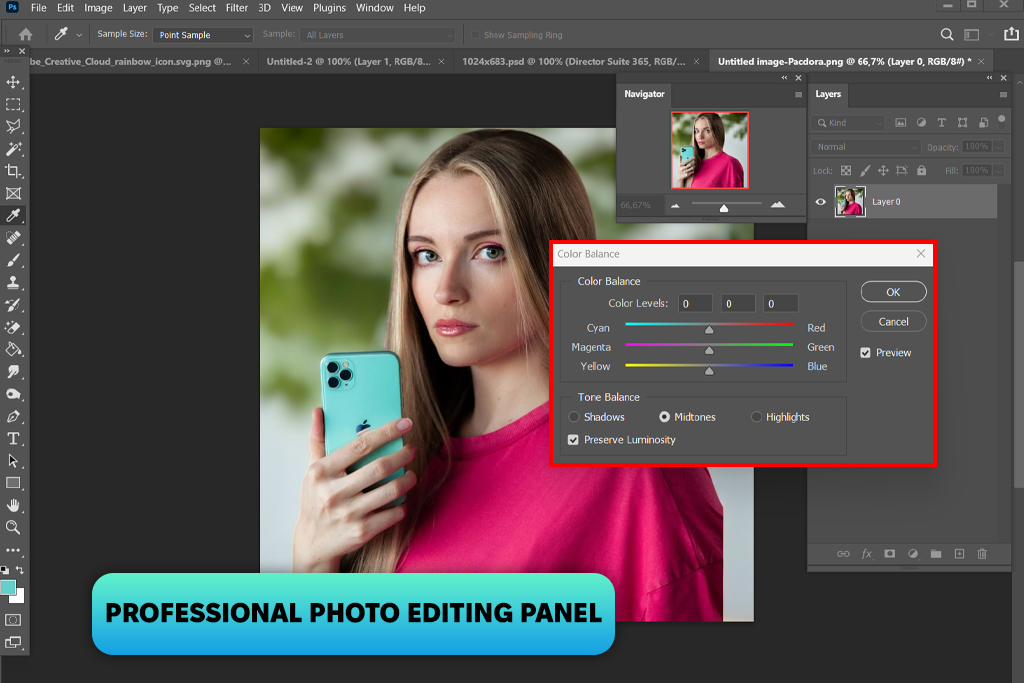
Photoshop was next to evaluate. I dragged selected images in and stacked layers, erased distractions with content-aware fill, sculpted skin tones through masks, and pushed colors to life with curves.
Thumbnails demanded even more. I cut subjects clean from their backgrounds, dropped them onto fresh scenes, then piled on text, shadows, and effects until every pixel earned its place. The final image always matched exactly what I'd pictured in my head.
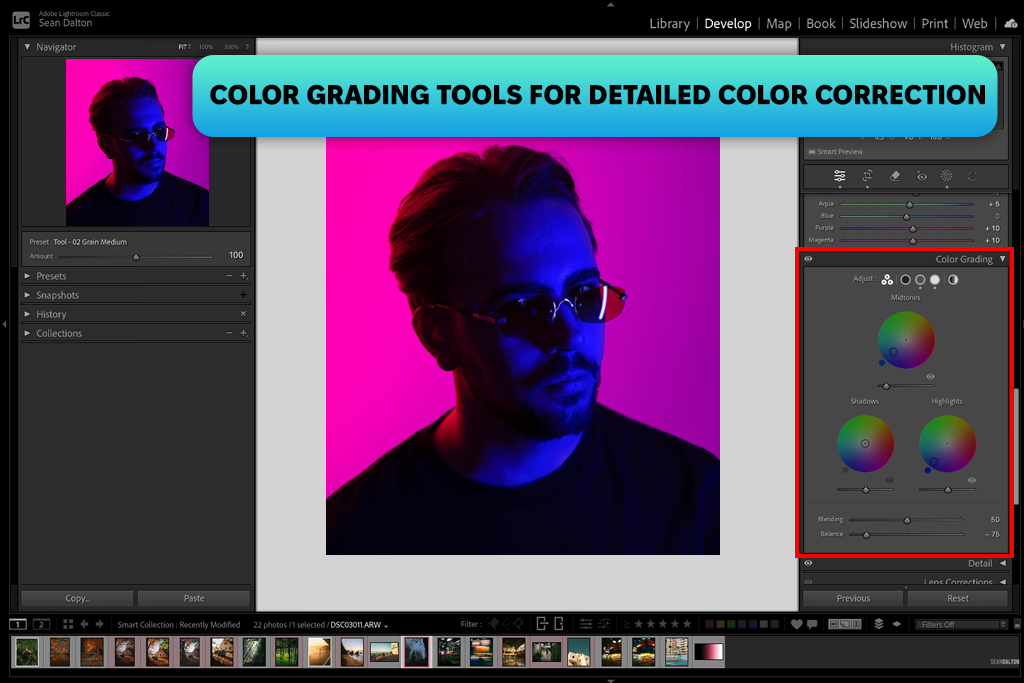
However, a single thumbnail takes 30-40 minutes on a heavy day. Multiply that across a consistent publishing schedule, and the hours vanish fast. Jumping between Lightroom and Photoshop also fractured my rhythm. The quality stayed high, but the process quietly drained the time I didn't always have to spare.
So, I brought the same tasks into PhotoDirector and let it prove itself.
The speed hit me first. I loaded an image, dragged a few lighting sliders, and jumped straight into the AI tools. Sky replacement finished in seconds, while typically this task requires multiple steps in Photoshop. Face retouching surprised me, too. The tool smoothed skin, sharpened eyes, and shifted lighting automatically, with almost no input from me.
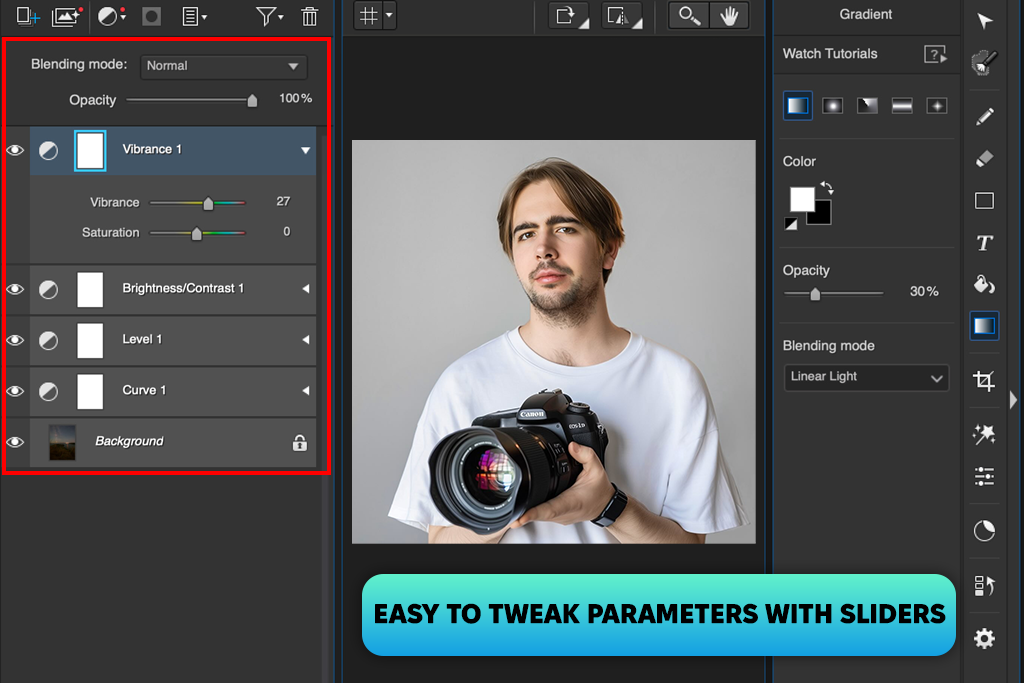
I pushed it further by rebuilding my usual thumbnail workflow inside PhotoDirector. I pulled the subject off the background, dropped a color grading preset, and layered on a quick effect. The edges didn't cut as cleanly, and fine detail control slipped away, but I finished everything in 10 minutes instead of 30.
That gap meant everything across multiple episodes. Photoshop delivered sharper, more refined images when I invested the time. PhotoDirector traded some precision for high speed, and consistently handed me results I could publish.
Winner: Adobe Creative Cloud Pro

The video was the biggest slice of this project. Every episode clocked in at 15–20 minutes, and each shoot handed me a messy pile of talking-head clips, b-roll, ambient audio, and interview footage to untangle.
Hours of raw material needed to be cut, polished, and shaped into something people would sit through. There were the perfect conditions to stress-test both Adobe Premiere Pro and PowerDirector, not with simple demos, but with genuine, demanding work that exposes the exact pros and cons of each program.
Premiere Pro anchored my video editing process. I built a structured workflow from the ground up, importing footage, sorting everything into labeled bins, syncing audio, and then assembling a rough cut directly on the timeline.
The track-based layout handed me complete control. I stacked video, audio, graphics, and effects exactly where each element belonged, never guessing, always placing with intention.
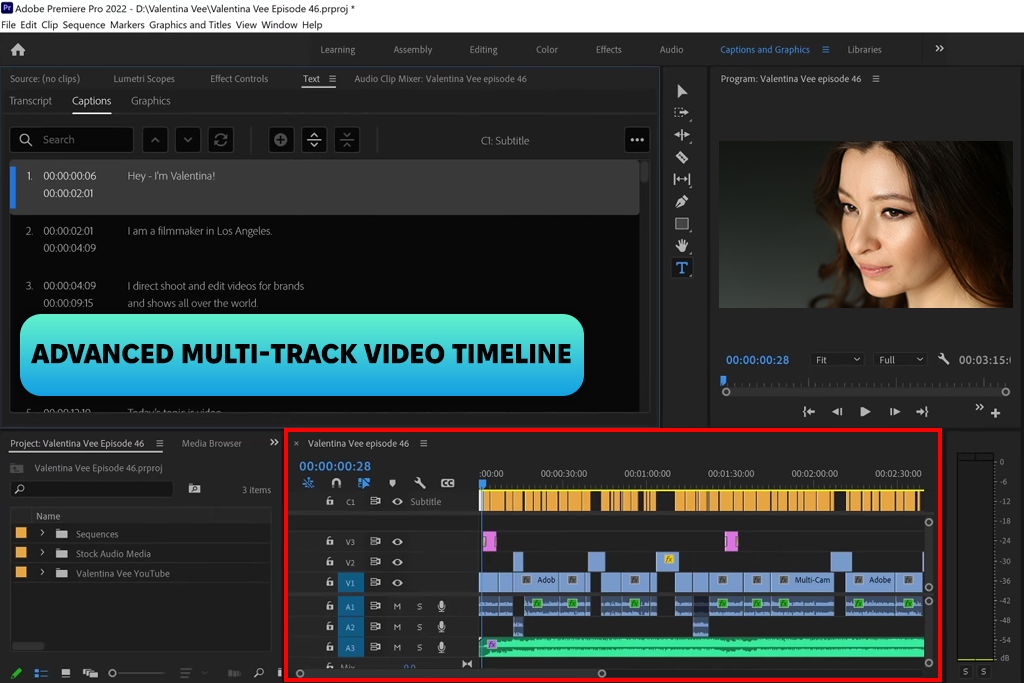
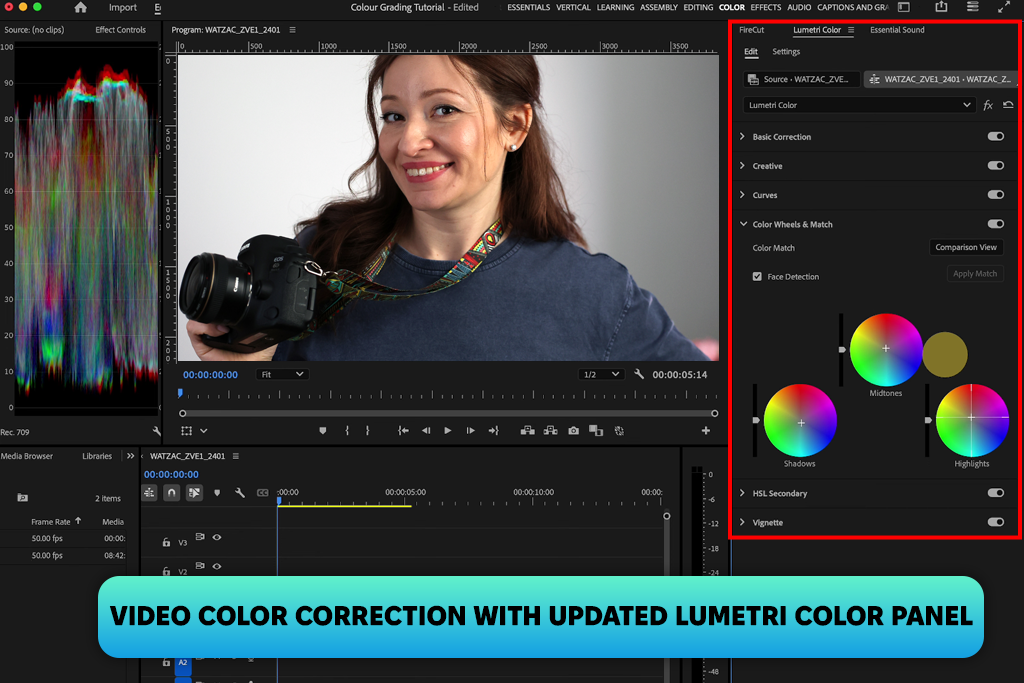
Precision drove every decision. During interview cuts, I trimmed frame by frame, protecting the natural rhythm of each response. I massaged audio levels by hand and scrubbed out background noise until every voice sat cleanly in the mix. Lumetri Color handled my grading, so I could control every shade and highlight.
When a scene demanded animated titles or polished transitions, I pushed clips straight into After Effects, built what I needed, and pulled everything back into Adobe video editing software for Mac and Windows without interrupting the flow.
PowerDirector took on the next episode, and it wasted no time making an impression.
The interface stripped away every unnecessary step. I dragged clips onto the timeline and started cutting straight away without manual configuration or project setup rituals holding me back. Every tool landed where I naturally looked for it, and the editing process flowed instead of constantly stopping to figure out what came next.
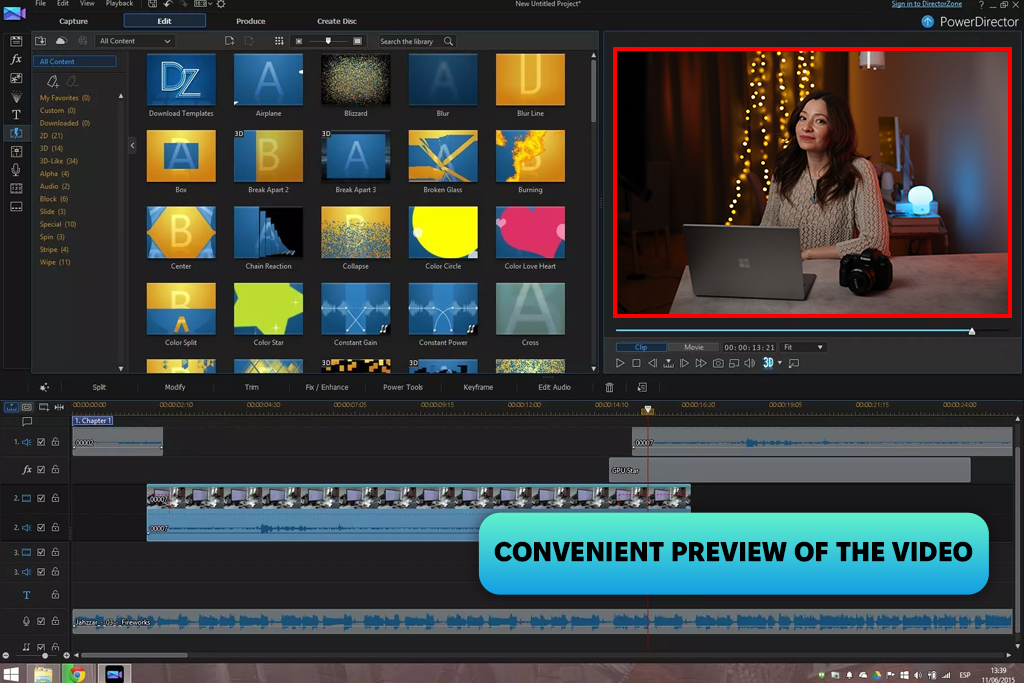
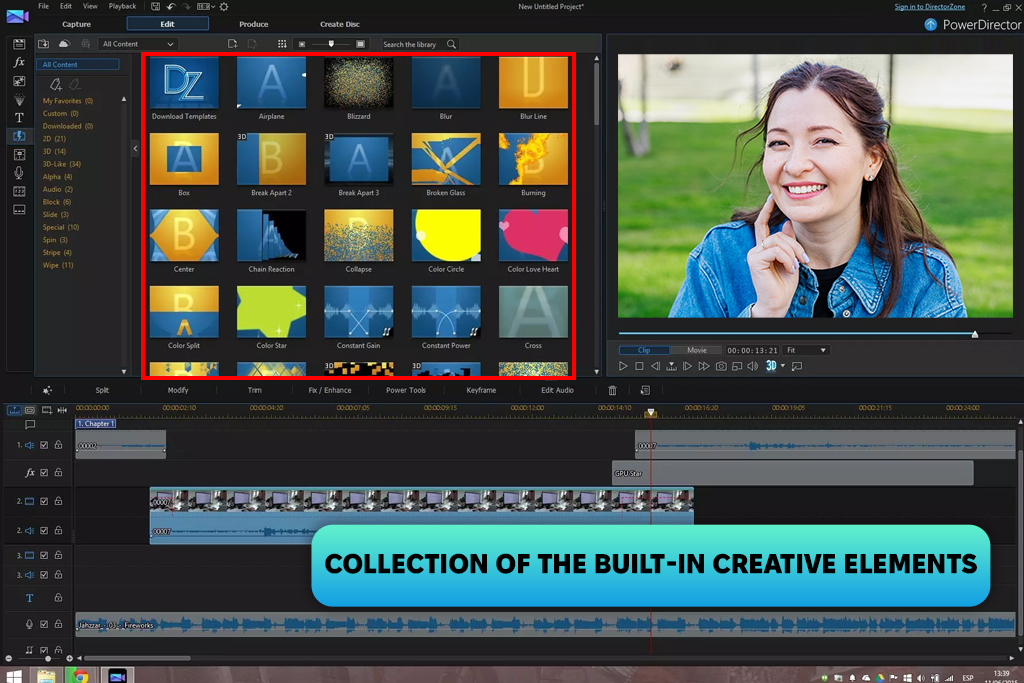
Testing the AI features revealed some genuine time-savers. Auto scene detection broke lengthy footage into tight, usable segments without any manual scrubbing. Motion tracking applied cleanly in seconds, skipping the technical setup menus that usually slow everything down. I pulled in built-in transitions and title templates to finish scenes faster.
Subtitles are worth special note in this Creative Cloud vs Director Suite workflow comparison. Premiere turned captioning into a multi-step process that often required outside tools. PowerDirector handled it differently. Auto-captions produced a complete subtitle track almost instantly. I cleaned up a few inaccuracies and finished the entire task faster than Premiere even got me started.
Rendering performance surprised me most. Even pushing my mid-range laptop, this AI video editor maintained smooth playback and exported footage without turning the process into a waiting game.
The limitations surfaced once I went deeper. Precise color grading and complex audio mixing exposed the software's ceiling. I simply couldn't reach the same control that Premiere handed me. Layered effects and custom animations showed restrictions quickly, and recreating advanced edits became a frustrating exercise in working around the tool rather than with it.
Flexibility was the sharpest loss. Premiere let me build sequences from the ground up, following my creative instincts at every step. Cyberlink video editing software for Windows consistently nudged me toward presets and templates instead.
For straightforward projects, that approach accelerated everything. For anything more specific, it forced me to reshape my ideas around the software's preferences. That trade-off became a real creative constraint with more ambitious edits.
Winner: Tie (depends on workflow)
Audio barely crossed my mind at the start. Then it demanded my full attention. The series wasn't recorded in a controlled environment. I shot almost everything in busy cafés, working workshops, and cramped little stores. Each setting introduced background noise, hollow echo, volume that jumped between clips, occasional wind, or street traffic bleeding into the recording. It seemed manageable early but became a genuine problem fast.
I handled the initial cleanup inside Adobe Premiere Pro, trimming noise, evening out levels, and dropping in basic effects. For a while, that was satisfying. Then the more stubborn audio issues exposed exactly how much Premiere's tools were holding back. I needed real precision, so I pulled everything into Adobe Audition and finally solved the problem properly.
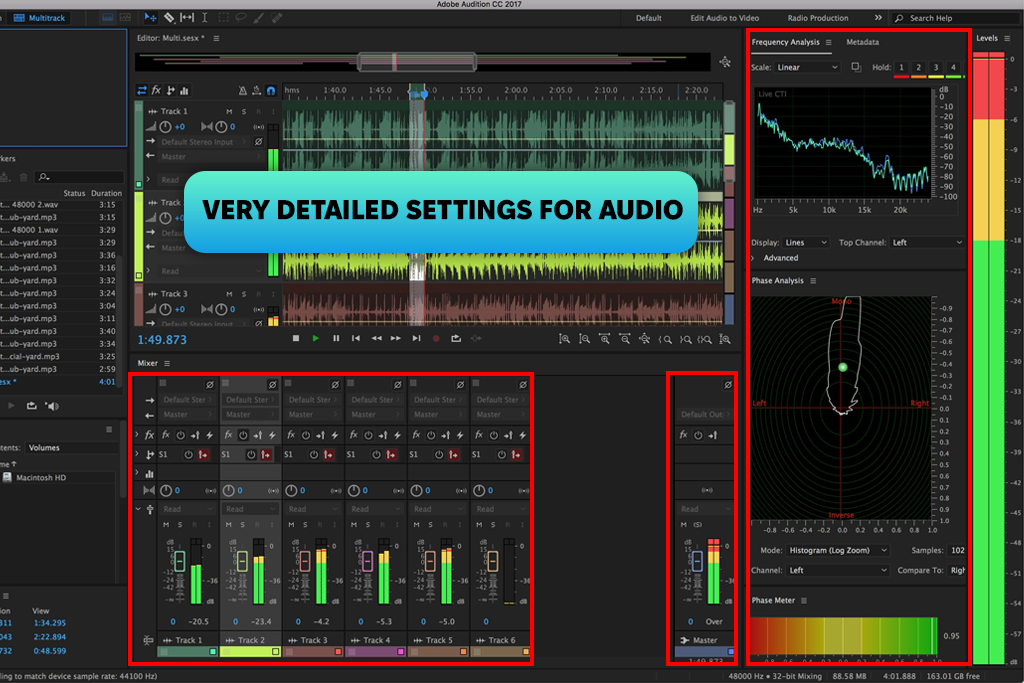
When comparing Director Suite 365 vs Adobe Creative Cloud for beginners, novice users often choose Adobe specifically for its audio capabilities. After using Audition alongside Premiere Pro, I completely understand why.
I routed audio from Premiere directly into Audition, refined it there, and returned the polished file to my timeline. Audition's noise reduction tool eliminated persistent background hum from indoor equipment. This is the problem that plagues nearly every beginner's footage. The spectral frequency display became my secret weapon. It transformed invisible audio problems into visual targets I could pinpoint and erase without touching the surrounding dialogue.
During one interview shoot, a door slammed mid-sentence. Audition let me isolate that exact spike and neutralize it while preserving the speaker's voice completely.
I applied compression to even out inconsistent speaking volumes and used EQ to add warmth and clarity to flat-sounding recordings. The final audio rivaled podcast and documentary production standards. Most beginners never expect to achieve this result early.
“If you do any kind of voiceover or interview work, this program will satisfy you. I can take a rough, echoey recording and have it sound clean and broadcast-ready in minutes. The noise removal alone is worth it. Feels like a full production suite, not just software.”

Next, I wanted to see how AudioDirector from Director Suite handled the same audio challenges.
From the moment I opened it, I noticed that this software was easy to understand. Every essential tool was placed front and center. Guided adjustments replaced complex manual controls, letting me apply noise reduction, voice enhancement, and basic cleanup without second-guessing myself.
I deliberately fed it the same problem clips I had already tackled in other free audio editing software. AudioDirector handled gentle background noise like distant chatter, electrical hum, and soft ambient sound with speed and confidence. What took careful attention in other tools took only a few clicks here.
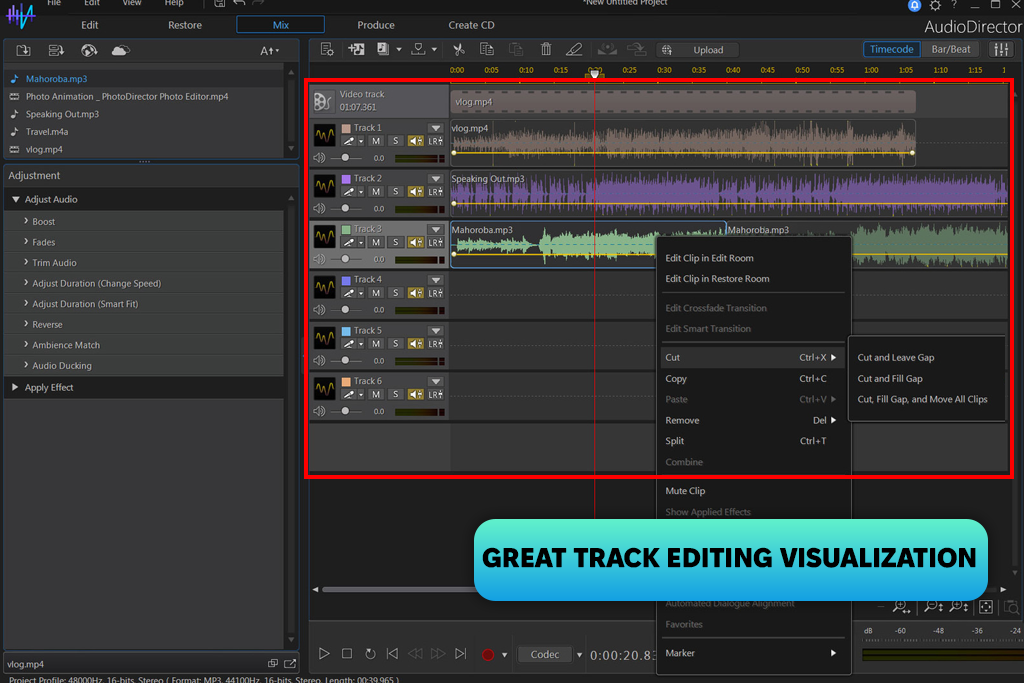
The real advantage showed up during high-volume editing sessions. When I faced a backlog of clips needing quick, reliable fixes, AudioDirector cut through the workload amazingly and delivered clean, consistent audio every time.
AudioDirector works best as a speed tool, not a precision one, and that distinction matters more than I expected. When processing a batch of short dialogue clips for one episode, it impressed me a lot. The tools are simple, the workflow is fast, and while the results weren't perfect, they were consistent enough to save me real time. For straightforward tasks, it comes out on top in the Adobe vs Director Suite 365 for video editing battle.
But if you push it further, you’ll notice the cracks. Such complex problems as overlapping noise, stubborn echo, and tricky frequency work never felt fully resolved. I'd land somewhere acceptable and move on, knowing I was leaving quality on the table. That "good enough" ceiling is frustrating when you know better tools exist.
But keep in mind that AudioDirector lacks depth. Audition lets me build a complete workflow with layered effects, precise adjustments, and output tailored to different formats from the ground up. AudioDirector doesn't think that way. It's built for quick edits. The moment a project demands more, that becomes impossible to ignore.
“The audio tools are solid. Noise cleanup and voice clarity are easy to adjust, even without going deep into settings. Is it as powerful as a dedicated DAW? No. But for YouTube and social content, it absolutely does the job. The real win for me is speed, though. Raw footage to finished, captioned, exported video in less time than I expected. Great option for creators.”

Winner: Adobe Creative Cloud Pro
As the project grew, visual identity became just as important as the editing itself. The YouTube series required both a polished look and consistency. Every episode needed thumbnails, title cards, lower thirds, branding elements, and occasional social media layouts. That's when Adobe Illustrator and Adobe InDesign became essential parts of my workflow.
Illustrator was my starting point for anything requiring scalable graphics. I built logo variations for the series, designed simple icons, and created layout elements that fed directly into thumbnails. The precision was stunning.
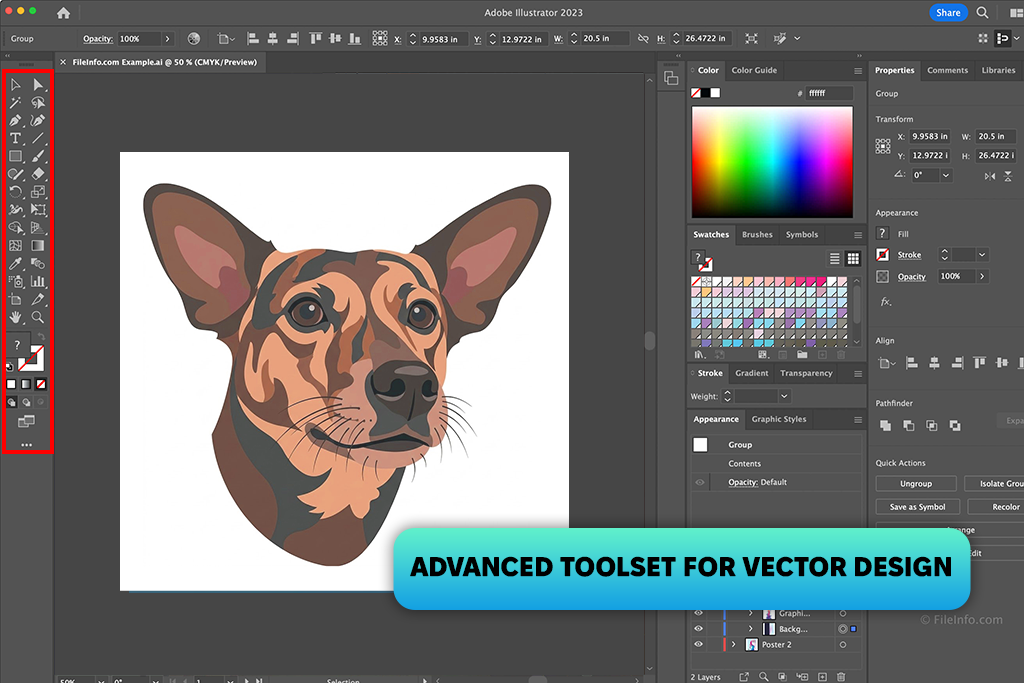
I could manipulate every anchor point, refine curves exactly as intended, and produce designs that stayed sharp at any size. Thumbnails, in particular, benefited from Illustrator's flexibility. Rather than rebuilding elements from scratch each episode, I developed reusable frames, text styles, and recurring shapes that could be quickly adapted to fit each new entry.
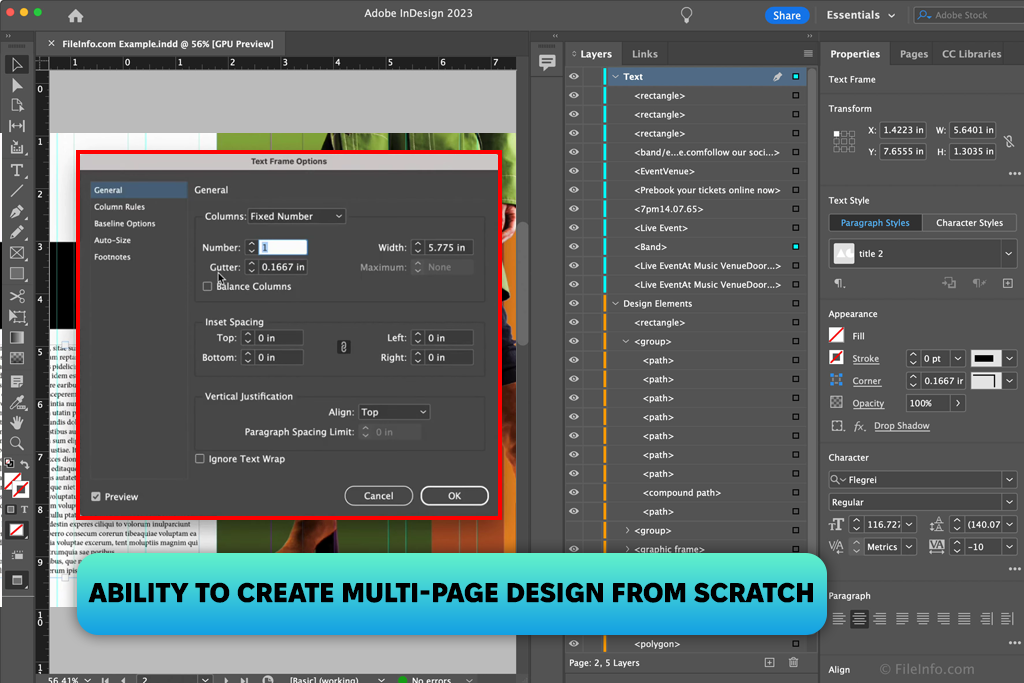
I discovered the value of Adobe's free graphic design software when I needed to bring order to my creative process. InDesign isn't just for editorial work. I repurposed it entirely to develop visual templates for the series. From episode cover layouts to precise text arrangement, it gave me a reliable framework to experiment with before finalizing anything for video or social media. Once I began posting on a regular schedule, my audience instantly recognized that visual consistency.
After spending time with Adobe's tools, I was even more curious about Creative Cloud vs Director Suite pros and cons. It was intriguing to see what Director Suite 365 could do.
My first experiment was building thumbnails and basic graphics using its built-in features, particularly its template library. The difference in workflow was immediately obvious. Unlike Illustrator, which starts you with a blank canvas, Director Suite is built around speed. Pre-made templates, drag-and-drop elements, and straightforward customization options speed up the workflow a lot.
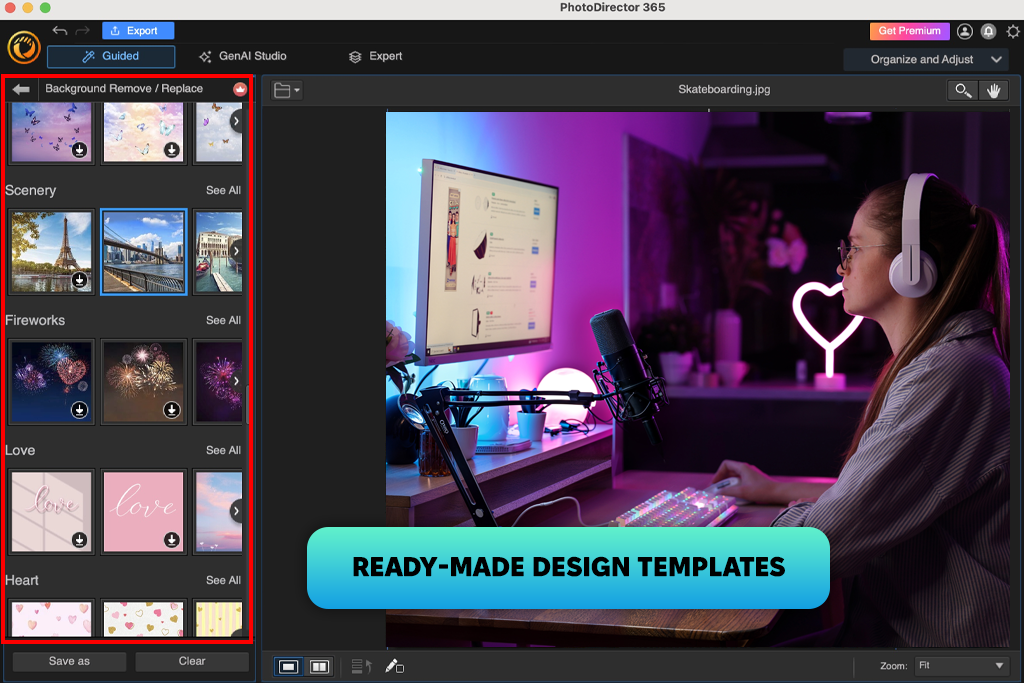
The process was refreshingly simple. I selected a thumbnail template, swapped in my image, updated the text, tweaked the colors, and had a finished graphic ready in just a few minutes. For anyone producing content at a fast pace, such efficiency is genuinely valuable.
The moment I tried to move past the pre-built templates, Cyberlink AI tools for designers showed their limitations. Compared to Illustrator, the precision was just disappointing. Simple tasks like refining typography, perfectly positioning elements, or constructing a custom layout were restricted. The software was built for editing existing designs, not making new ones.
Keeping a consistent look across multiple designs was also frustrating. With InDesign, I had built a solid system of saved styles and structured layouts that ensured every episode was visually connected. Director Suite had no equivalent. Each new design meant repeating the same manual adjustments, which slowly chipped away at the overall consistency.
Working with both tools on the same project, I clearly grasped the difference. Adobe gave me the detailed control that a well-defined visual identity genuinely requires. Director Suite offered convenience and an intuitive working process, but those advantages came with limited flexibility and far less room for creative precision.
Winner: Adobe Creative Cloud Pro
Motion graphics became a serious priority once I began adding intros, transitions, and animated elements to the YouTube series. Initially, basic text animations seemed enough until I saw firsthand how top-notch motion graphics could transform the overall viewing experience. That was the moment I decided to level up.
I turned to the Adobe After Effects free version, available through Adobe Creative Cloud and deeply integrated with Premiere Pro. My plan was to design a memorable intro for the series, build animated lower thirds for interview segments, and develop dynamic scene transitions that would give the videos a more professional and cohesive feel. It started as a small experiment but quickly became an essential part of my entire production workflow.
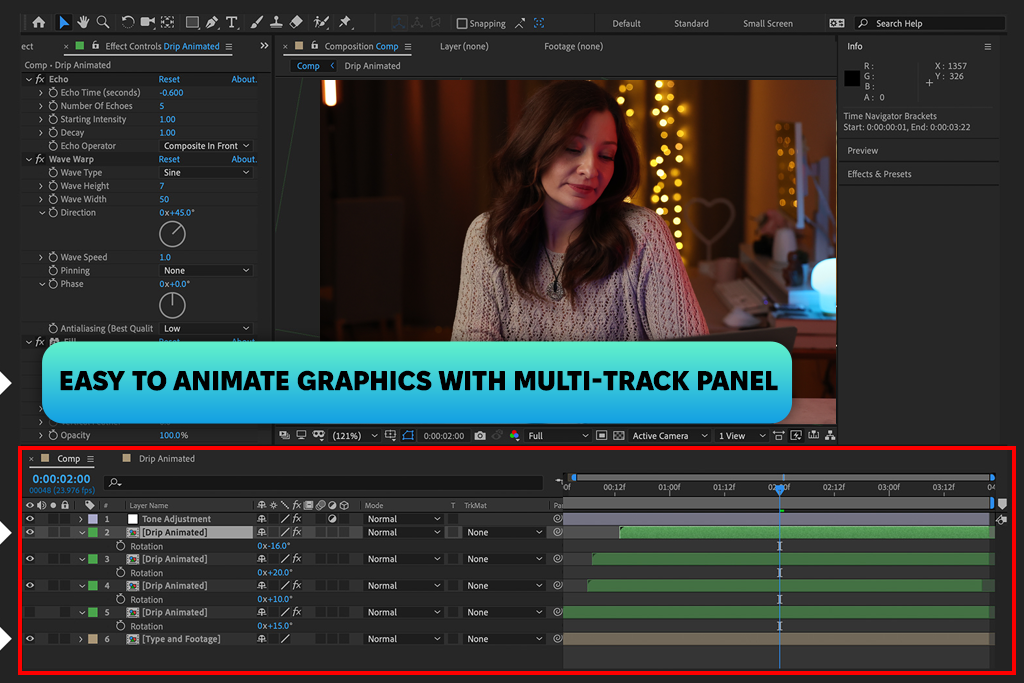
When I first opened this motion graphics software, I was impressed by the extensive customization. Even a basic task like animating a title involves keyframes, motion curves, easing, and layer hierarchy. I spent my early sessions just sliding text across the screen, tweaking timing, layering blur and glow effects, and chasing a professional look. Once everything clicked, I understood why professionals rely on it so heavily.
I built a clean intro sequence featuring animated text, subtle background movement, and fluid transitions that perfectly matched my project's tone. It was easy to adjust timing or rework a motion style because every detail remained fully editable. Another highlight is smooth integration with Premiere. I could finish a composition, drop it straight into my video timeline, and revise it later without starting over. So, it became easier to maintain consistent branding across multiple episodes.
If you've been comparing CyberLink Director Suite 365 vs Adobe Software Suite, After Effects clearly stands out for anyone serious about motion graphics and long-term creative projects.
However, speed was never its strong suit. Even straightforward animations demanded time and patience to get right. Rendering became a real challenge, too, particularly when several effects were layered on top of each other. My system definitely felt the strain.
Next, I shifted my focus to Director Suite 365. I tested its built-in effects using the PowerDirector 17 free version.
The contrast was immediately clear. Rather than constructing animations from the ground up, I had a library of ready-made templates and preset effects at my fingertips. Animated titles, transitions, and overlays could be applied within seconds. To test it out, I made a simple intro by selecting a template, swapping in my text, and tweaking the colors. The result looked professional and perfectly suited for fast-turnaround content.
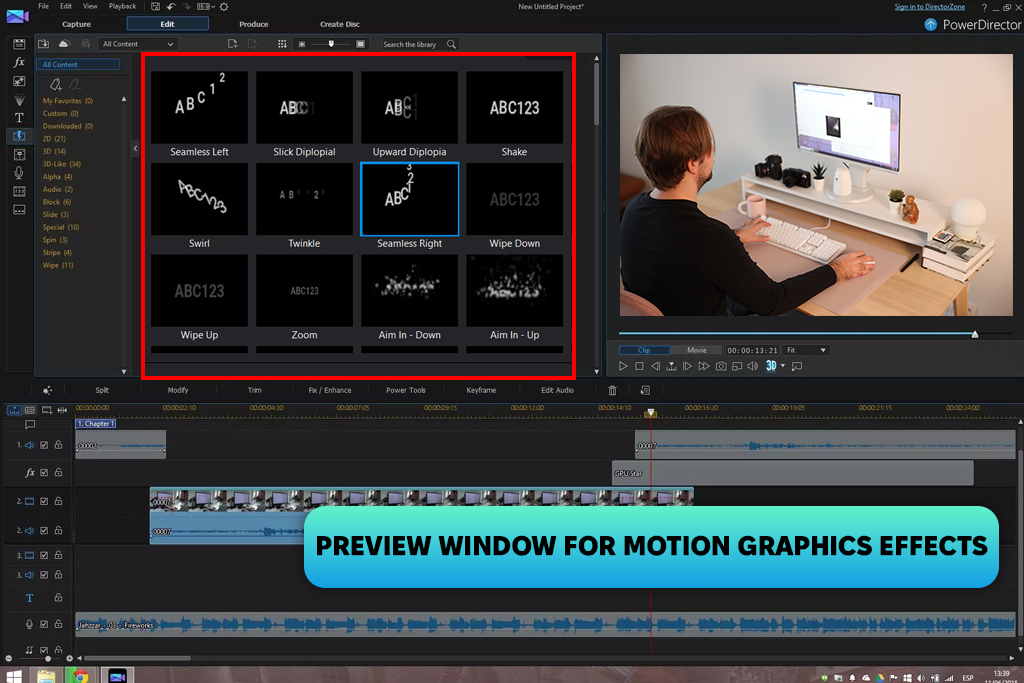
PowerDirector also surprised me with its motion tracking and basic keyframe tools. I tried pinning text onto a moving subject within a clip. The accuracy was amazing for casual projects. Whether you're producing social media clips or uploading regularly to YouTube, this tool comfortably covers the basics.
As soon as I got down to layered animations or fine-tuned motion timing, I noticed shortcomings. Precise control over motion paths simply was missing, and most effects leaned heavily on presets with little room for genuine customization. It is okay for quick turnarounds, but users who like to experiment freely may be disappointed.
Testing both applications back-to-back painted a vivid picture. After Effects handed me complete creative control, allowing me to bring any concept to life exactly as envisioned. However, it demanded considerable time and technical know-how along the way. Director Suite flipped that equation entirely, delivering eye-catching results at impressive speed, but keeping me firmly within the boundaries of its preset library and template collection.
Winner: Adobe Creative Cloud Pro
Everything changed the moment I started cutting YouTube videos into short clips for TikTok, Instagram, and Shorts. Success on these platforms has nothing to do with sophisticated editing. It is more important to publish quickly, stay consistent, and make eye-catching content.
PowerDirector copes well with converting horizontal footage to vertical in seconds. The subject reframing worked automatically, and captions were just a few clicks away. The subtitle generator alone saved me hours each week. I'd drag in a clip, let this app for video captions do its thing, tweak a couple of errors, and walk away with an upload-ready video within minutes.
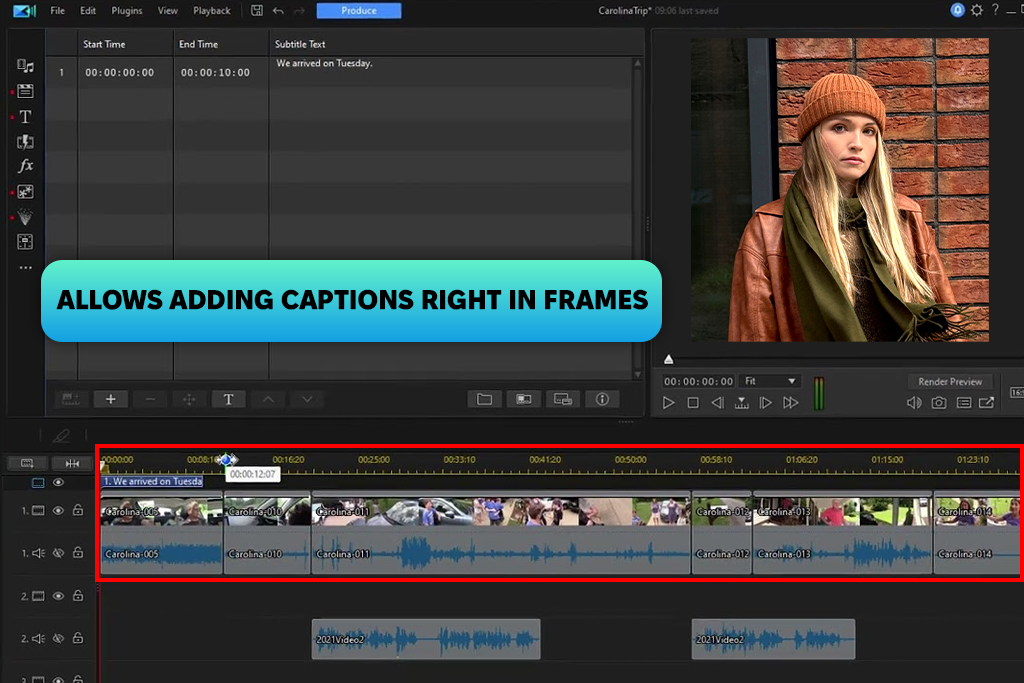
I didn’t build everything from scratch and just used the built-in social media templates for intros, outros, and transitions. Pick a style, drop in the footage, tweak the colors, and you’re done. At that point, speed and output mattered far more than pixel-perfect results.
“Picked this up out of frustration with my old setup. Turned out to be the right call. It's not flashy but it's fast. You open a project and start working. Such workflow makes it a good option for content production.”

Adobe Premiere Pro could handle it, but it is obvious the program wasn’t built for this kind of work.
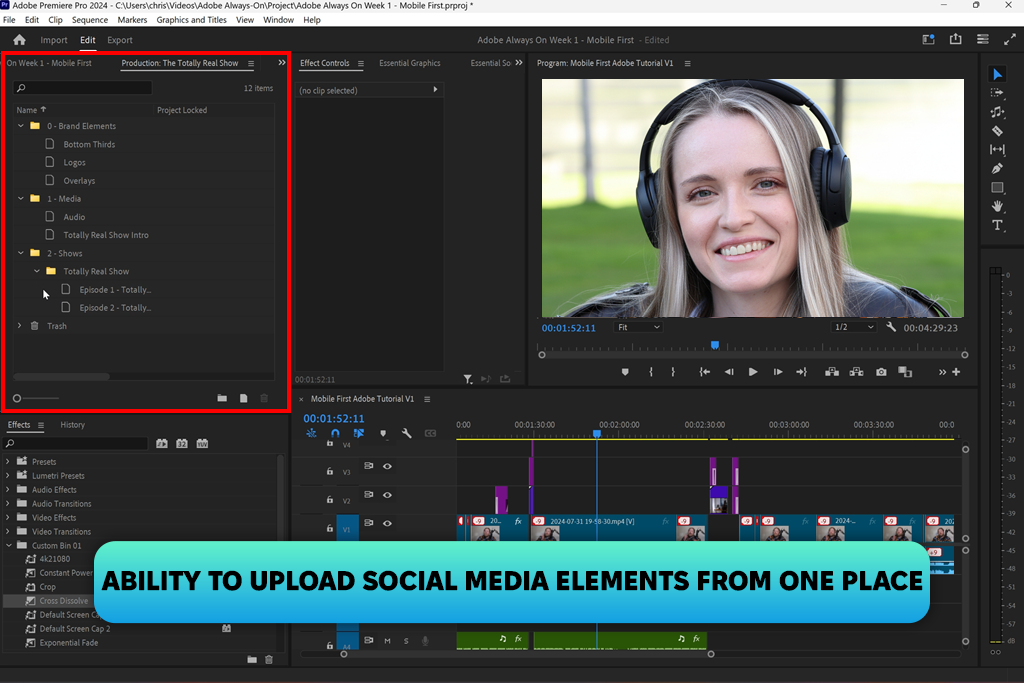
Every small task requires manually resizing sequences, tweaking compositions, and switching between tools. For a quick social media clip, that's just unnecessary effort. It slowed me down more than it helped.
“The integrated workflow is the real selling point for me. Editing audio to motion graphics without constantly switching apps or losing consistency is great. Still, it is not the fastest for quick social posts. But when I want the output to look top-grade, it satisfies my needs.”

Winner: Director Suite 365
Director Suite 365's AI editing tools were something I didn't expect to rely on as much as I did. Adobe offers similar features, but getting decent results usually means digging through settings and knowing exactly what you're doing from the start.
With PhotoDirector and PowerDirector, I just jumped in. I tested auto scene detection, background removal, one-click enhancement, and AI object tracking. I ran raw interview footage through the AI tools and watched it automatically trim awkward pauses, smooth out shaky clips, and brighten dull lighting. I didn’t need to input anything manually. It was not flawless, but genuinely useful.
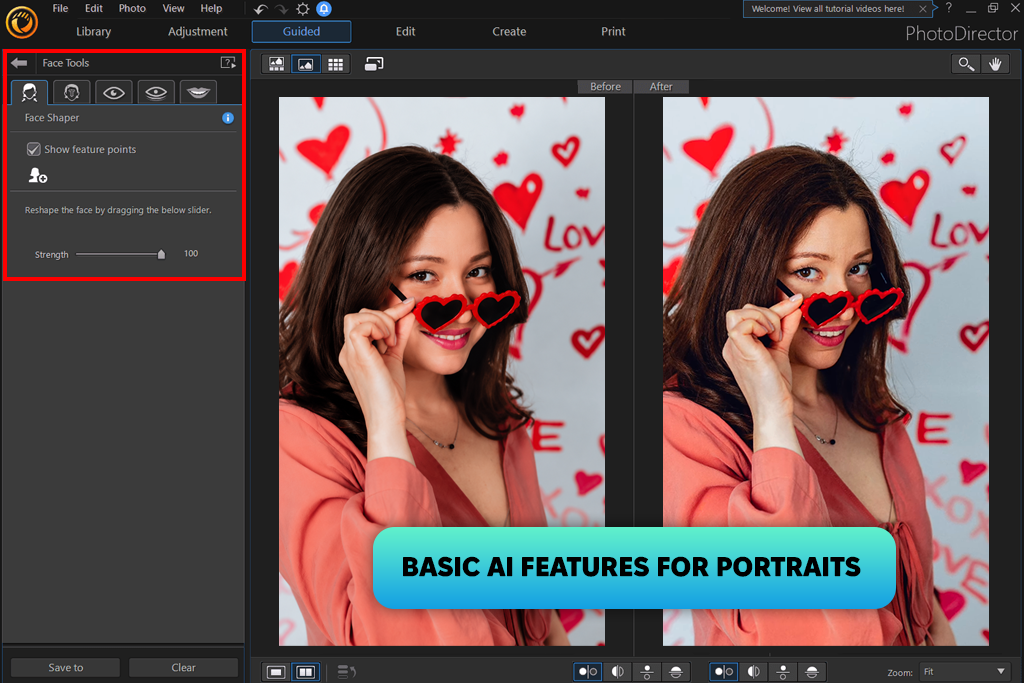
Once I had a pile of promotional clips that needed editing before morning. Normally, I'd be up late manually cutting and adjusting every single one. Instead, I used AI auto-editing to handle the rough cuts, applied a consistent style across all of them, and exported everything quickly. That was awesome.
Adobe Creative Cloud never made things easy when I needed to move fast. It definitely provided more control, but also more settings and more time spent on tasks that should take minutes.
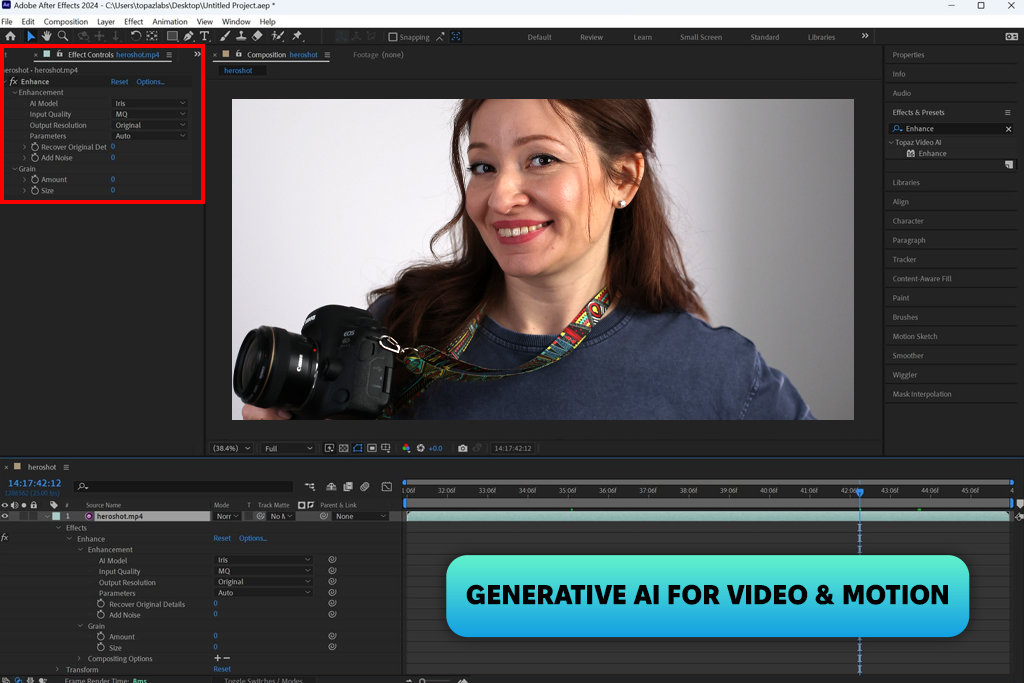
Director Suite 365 works differently. For anyone searching for the best alternative to Adobe Creative Cloud, Suite 365 consistently delivers high-quality results without complexity. It's built for people who produce content regularly and can't afford to lose hours tweaking workflows.
Adobe fits perfectly in slower, more precise projects. But for quick turnarounds and everyday production, Director Suite wins without much debate.
Winner: Director Suite 365
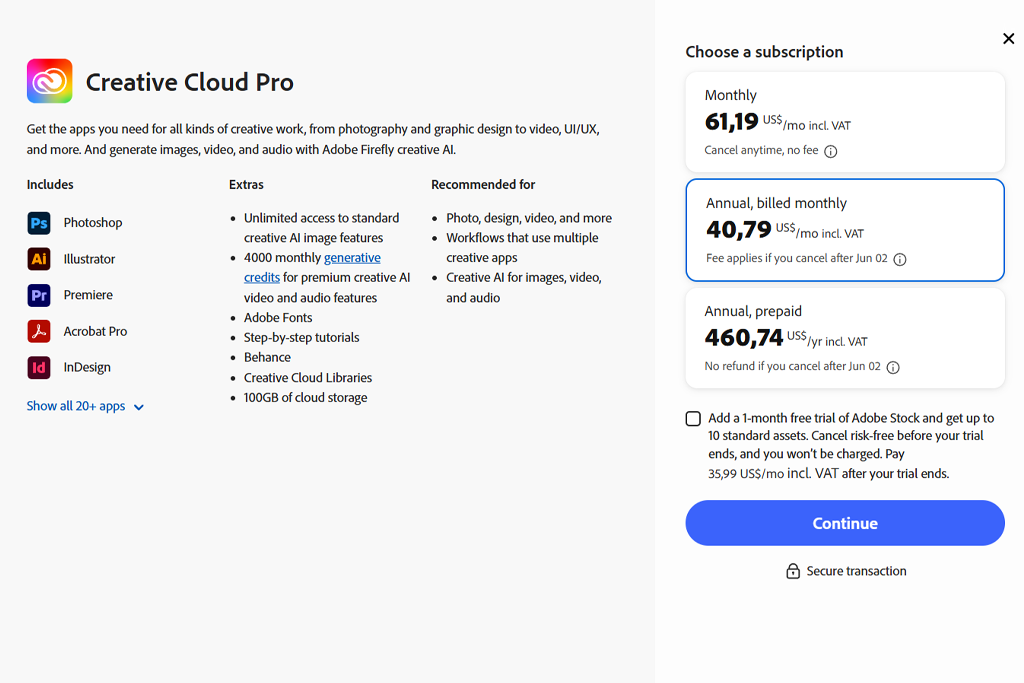
Adobe Creative Cloud is a premium-tier subscription offering a comprehensive set of professional tools for design, video, photography, and motion graphics.
| Plan | Price (approx.) | Notes |
|---|---|---|
|
Creative Cloud Pro (All Apps)
|
~$69.99 / month
|
Full access to 20+ apps
|
|
Single App
|
~$22.99 / month
|
One selected app only
|
|
Photography Plan
|
~$19.99 / month
|
Photoshop + Lightroom
|
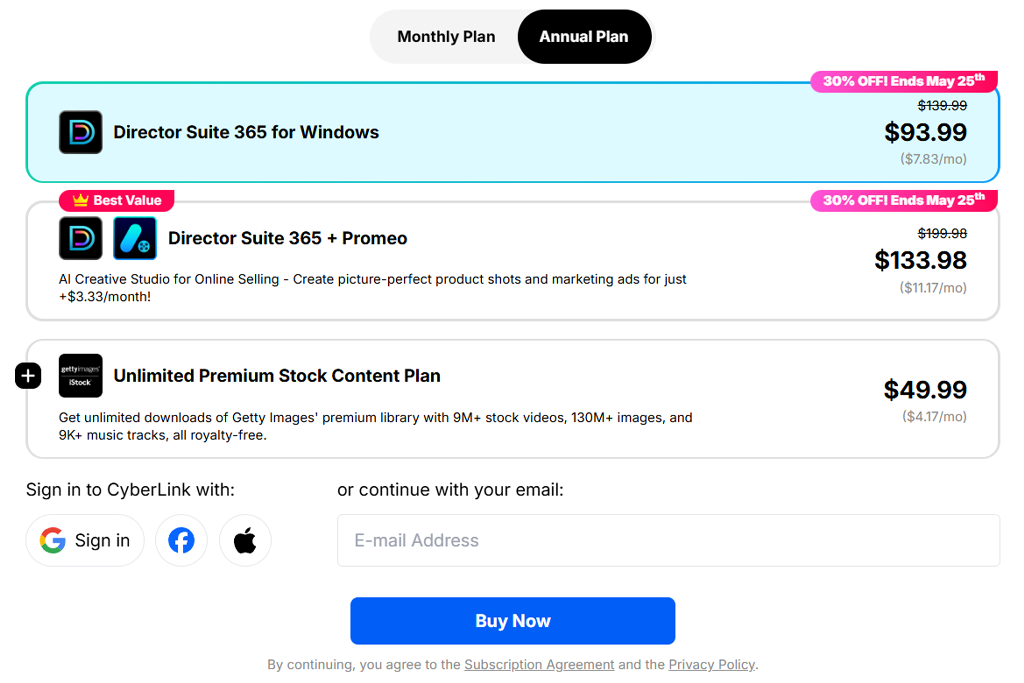
Director Suite 365 is an affordable, all-in-one package focused on producing content quickly and efficiently.
Run a Creative Cloud vs Director Suite pricing comparison yourself to notice the value gap. One is built for studios. The other is built for creators.
| Plan | Price (approx.) | Notes |
|---|---|---|
|
Director Suite 365
|
~$12–$20 / month
|
Full bundle access
|
|
Annual plan
|
Cheaper monthly rate
|
Discounted subscription
|
Adobe Creative Cloud Pro wins when you need depth and control
Adobe Creative Cloud is the best fit for tasks where precision, flexibility, and full control over every element are crucial. It's the go-to choice for complex video editing, professional photo retouching, design, branding, and motion graphics. Tools like Adobe Photoshop, Adobe Premiere Pro, and Adobe After Effects allow you to build intricate projects with a high level of detail and customization.
This is the strongest option for professional work, client projects, studio production, and any project where the final result must meet specific technical and visual standards. If complete creative freedom at every stage of the process is a priority, Adobe remains the most versatile and powerful solution available.
Director Suite 365 Wins when speed and simplicity come first
Director Suite 365 is perfect for fast content creation without confusing settings or lengthy editing processes. PowerDirector and PhotoDirector let you cut videos, retouch photos, and prepare social media content quickly using templates and AI-powered features.
It's a solid choice for bloggers, content creators, and anyone who needs to publish material consistently without getting tangled in complex menus or time-consuming workflows. If the main goal is fast results and a steady publishing schedule, Director Suite 365 is simply the more practical option.



![7 Best HeyGen Alternatives [{{%year}} FixThePhoto Choice]](http://fixthephoto.com/blog/images/gallery/news_main__preview_28944.jpg)
![7 Best Speechify Alternatives [{{%year}} FixThePhoto Choice]](http://fixthephoto.com/blog/images/gallery/news_main__preview_28954.jpg)
![7 Best Cricket Logo Makers [{{%year}} FixThePhoto Choice]](http://fixthephoto.com/blog/images/gallery/news_main__preview_28973.jpg)
![11 Best Favicon Generators [{{%year}} FixThePhoto Choice]](http://fixthephoto.com/blog/images/gallery/news_main__preview_29010.jpg)


![9 Best AI Label Generators [{{%year}} FixThePhoto Choice]](http://fixthephoto.com/blog/images/gallery/news_main__preview_28972.jpg)


















