I’ve been using Speechify for some time while working on my projects, and I believe that it’s one of the most useful text-to-speech tools available today. However, recently, many of our subscribers have started to ask us about the available paid and free Speechify alternatives. Some of them are looking for more affordable solutions, while others want to find free platforms with a wider choice of free features. Besides, many readers want to discover the services available from different devices that would allow them to generate more human-sounding voices.
As I wanted to find the solutions that could potentially replace Speechify, I decided to test its most popular competitors and some lesser-known platforms. To ensure that the testing process would be completely fair and transparent, I asked other members of the FixThePhoto team, including editors, reviewers, and translators who use AI text-to-speech tools daily, to join me. Together, we have been testing each service for several weeks, trying to see whether it would be suitable for different tasks, from content editing and script narration to audiobook listening.
| Core Use Case | Voice Customization | Multilingual Support | Podcast / Video-Ready | |
|---|---|---|---|---|
|
Speechify |
Article & document listening
|
Limited
|
✔️
|
❌
|
|
Video captions & voiceovers
|
✔️
|
✔️
|
✔️
|
|
|
Professional voiceovers
|
✔️
|
✔️
|
✔️
|
|
|
Realistic AI voices & cloning
|
✔️
|
✔️
|
✔️
|
|
|
Podcast & video audio
|
✔️
|
✔️
|
✔️
|
|
|
Cross-device text reading
|
Limited
|
✔️
|
❌
|
|
|
Multilingual & dialog audio
|
✔️
|
✔️
|
✔️
|
|
|
Marketing & training content
|
✔️
|
✔️
|
✔️
|
When testing these Speechify alternatives, we discovered that some of them generated impressive, human-sounding AI voices, while others were more affordable. Besides, there were some solutions that supported extensive customization, allowing users to adjust speed, perform voice cloning, or produce content in multiple languages.
Whether you are looking for free software that could potentially replace Speechify, want to find an AI-driven text reader, or discover a reliable Speechify alternative for students and audiobook enthusiasts, take a closer look at the options listed below to choose the right solution for your needs.
I’ve been using Adobe Express when working on my projects for a while, as it’s perfectly suitable for editing visuals and social media assets quickly. This is why I was fairly sure that it is one of the best Speechify alternatives available today.
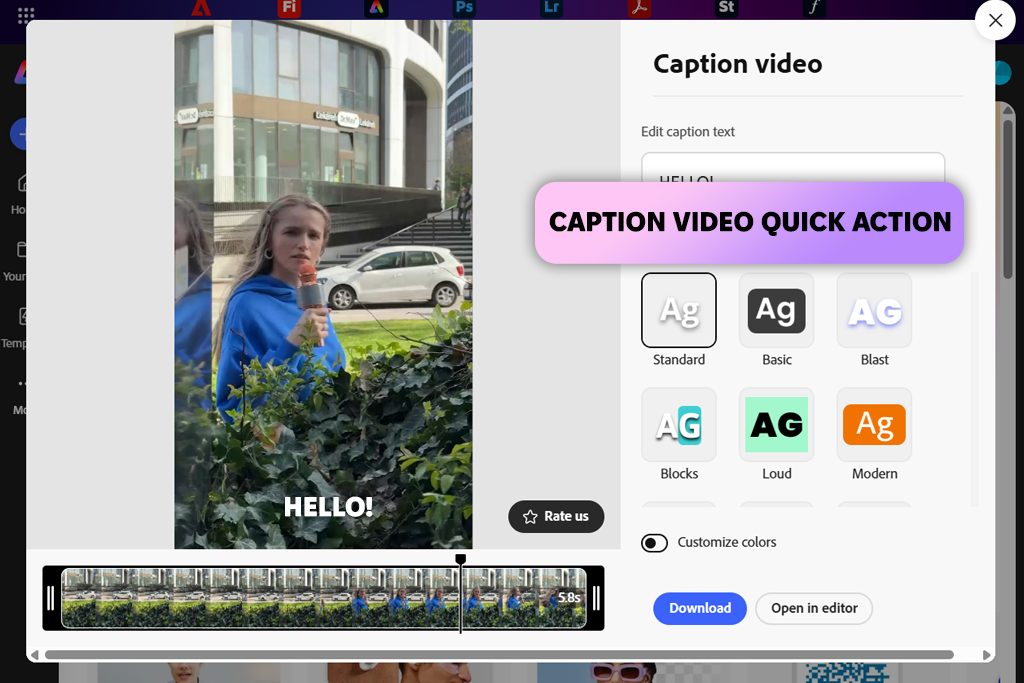
When I discovered that it has the Caption Video feature that allows users to automatically generate captions based on their audio, I decided to test it to confirm my initial assessment. The results of the testing process exceeded my expectations.
“I prefer to use Adobe Express when I need to edit video content quickly. Its caption and voice features have become an integral element of my workflow. I like the fact that I do not need to install any third-party tool to add narration or subtitles. While it’s hardly suitable for long listening sessions, it saves me a lot of time when I work on short videos.”

After signing into Adobe Express, I found the Video tab on the home page and clicked the “Caption video” option listed under Video Quick Actions. Then, I examined the dropdown menu and selected Language spoken.
After uploading a short tutorial video, I waited a bit until it was transcribed in real time. The interface is easier to navigate than Speechify’s UI, as it’s more visual and does not focus solely on the tools for reading text aloud. This solution is suitable for creators who produce video content, as it facilitates converting audio to text and has accessibility features.
I was especially pleased with the AI Voiceover feature that helped me add narration. I added my script and selected three voices I wanted to use. After I adjusted speed and pitch, Express quickly generated clean narration. I was able to drop it on the timeline and export it. Unlike some other Speechify replacement tools, this solution supports decent voice quality.
While Speechify offers a wider selection of voices and is more suitable for long articles, Express is more suitable for creating videos quickly. It allows one to access TTS, captioning, and styling options without using third-party software. After achieving the desired result, I exported my video. Besides, with it, I was able to render voiceovers and use them when working on various projects.
Murf is one of the most advanced AI audio tools I’ve ever used when working on my projects, and I mean it literally. I decided to use Murf AI because I was interested in more flexible solutions than the regular Speechify alternative software when creating content for multiple channels.
I wanted to find a solution suitable not only for reading articles but also for creating voiceovers for videos, e-learning modules, and narration suitable for audiobooks. When I started to use it, I discovered that it was more similar to a pro-level voice platform than a regular text reader.
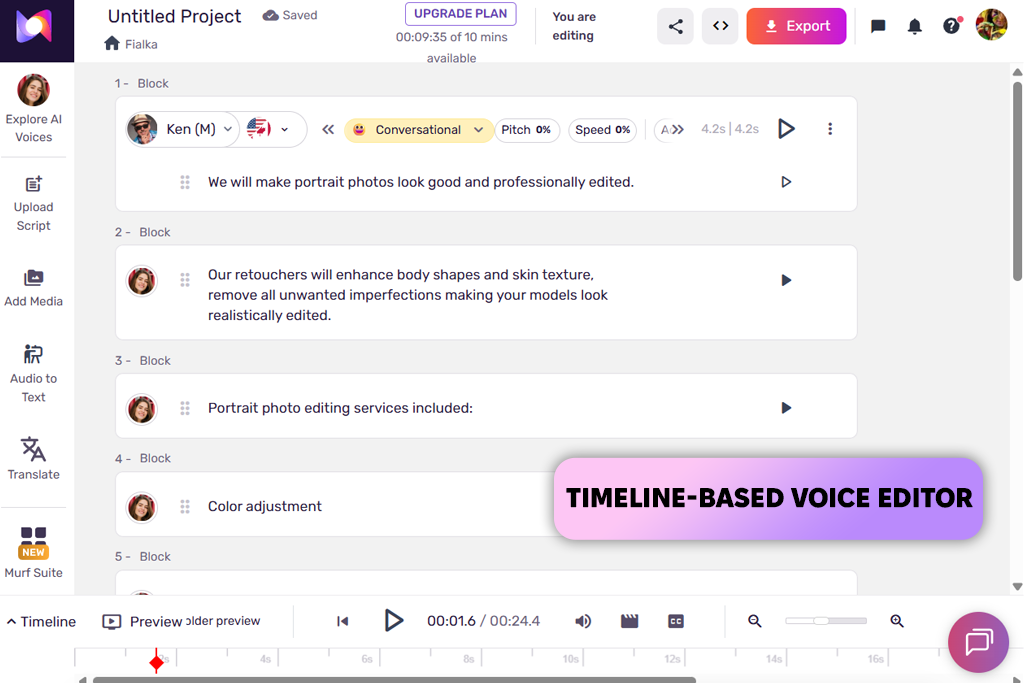
The first thing I did was to paste my script into the editor. I was impressed with the level of control I had. I was able to choose a suitable option from dozens of voices and adjust speed, emphasis, tone, and pauses for every line. I spent 20 minutes trying to find a suitable style and decide which option, calm, conversational, or corporate, suits me more. I can’t achieve the same level of control when using Speechify.
The timeline-style editor allows me to preview sections without re-creating the whole audio from scratch. It helped me expedite my workflow when editing longer narrations. In addition, I checked whether it would be easy to export files for a short video voiceover and then reuse the output on other platforms. This Speechify alternative text reader integrates with WordPress, Canva, Articulate 360, and Adobe Captivate, making it more suitable for teams and business projects than Speechify. Even though Speechify is more suitable for quick article listening, Murf is an excellent option for those who are interested in custom, natural-sounding AI narration in different formats.
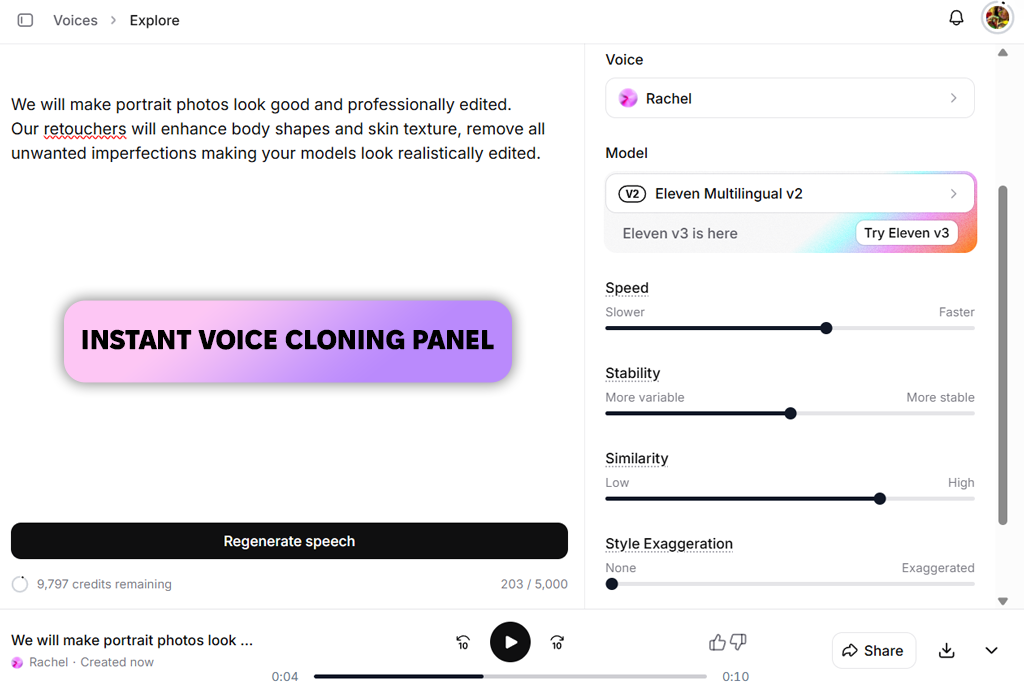
My colleague Ann was the first to recommend ElevenLabs to me. As she often works on projects that require her to work with many audio files, she prioritizes high voice quality. When I started testing this solution, I immediately realized why it’s so popular.
It’s not a regular reader, but an advanced AI sound generator built specifically for those who value high realism. When using Speechify, I typically start with a long script. However, I decided to clone a voice to test the full functionality of ElevenLabs.
“I highly recommend ElevenLabs because I prioritize high voice quality when working on my projects, and it allows me to produce more natural voices than most other tools are capable of generating. I was impressed with the results of voice cloning even after uploading a short sample. While I would not use it for casual reading, it’s an excellent option for narration.”

I uploaded a short audio sample from the dashboard. Its interface is extremely intuitive and does not have any unnecessary tabs or cluttering elements. This service cloned the uploaded voice within minutes. I was able to customize tone and delivery after generating the output, which makes this solution more flexible than Speechify with its collection of voice presets. I was pleased with the level of emotional nuance. Pauses and emphasis were perfectly intentional, so I did not need to perform a lot of adjustments.
Despite the undisputed advantages of the Speechify alternative AI voices, this solution has some shortcomings as well. When I started to use the chat agent feature, I discovered some issues. For instance, it failed to recognize my spoken input, which resulted in incomplete replies and misunderstandings.
I have never encountered similar issues when working in Speechify, which delivers a more consistent performance when it comes to basic listening tasks. However, ElevenLabs might be the perfect option for creators who value voice authenticity, multilingual output, and scalable production.
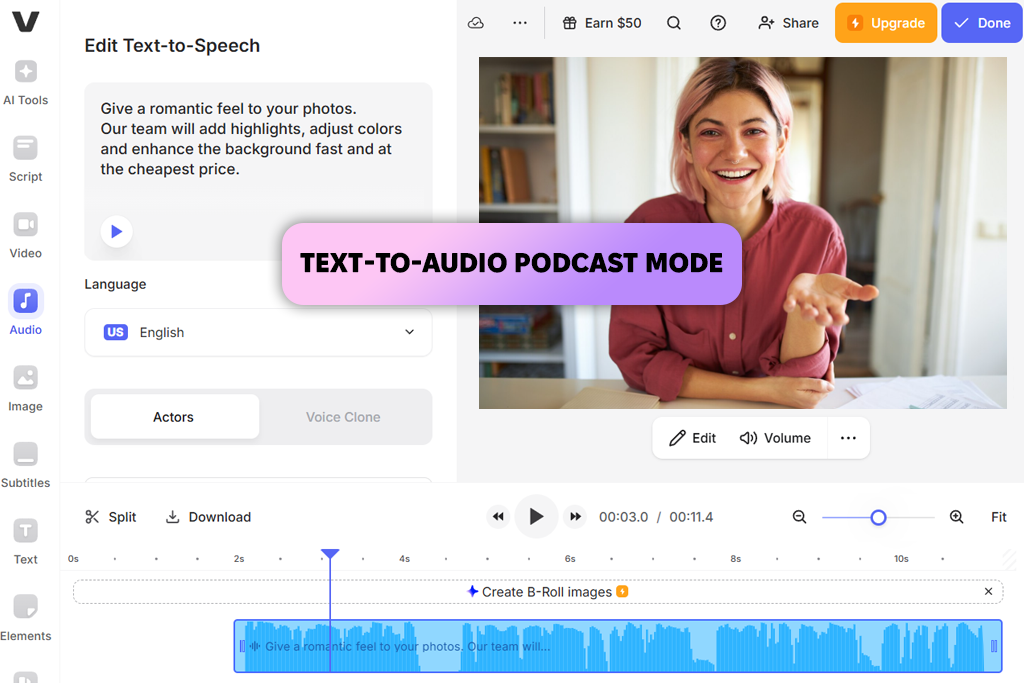
I often use VEED when working on short-form videos and social media content. This is why I decided to compare to Speechify. I did not want to test VEED as a regular text reader, so I started to use it the way it’s used by most creators. I used it for converting text content into audio using Text-to-Speech and Text-to-Audio tools. Then, I tweaked the output to ensure that it would be suitable for a podcast.
The first thing I did was to paste a script written in a blog style into VEED’s Text-to-Speech tool. Then, I selected a suitable AI voice. I was pleased with the high level of control I had over pace and tone. Speechify does not allow me to adjust such settings with high precision. After generating the output, I used the available editing Speechify alternative tools to trim pauses, remove unnecessary transitions, and adjust timing a bit.
I liked the fact that I did not need to use any third-party software to perform these tasks. I was pleased with the high level of editing flexibility. It makes this solution different from Speechify, where you can’t do much with a file after generating an output.
VEED is the perfect option for those who need to create podcast episodes or narrated videos. It supports multilingual voices and timeline-based editing. However, when I decided to use it to listen to long articles and documents, in the same way I often use Speechify, its performance became less impressive. VEED is a powerful solution for creators. It’s not a basic reading app. It stands out among other Speechify alternatives for its extensive toolset suitable for production purposes.
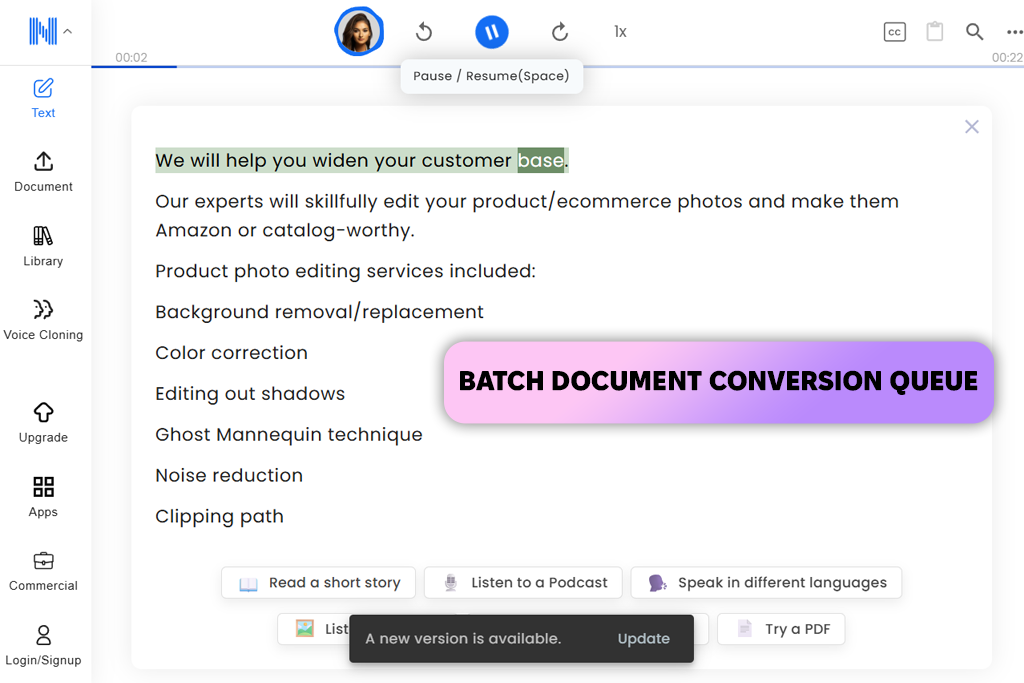
I became interested in testing NaturalReader after reading Reddit threads. Many users recommended it as one of the best text to speech alternatives to Speechify that can be used for all sorts of projects. This is what got me interested, because many similar options fail to deliver consistent performance across several devices. When I started to test it, I had high expectations, and this solution met them.
I wanted to upload several articles, so I tested the Batch Upload feature. I was able to quickly add several PDF and Word files by using a convenient dashboard. NaturalReader supports a streamlined Batch Convert workflow. Speechify does not allow me to queue multiple files with ease. Besides, I was able to test the Export Audio option. It helped me save files in different formats and use them later in other Speechify alternative apps. The interface does not have any advanced features, but it performs its task well. Besides, I liked the fact that I was able to use it with other tools.
The only shortcoming that I noticed is that it took me longer to convert my files in NaturalReader than in Speechify. Besides, while English voices sounded natural, in some other languages, they were a bit robotic. I was also distracted by hourly conversion limits. They are present even in the premium version.
My workflows in Speechify were more seamless and free of these interruptions. However, if you are interested in AI text to speech alternatives to Speechify and want to find a privacy-focused service, this solution will integrate perfectly into your workflow. This text-to-speech converter delivers a consistent performance, even though its speed may be a bit slow.
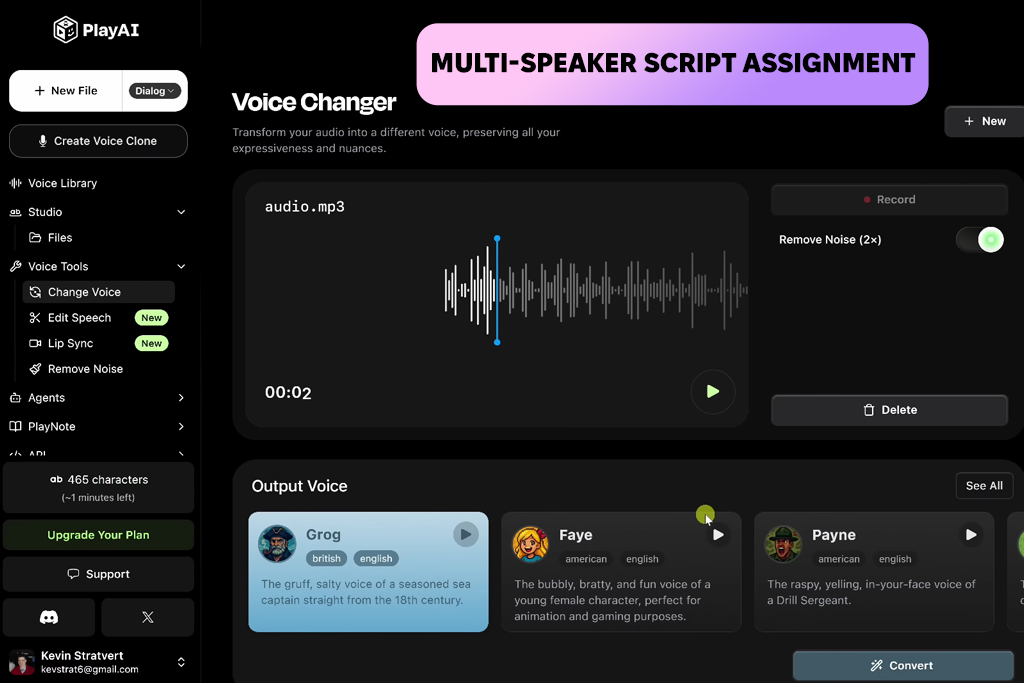
I tested PlayHT after my colleague Kate recommended it as an excellent AI podcast generator. She used it to create episodes with multiple speakers and discovered that it supported higher flexibility than Speechify, especially when it came to producing dialogue-based audio. Her recommendation ignited my curiosity, as I considered Speechify more like a solo listening tool than a solution for generating conversational audio.
“I became curious about PlayHT and decided to test it to experiment with various podcast formats. It was easy to choose multiple speakers. I was able to assign different voices without much preparation. I had to adjust some voices a bit, but overall it’s the perfect platform for experimenting.”

After pasting my text into the editor, I assigned voices for each paragraph and configured pitch, speed, and emotional tone for both speakers. The voice library is quite extensive. At first, it was difficult for me to find a suitable voice from a collection of hundreds of voices. However, this is where this service can easily beat Speechify.
I also liked the Podcast Mode and templates for conversational videos. They make this solution more suitable for those who focus on production. In contrast, Speechify has a more limited linear text reader.
I decided to use the same script to create recordings in multiple languages and experiment with different accents. I wanted to see whether the outputs would be consistent. While I liked the fact that some voices sounded realistic, some voices were a bit robotic. When using the curated voice library available in Speechify, I can achieve more consistent results. However, if you want to create podcasts in multiple languages, use conversational agents, or experiment with different audio formats, PlayHT is one of the best Speechify competitors, as it supports a higher degree of creative freedom.
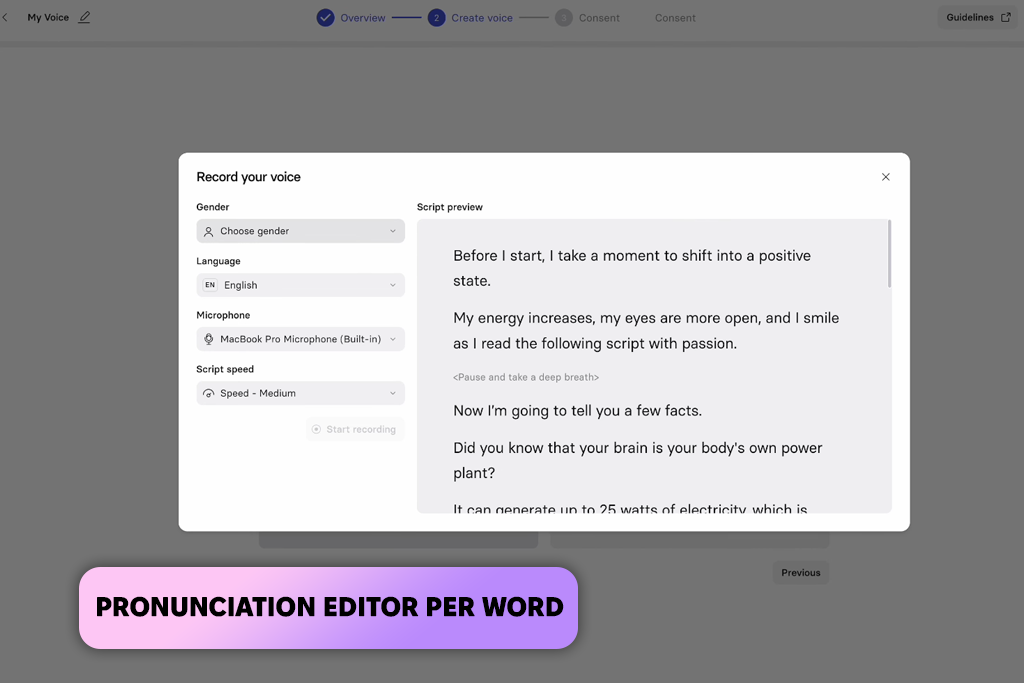
I consider Synthesia an excellent Speechify alternative for marketing materials. It’s the perfect solution for those who prioritize high speed and consistency over casual listening. I tested it when trying to create a short promotional video. I did not just want to find a service for reading text aloud. Instead, I needed to discover a solution suitable for converting written copy into professional-level audio and video assets.
I was pleased with the slide-based editor, as it allows me to create content in a similar way I build a presentation. I added my scripts to a slide, selected a suitable AI voice, and produced a voiceover without using a microphone. In addition, I tested the Voice Cloning tool available in this Speechify alternative for audiobooks. To do this, I uploaded a short sample to check whether I would be able to produce an output close to my own tone. While the generated voice wasn’t perfect, I was able to adjust pronunciation using the available controls. With the help of the Pronunciation Editor, I edited brand names manually.
Using the one-click translation tool, I translated my script into another language and created another voice-over in a few clicks. Synthesia is much better than Speechify when it comes to creating marketing and training content. However, Speechify is more suitable for those who are looking for a convenient service for personal use or article listening. In contrast, Synthesia is perfect for large-scale projects. It allows one to create audio and video content in multiple languages without spending too much on production.
If you mostly need to create short videos and social media content or are interested in accessibility features, I recommend you take a closer look at Adobe Express. I consider this a practical solution perfect for situations when one needs to use a text-to-speech tool that could become a part of a complex visual workflow. With it, you can create captions and voiceovers, as well as make quick edits. It’s especially suitable for those who do not want to switch between different tools when creating content.
If you are a creator who needs to create polished, professional voiceovers and often works on projects that involve the creation of e-learning, audiobooks, or branded videos, Murf is a great option to consider. I highly recommend it for the situation when one needs to adjust pacing, emphasis, and tone to control voices with higher precision.
It will give you more creative control than a regular reading app. This solution is less suitable for those who are interested in passive listening. However, it’s an excellent choice for those who prioritize production quality.
If your main focus is on realism and if you are interested in voice cloning or emotional narration, ElevenLabs is a great option to consider. I recommend it to those who want to generate human-sounding voices and generate content in multiple languages. It’s more suitable for narration, dubbing, or experimental audio than for regular document reading.
VEED and PlayHT are the best choices for creating podcast-style audio, narrated videos, or creator-focused projects. However, their functionality is a bit different. VEED is the best option for those who need to access editing and audio shaping tools on one platform, while PlayHT is more suitable for those who need to produce multi-speaker conversational audio in multiple languages at scale.
If you are looking for something similar to Speechify that is simple, reliable, and accessible from different devices, you might benefit from using NaturalReader. Training teams and marketing departments interested in generating a lot of localized content may consider Synthesia, as this Speechify alternative for students will allow them to work on audio and video.
When we started testing Speechify alternatives, we wanted to see whether these solutions would be suitable for solving the practical tasks we have to deal with daily. We wanted to exclude the services that looked perfect only on paper. This is why we checked whether these platforms would produce consistent results when handling long-form content, including articles, scripts, and educational materials. Many text-to-speech tools have issues when processing such content. I was also interested in pacing, sentence flow, and voice consistency. I ranked lower the services that generated voices that sounded too robotic.
In addition, we focused on voice quality and control. We examined whether the voices sounded natural at various speeds. The best tools add emphasis in the right places and pronounce names, technical terms, and brand-specific words without any issues. Ann also decided to check whether it would be possible to adjust pitch, pauses, and tone, as she wanted to find solutions that supported advanced control.
We were also interested in workflow flexibility. Our goal was to find the tools that would allow us to quickly convert text to audio, edit the generated files, save them in various formats, and use them when working on other projects. We ranked the tools lower if they were too basic and did not support extensive customization. It helped us to create a list of services that supported editing, batch processing, and quick revisions. Using them, one can make adjustments without re-creating a file from scratch.
In addition, during our testing, we focused on language support and scalability. Tata paid attention not only to the number of supported languages but also to the consistent quality of outputs. She wanted to find the tools that would allow creators to scale their operations. Such solutions are capable of handling multiple files, processing longer scripts, and reusing assets. Besides, they do not have too restrictive use limitations.
Finally, we assessed practical usability. We were looking for solutions with intuitive interfaces that were easy to master. Besides, we were interested in tools that consistently delivered a reliable performance. A platform with many handy features won’t be useful if it has many bugs. Using these criteria, we were able to discover the most powerful Speechify alternatives that could become an integral part of professional and educational workflows.





![The Best Lecture Recording App for Students [Tested & Ranked]](http://fixthephoto.com/blog/images/gallery/news_main__preview_28904.jpg)
![12 Best AI Flyer Generators [Online & Free]](http://fixthephoto.com/blog/images/gallery/news_main__preview_28910.jpg)
![Best Leonardo AI Alternatives [FixThePhoto Choice]](http://fixthephoto.com/blog/images/gallery/news_main__preview_28887.jpg)


![5 Best EML File Converters to PST in {{%year}} [Windows & Mac]](http://fixthephoto.com/blog/images/gallery/news_main__preview_28894.jpg)

















