Adobe Firefly and Leonardo AI share a lot of similar features, but they support different degrees of customization, control over the outputs, workflow usability, and the area of applications. Even though both of them can produce AI visuals based on text prompts, Adobe Firefly integrates with other Adobe software, while Leonardo AI supports extensive flexibility and allows users to achieve more creative outputs.
When comparing Adobe Firefly vs Leonardo AI, I focused on output quality, intuitive functionality, editing features, pricing, and practical use. Whether you are a designer, a digital artist, or a video content creator, it’s important for you to understand what makes these programs unique to choose an AI image generator that is perfect for your needs.
Several months ago, I decided to find an AI platform that would allow me to produce short promotional videos, social media content, and visuals for personal use. I often need to generate storyboards and concept art to produce animated scenes and produce engaging visual clips.
I started by testing several AI tools for content creation, but then I realized that only two solutions were mentioned most frequently by content creators: Adobe Firefly and Leonardo AI. Both services rely on AI to generate attention-grabbing visuals, have tools for producing videos, and support workflow automation. However, after testing them for several weeks, I concluded that they were built for different tasks.
Some professionals like using Leonardo AI, as it supports an impressive degree of creativity and style control, while others use Adobe Firefly, as it integrates into their professional workflow perfectly and allows them to produce outputs that can be used for commercial purposes. I decided to compare Leonardo AI vs Adobe Firefly to assess them in terms of output quality, editing tools, creative control, workflow efficiency, commercial use, and practical use.

Adobe Firefly is not quite a traditional AI video generator, but it can become an important part of video production workflows, especially for professionals who already use paid and free Adobe software.
Here are the main video tools that I enjoyed using while writing this Adobe Firefly comparison:
One can use Firefly to create videos at the pre-production stage and create polished assets that can be used for commercial purposes.

Leonardo AI is all about generating creative outputs and experimenting with visual ideas. It’s especially useful for initial video ideation and concept visualization.
Here are the main tools for producing videos that I tested while writing this Leonardo AI comparison:
When using Leonardo AI, I discovered that it is more suitable for creating initial drafts and visualizing concepts. It allows one to decide on the style of their project before polishing the outputs with the help of professional editing and animation tools.
|
Category
|
Adobe Firefly
|
Leonardo AI
|
|
Realism (Video & Images)
|
★★★★★
|
★★★★☆
|
|
Brand Design & Consistency
|
★★★★★
|
★★☆☆☆
|
|
AI Models / Technology
|
Firefly Image 4, Firefly Video Model
|
Alchemy, RealVision, Phoenix (In-house)
|
|
Ease of Use
|
Very Easy
|
Moderate
|
|
Generative Fill / Edit
|
Excellent
|
Good
|
|
Vector Output
|
|
Limited
|
|
Video Generation Quality
|
★★★★★
|
★★★★☆
|
|
Editing & Post-Production Tools
|
★★★★★
|
★★☆☆☆
|
|
Integration with Other Software
|
Best-in-Class
|
Limited
|
|
Commercial Use & Licensing
|
Excellent (Commercially Safe & IP-Friendly)
|
Good
|
|
Pricing & Plans
|
Higher Price, More Value for Professionals
|
Affordable, Flexible
|
|
Customization & Style Control
|
Good
|
Excellent
|
|
Concept Art & Character Design
|
Very Good
|
Excellent
|
|
Team Collaboration Features
|
Advanced
|
Basic
|
|
Best For
|
Branding Teams, Marketers, Content Creators, Professionals
|
Artists, Concept Designers, Game Developers
|
When I started using Adobe Firefly, I was struck by its well-organized interface focused on production tasks. It does not have any unnecessary experimental controls or eye-catching design elements. Instead, it allows you to optimize your workflow. You just need to write a prompt, configure generation settings, and adjust the outputs. It functions in the same way other creative tools do.
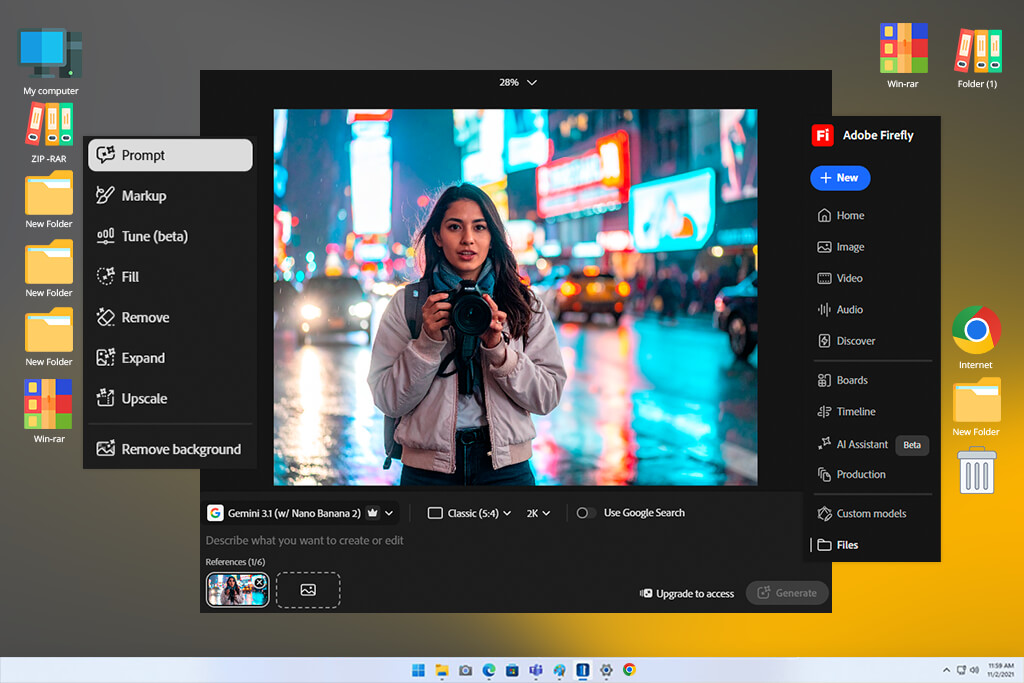
I was especially impressed by the way the video features are organized. It was easy to access grouped motion controls, style settings, and composition features. The whole UI prioritizes production over experimentation. For instance, I generated a short product video using the prompt “minimalist sneaker ad with slow-rotating camera and soft studio lighting.” Next, I improved camera motion, tweaked style, and exported the variation I liked most.
Another advantage of this solution is that it is predictable and easy to use. When I mastered its interface, it was easy for me to find the tools I needed. During long sessions, the program maintained a stable performance, making it easier for me to work on multiple clips and variations for the same campaign. This solution was created for those who want to speed up their production processes. However, it’s less suitable for creative experimentation.
If you have little to no prior experience with such software, its interface may seem a bit convoluted at first. It requires you to understand basic video production concepts, including framing, motion direction, and scene composition. However, once you have mastered this software, it will help you streamline your workflow and achieve professional outputs.
What makes Leonardo AI different is that it focuses on visual experimentation and encourages producing multiple outputs in different styles based on the same prompt. After entering a prompt, you need to specify the style. The program will instantly produce the output. It facilitates exploring different ideas.
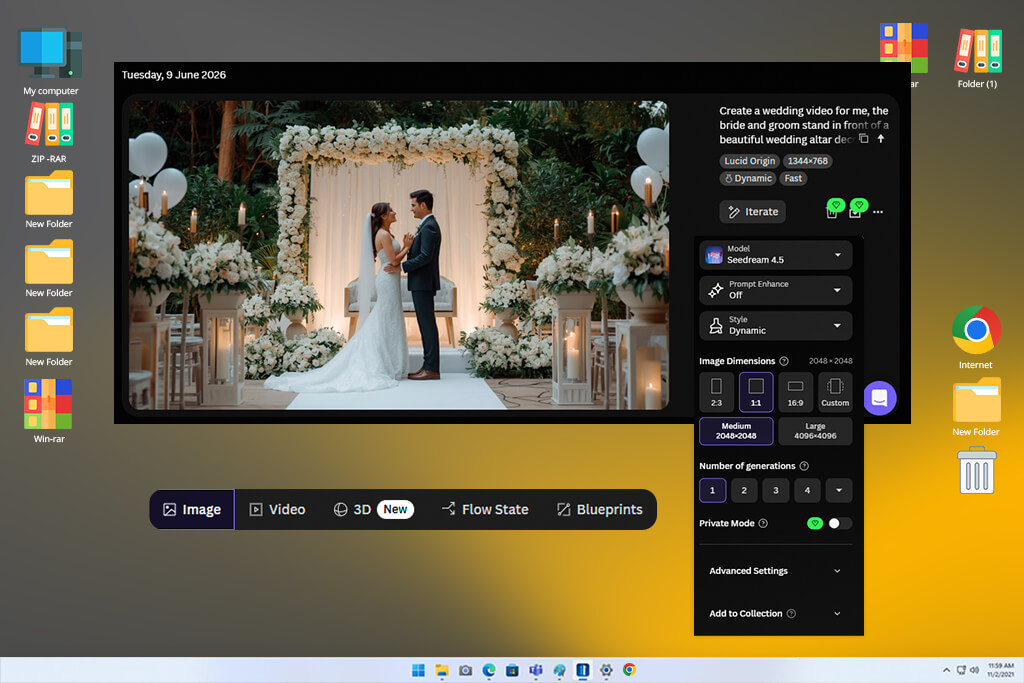
While testing this service, I realized that its interface was created specifically for quick iteration. For instance, when I entered a prompt like “fantasy castle in storm clouds with cinematic camera movement,” it allowed me to create several variations in no time. I could achieve the desired result by using style sliders. This service facilitates experimenting with different visual styles without wasting a lot of time.
I like the fact that Leonardo AI has such an accessible interface. It’s easy to navigate even without any background in video editing and motion design. You can quickly adjust the settings and preview the results in real time. This platform is perfectly suitable for beginners and supports impressive responsiveness.
However, if you often need to work on complex projects, you may discover that this flexibility cannot always be considered an advantage. When you have so many styles to choose from, it might be challenging to keep your workflow well-organized. When I need to create multiple videos for a single sequence, I sometimes need to adjust the settings manually to maintain style consistency between scenes.
Winner: Adobe Firefly
When I decided to thoroughly test Adobe Firefly, I started using commercial prompts such as “luxury smartwatch advertisement, slow cinematic orbit, studio lighting, ultra-realistic reflections.” Using this service, I immediately created a polished output that was production-ready.
One of the best features of this solution is that it allows one to keep objects consistent that remain the same throughout this clip. Their shape remains the same, there is no warping, and the details stay consistent.
In addition, I tried using motion features to control camera movement (pan, zoom, or orbit-style motion) and maintain scene continuity across frames. For instance, when I was working on a “product turntable” video, I used the available tools to ensure that the watch would have the right proportions and reflections when the camera made a circle around it.
This is one of the key selling points of Firefly, as it allows you to control motion and ensure that it won’t look random.
In addition, I decided to test the consistency of the environment. I used the prompt “futuristic city skyline at sunset with slow aerial drone movement,” and Firefly recreated the right lighting direction. It also maintained the right level of depth and architectural structure. The atmospheric effects, including haze, light bloom, and reflections, looked the same, making Firefly perfect for producing cinematic content and ads.
I was also interested in using references for motion replication. I could control the output using visual or motion references. Firefly handled camera pacing and movement style perfectly and ensured that they would stay consistent. It helped me achieve controlled results to produce content.
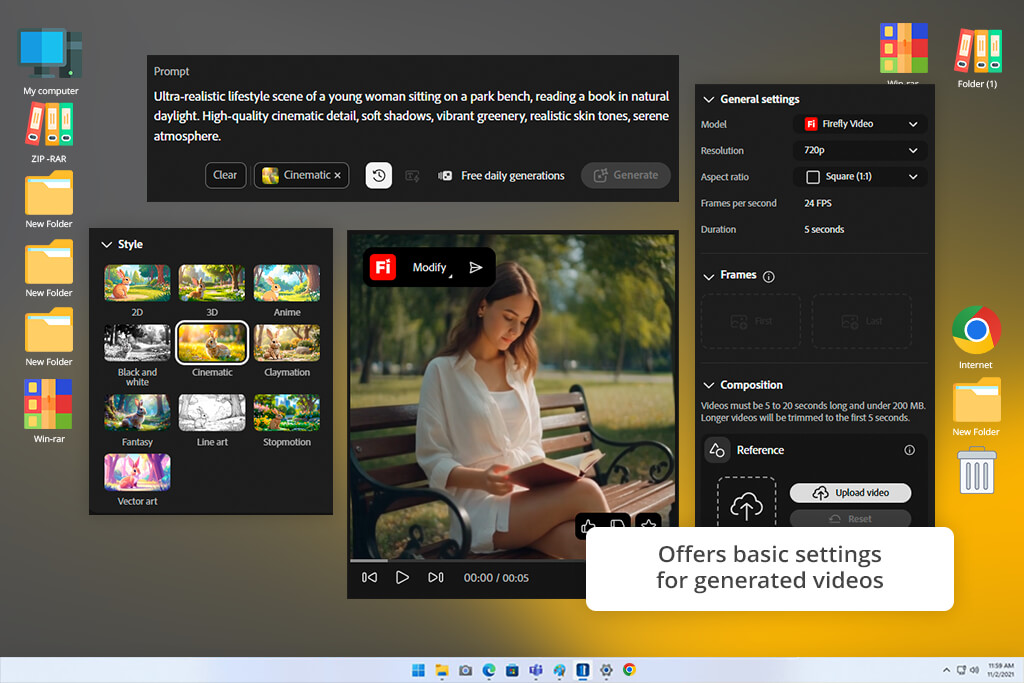
Firefly was created specifically for generating outputs that were ready for actual usage. Even though it is less suitable for creative tasks, the resulting videos do not require a lot of editing, as they can be used for marketing purposes or client projects without extra editing.
“I do not consider it a full video generator for me. I typically use it to generate frames and visuals for my videos in Premiere. Even though it’s suitable for implementing quick concepts, I have to use After Effects to make outputs more realistic.”

When using Leonardo AI, I relied on more stylized prompts like “dramatic fantasy battlefield with magical explosions, slow pan, intense lighting, highly detailed environment.” This service produced the outputs that looked more creative and dramatic than the results I achieved with the help of Firefly.
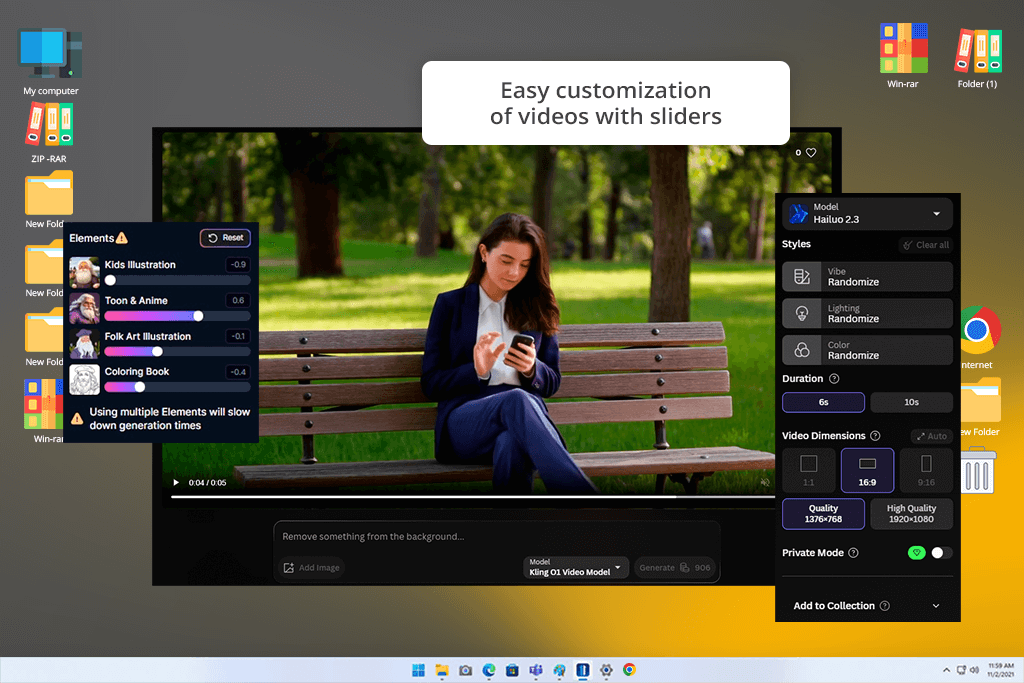
This AI video generator is especially suitable for creating stylized outputs. When I use it to create videos in the style of cinematic fantasy or make them look like illustrations, it generates eye-catching frames with a distinct mood and composition. I created short videos that lasted 3–5 seconds. They looked like animated concept art, making them perfect for creative storytelling.
However, I noticed some consistency issues when working on long sequences. For instance, when I used the prompt “armored warrior walking through burning ruins,” I noticed that armor details, lighting direction, and background changed a bit. These problems do not always spoil the outputs, but they make it challenging to achieve continuity.
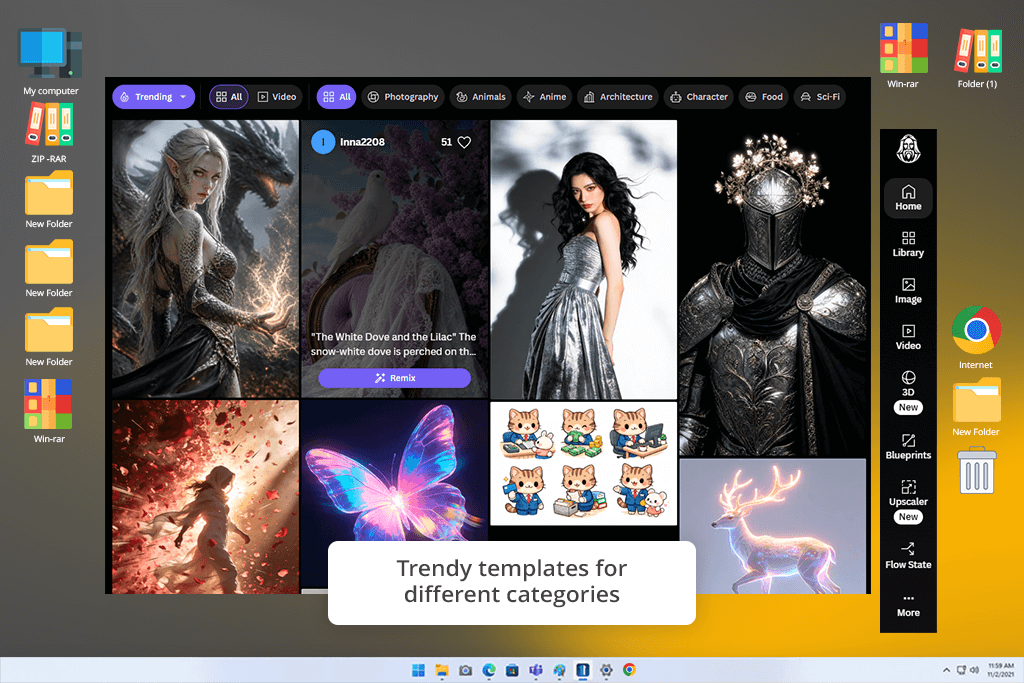
When I started testing Leonardo to see whether it maintains motion and scene coherence. Even though camera movement, such as slow pans or zooms, looks professional, it’s more difficult to make it more predictable than in Firefly. The motion does not look consistent, making it challenging to create polished advertising sequences.
Despite some shortcomings, Leonardo AI is perfect for creative tasks. It creates shots that look more expressive than the results you can achieve with the help of Firefly. It’s especially suitable for creating outputs in fantasy, sci-fi, or cinematic styles. However, this service makes it difficult for me to achieve consistency from frame to frame.
Winner: Adobe Firefly
“It’s perfect for generating video concepts and frame ideas, but there might be consistency issues. The way characters look may change between scenes, so I rarely use it for achieving the polished output.”

While using Adobe Firefly, it’s easy to adjust the style and maintain visual consistency. This AI art generator does not have many sliders for choosing between different artistic styles and effects.
However, it enables users to adjust various parameters like visual tone, lighting direction, composition, and aesthetic consistency. When I entered detailed prompts like “a polished luxury skincare ad, soft pastel palette, minimal studio lighting, commercial look,” Firefly created professional-looking visuals that I could use in advertising materials.
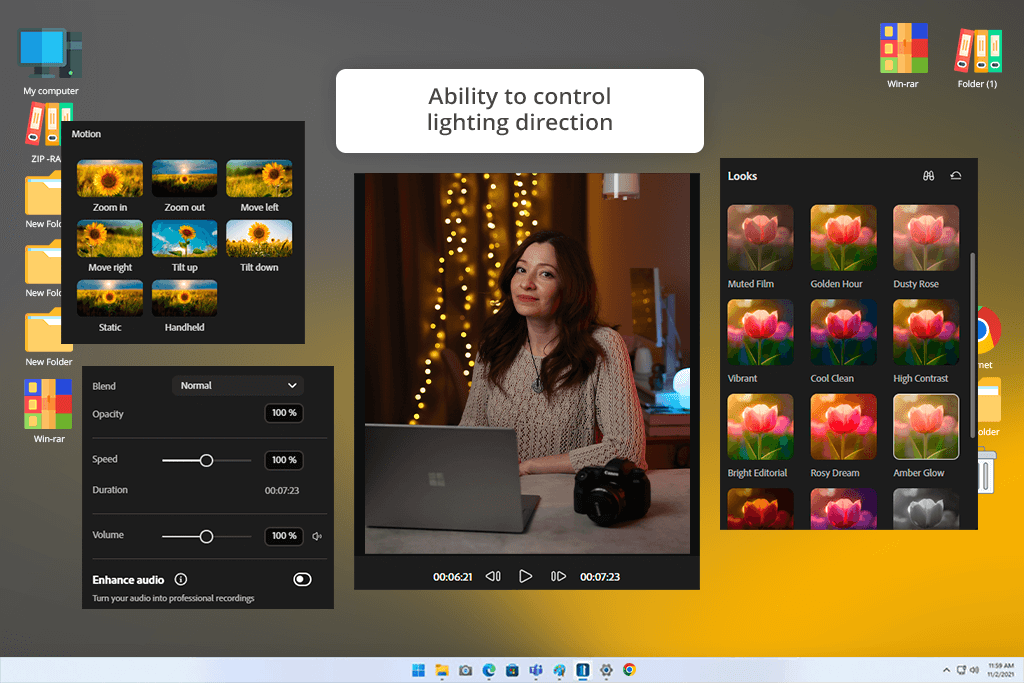
I was especially impressed by the fact that Firefly allows one to achieve style consistency when producing different outputs. For instance, I used it to create a series of product images for a fictional perfume brand in the “soft editorial luxury” style.
Even when I adjusted prompts a bit to change the background or lighting, the visual aesthetic stayed the same. It makes this solution especially suitable for those who need to create campaigns with consistent visual assets.
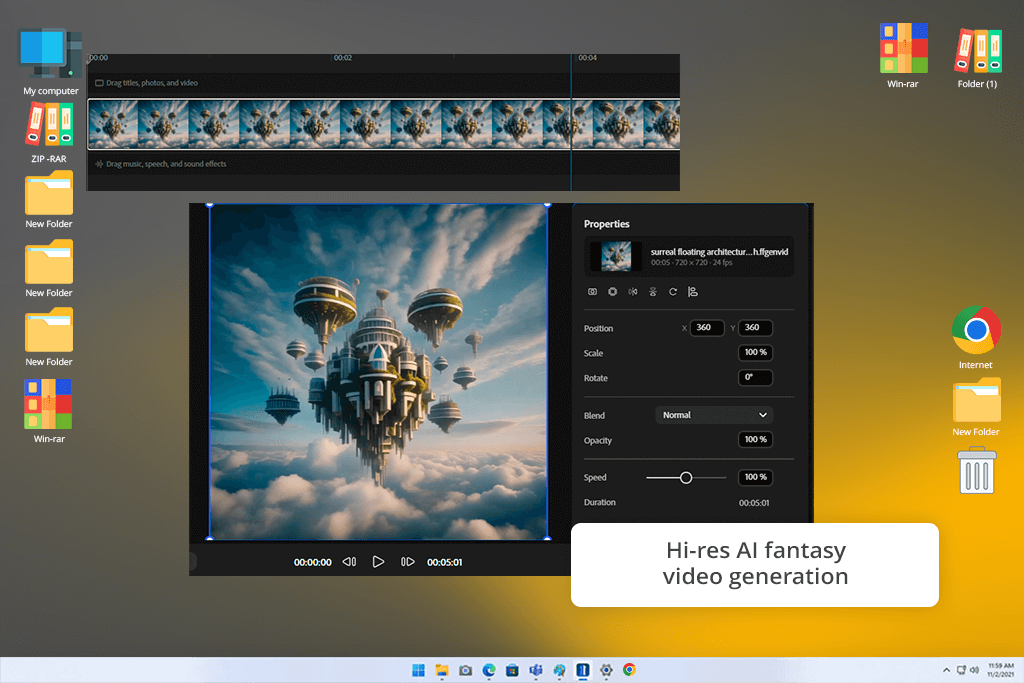
In addition, I checked whether Adobe Firefly AI video generator was suitable for dealing with more creative prompts like “surreal floating buildings in the sky, dreamlike atmosphere, cinematic lighting.” The outputs still looked decent but were somewhat too predictable. Firefly creates outputs that are already adapted for commercial purposes.
It may be considered one of its limitations if you are more interested in experimental art. However, it is one of the main advantages of this service, as such functionality makes it suitable for professional use where consistent results are more important than experimenting.
Another advantage of this AI clip maker is that it focuses on predictability instead of variation. If you use it to create several generations based on the same prompt, you are unlikely to notice a lot of stylistic differences. It allows one to create a consistent visual system that may include ads, content for social media campaigns, or branded content where assets are unified by the same idea.

While using Leonardo AI, I discovered that it supports a different editing experience. It allows me to control the style of my outputs by experimenting with different ideas and giving them an artistic feel. When I entered prompts like “cyberpunk samurai character, reflected neon lights, detailed illustration, dramatic sci-fi mood,” Leonardo produced creative variations that were stylistically very different from one another.
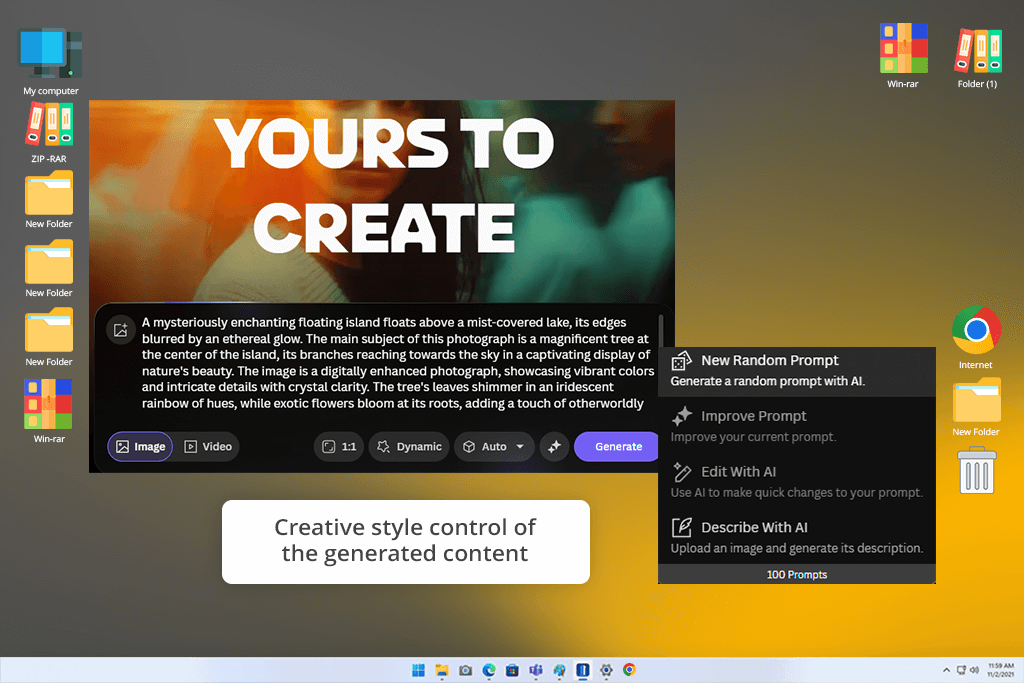
What makes Leonardo AI video generator stand out is that it supports extensive style customization and model flexibility. It allows me to test out different visual styles or visualize the same prompt in different ways.
For instance, I would give a realistic sci-fi scene a more artistic feel or make it look like a game concept art piece. This solution is perfect for those who are still at the early stages of concept development and want to understand how their ideas could look instead of focusing only on one direction.
In addition, I used the tools for creating characters and achieving style consistency. I created a rogue AI bounty hunter and tried visualizing this character in different environments. This AI reel generator coped with the task perfectly. It kept the character consistent across different scenes while changing poses, lighting, and mood. It makes it perfectly suitable for world-building and producing concept art.
However, this solution does not allow one to maintain consistency when using the same prompt and style. In some cases, it would create a cinematic version of a scene and then produce a highly stylized fantasy interpretation of the same prompt. While it may help one choose a creative direction, it requires one to spend a lot of time and effort to achieve the result you need.
Leonardo motivates me to focus on a more creative approach instead of prioritizing a controlled workflow. It opens a wealth of creative possibilities, making it perfect for artists. Nonetheless, it might be less useful when you need to achieve consistent results.
Winner: Adobe Firefly
“I was extremely pleased with the style control options. You can experiment with different styles, cinematic, anime, or realistic. However, you need to control outputs to ensure that the variations won’t differ from the desired result too much.”

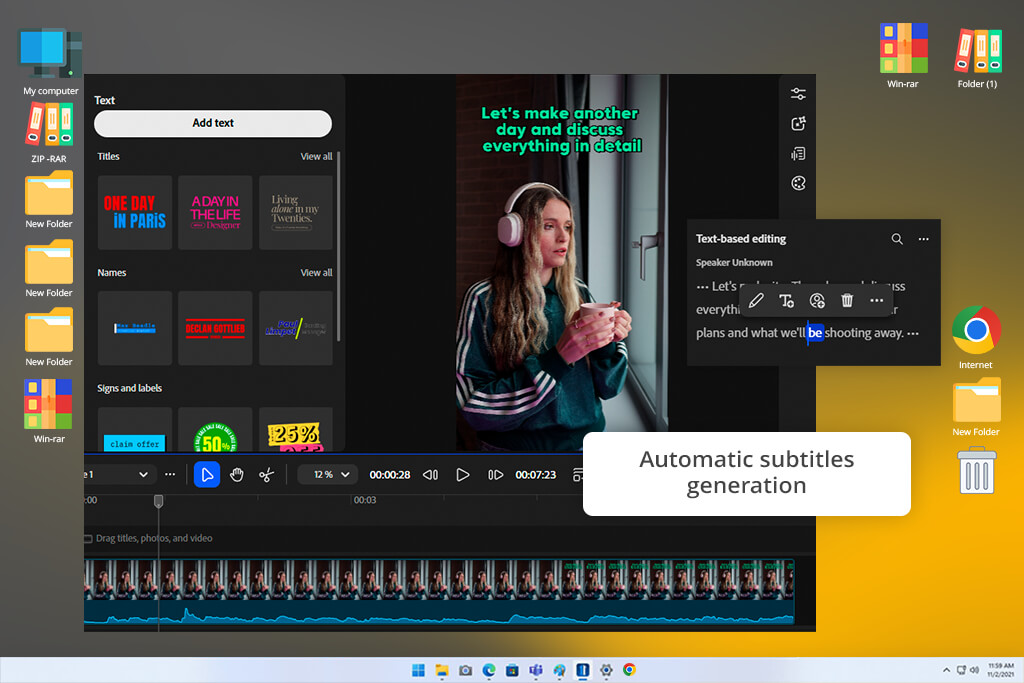
I enjoyed my editing experience while using Adobe Firefly, as it helped me structure my workflow and build a seamless production pipeline. After generating a video, I could produce iterations by changing prompts, improving motion directions, and creating variations based on the same input.
For instance, I created a short product video and then made subtle edits by adding such prompt lines as “slower camera orbit,” “golden-hour lighting,” or “shallow depth of field.” This approach helped me achieve the result I needed without affecting the original composition.
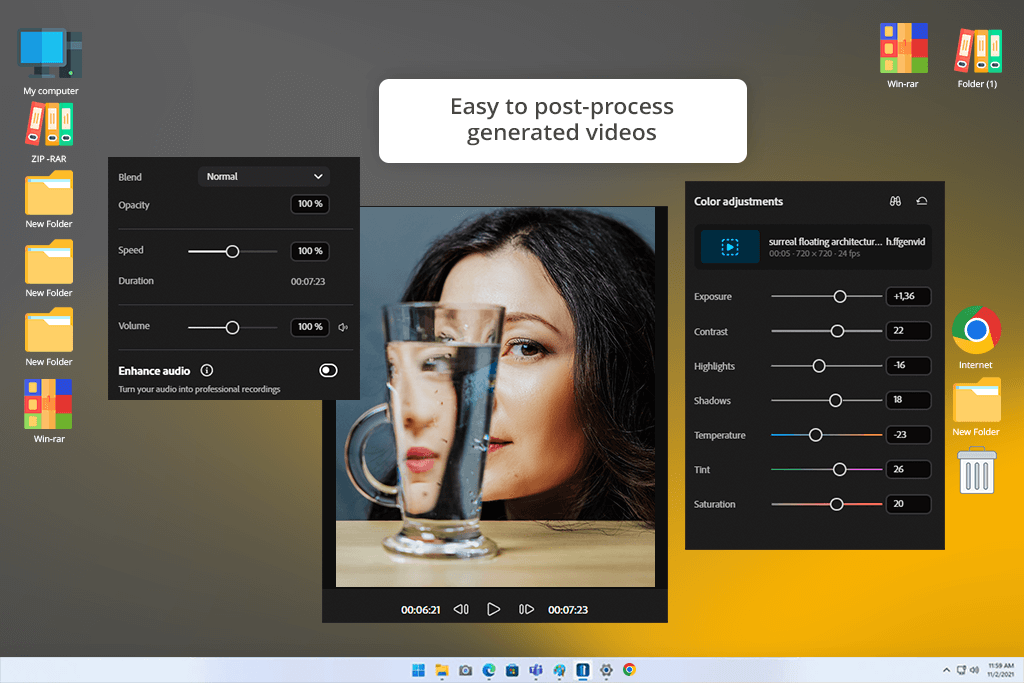
I was impressed by how this Adobe video editor allows me to tweak outputs instead of recreating them from scratch. I could specify which details I wanted to change, including lighting or camera pacing.
It helped me achieve the desired scene consistency. The ability to make minor adjustments is especially useful when one needs to produce commercial content without redesigning visuals completely.
Firefly is closely integrated with other Adobe software, which allows one to use it to optimize a workflow. While it can hardly be considered a regular timeline-based video editor, it is a part of a larger ecosystem where one can quickly continue editing visuals in other programs. It allowed me to produce several versions based on the same prompts and then select the best option and keep editing it with the help of other tools.
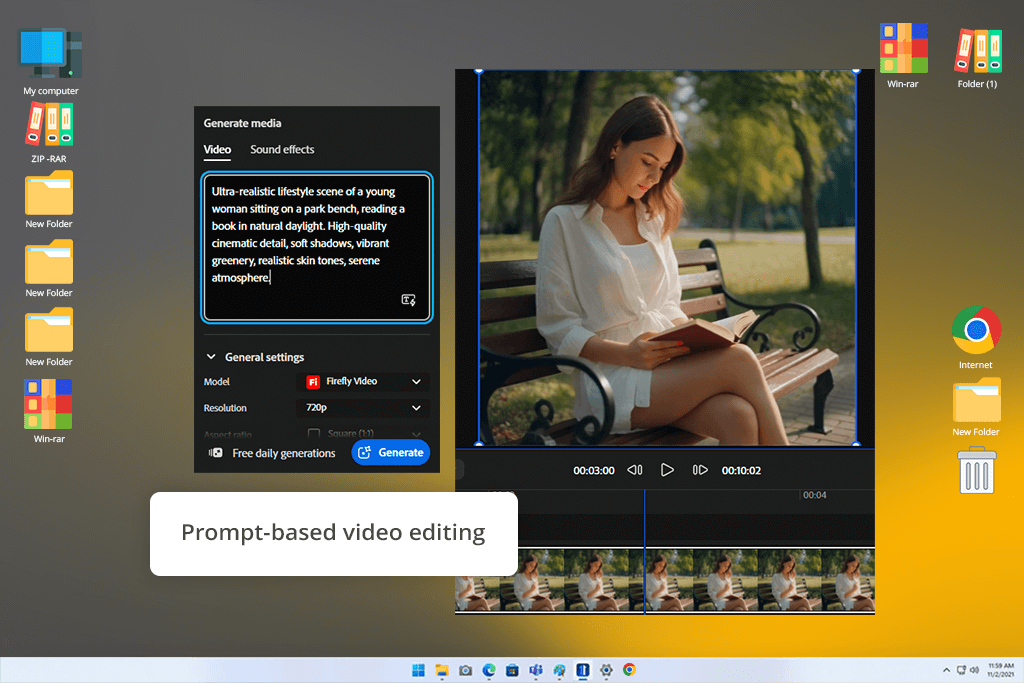
Another selling point of this solution is that it allows me to maintain consistency when producing different versions. When creating iterations, Firefly preserves the way a scene looks and is structured when one makes revisions. For instance, I could keep the scene intact and change the camera motion. It ensures that you won’t lose the output you are satisfied with as a result of edits.
However, if you consider Adobe Firefly generative AI vs Leonardo AI, you will see that the former should not be considered as an alternative to full video editing software. It does not have advanced timeline or frame-by-frame editing tools. It prioritizes controlled improvement, making it especially suitable for those who have modular or product-focused workflows.
“I was pleased with its integration with Adobe apps. I can use it to generate an image in Firefly and further enhance it with the help of other programs. It helps me save time, but I would not use it as a replacement for an editor.”

With Leonardo AI, it’s easier to experiment with different variations of prompts. While it’s hardly suitable for structured improvement, it’s easy to adjust outputs by changing prompts and making multiple re-generation attempts. For instance, while trying to produce a cinematic fantasy clip, I would specify what changes I wanted to make, like “apply a more noticeable storm effect,” “increase glow intensity,” or “change the mood to a darker tone.”
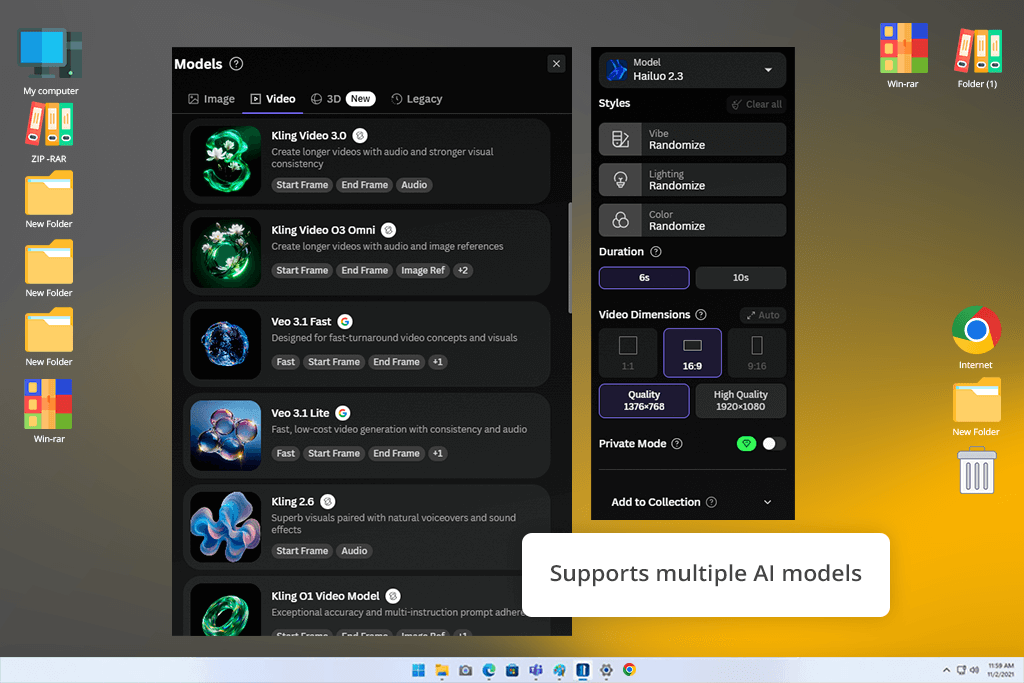
This solution facilitates quick iteration. However, it might be more difficult to control the outputs. Minor prompt changes allow one to get different variations, which makes it easier to experiment with ideas, but does not allow one to make accurate adjustments. It makes the workflow more similar to interpretation than editing.

This video editing software with no watermark also focuses on creating variations instead of making incremental edits. As it was difficult to edit a single clip, I created several versions and selected the best option.
When I was working on a character walking scene, I created multiple versions with different lighting and motion styles instead of editing the first draft.
The key advantage of this app is that it supports high ideation speed. If I did not know how to proceed, Leonardo AI would help me experiment with different versions. However, I couldn’t make precise edits like motion smoothing or scene corrections.
Another issue with this app is that it makes it difficult to maintain consistency during editing. When you are trying to enhance your video, regenerated clips may have a different structure, which makes it challenging to keep close to the original.
Winner: Adobe Firefly
“I don’t use Firefly to edit videos. However, I often use it during the pre-production stage. It allows me to plan scenes and visualize ideas before improving them in pro-grade editing software.”
While using Adobe Firefly, I was pleased with its concept development features. Adobe Firefly vs Leonardo AI for video creators, I realized that the former can help me organize my workflow. The whole experience felt as if I were using a guided design system. I used prompts like “futuristic eco-city with edgy architecture, soft natural light, and sustainable design concept art” to achieve visually-appealing outputs.
The results were predictable and had a professional look. Firefly often generates visuals with well-balanced compositions. Its outputs rarely look experimental or remind one of rough drafts.
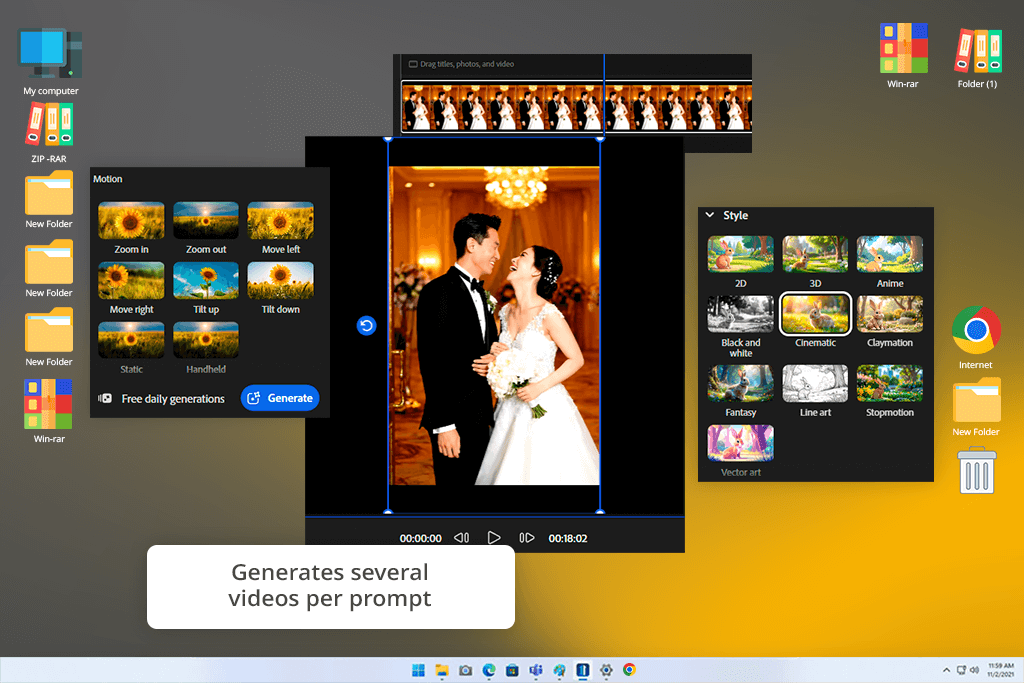
This solution is especially useful when you understand what style you prefer and what result you want to achieve. In this case, it can help you bring your vision to life quickly and make it look polished.
For example, I could use a draft like a “sci-fi interior in a minimalist style” to create several variations based on this prompt and use them for presentations. The results were ready to use in client decks and pitch materials, making Firefly perfect for professional workflows.
Nonetheless, I discovered that this AI video editor is less suitable for creating multiple variations based on the same idea. When I used more abstract prompts like “haunting biomechanical forest with organic and artificial structures,” I achieved visually pleasing results, but they looked less creative than I expected, as if this app focused on practical usability instead of experimenting.
I concluded that it’s better to use Firefly when one has already developed a concept and wants to visualize it with high precision. It’s hardly suitable for discovering new ideas. It’s the best choice for creating polished images based on the concepts one already has.
While using Leonardo AI, I realized that it was mostly suitable for experimenting with different ideas and exploring concepts. I intentionally used vague prompts like “cyberpunk floating market in the sky, eye-catching neon signage, chaotic composition with an artistic feel, concept art style.” This service came up with two different versions based on the same idea, which helped me explore different directions.
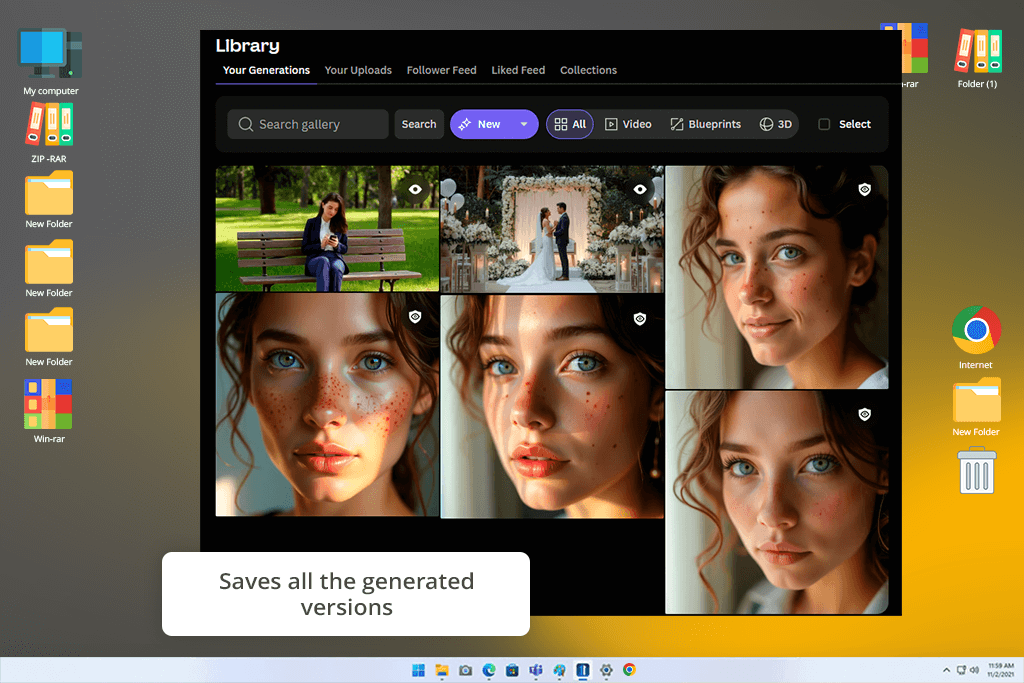
One of the key selling points of this service is that it generates variations quickly. It does not provide a single polished interpretation but creates variations that look as if they were created by different artists based on the same prompt. Such functionality makes this solution useful for those who are still at the early stages of concept development when a creative professional tries to determine the style they want to use.
In addition, I checked whether this service was suitable for environment ideation workflows, including such tasks as creating all sorts of alien landscapes and a rogue AI bounty hunter. This video editing software for Windows and Mac facilitates iteration. With it, I can tweak prompts to receive different outputs, some of which would be quite stylized. Such capacities will help you brainstorm new ideas and create a different creative world.
When comparing Adobe Firefly video generator vs Leonardo AI, I noticed that another advantage of the latter lies in its capacity to produce stylized concept art aesthetics. With it, you can create outputs that are ready for game development, mood boards, or cinematic pitch decks. Even though it won’t help you produce polished results, you will generate visuals that will help you generate new ideas and come up with new concepts.
The only shortcoming of this service is that it makes it difficult for you to achieve consistency. However, it can hardly be considered a limitation when it comes to concept development. This solution was built for experimentation instead of producing finished results.
Winner: Leonardo AI
The fact that Firefly integrates with other Adobe software is probably one of the main advantages of this service. It wasn’t created as a standalone solution. Instead, it was developed as a part of an already existing ecosystem.
When working on my projects, I often need to access other Adobe products, including such tools as Premiere Pro, After Effects, Photoshop, and Illustrator.
Whenever I generate assets, I can use them in other software without disrupting my production workflow. I decided to compare Adobe Firefly vs Leonardo AI for marketing videos to see the potential limits of their capabilities.
For instance, I created short AI videos in Firefly and then exported them into Premiere Pro to edit them using the available timeline tools. Using this software, I could create a video using AI-generated segments and real footage, insert transitions, adjust sound, and perform color grading without causing any conversion issues. It makes Firefly less similar to traditional AI generators, as it looks like an extension of an already existing production pipeline.
Another thing that it worth considering is that Firefly could be the perfect addition to Photoshop and Illustrator workflows. After using it to generate product mockups, scene compositions, and other assets, I could export them into photo editing software for PC to further improve them or use them when working on complex projects.
This solution will come in handy to those who produce marketing materials, as they can use AI tools to produce images and then perform slight adjustments in other software before sharing the outputs with clients.
Firefly also allows users to access and share assets via the cloud. As this app integrates with other Adobe solutions, it becomes easier to create projects and generate assets using different programs. This way, one can quickly move from ideation to editing and export. It facilitates working on the projects while staying in the same production environment.
The key advantage of this app is that it allows one to enjoy an uninterrupted workflow. Instead of exporting and reformatting assets using different programs, you can quickly move from content creation to editing.
When using Leonardo AI, you will notice that this standalone software allows you to export generated assets with the right settings. It does not require you to use a specific ecosystem. You can generate assets and edit them using different software.
While testing this service, I would export pictures and videos created with the help of Leonardo into another software like After Effects, Blender, or video editing software for Mac and Windows, such as Premiere Pro or DaVinci Resolve. My workflow was quite streamlined. After creating an asset, I would download it to my device and import it to another software.
For instance, produced character concepts using Leonardo and imported them into Photoshop to perform compositing and color adjustments. It took me some time to transfer the files manually, which makes this too less convenient than Firefly. Here, you can’t rely on the integrated pipeline and need to do everything manually.
If you compare Adobe Firefly vs Leonardo AI for social media videos, you will see that both have their uses. However, Leonardo AI is a more popular option among those who specialize in 3D or game development. While testing it, I used the concept art I created as reference materials for Blender.
It helped me perform modeling and create environmental designs. This solution will come in handy for game developers and concept artists who typically use several standalone solutions when working on their projects.
Due to the fact that this app does not integrate with other solutions, it might be more challenging to scale projects. You need to organize files, handle versioning, and maintain consistency when working across several apps. While it allows you to build a flexible workflow, you won’t be able to automate it fully.
Winner: Adobe Firefly
If you take a look at Adobe Firefly, you will immediately notice that its pricing depends on the prices of other Adobe products. It comes in the same package with other solutions like Photoshop, Illustrator, and Premiere Pro. You will need to spend credits when using Firefly to perform different tasks, including generating pictures or videos. The number of credits spent per task depends on its complexity.
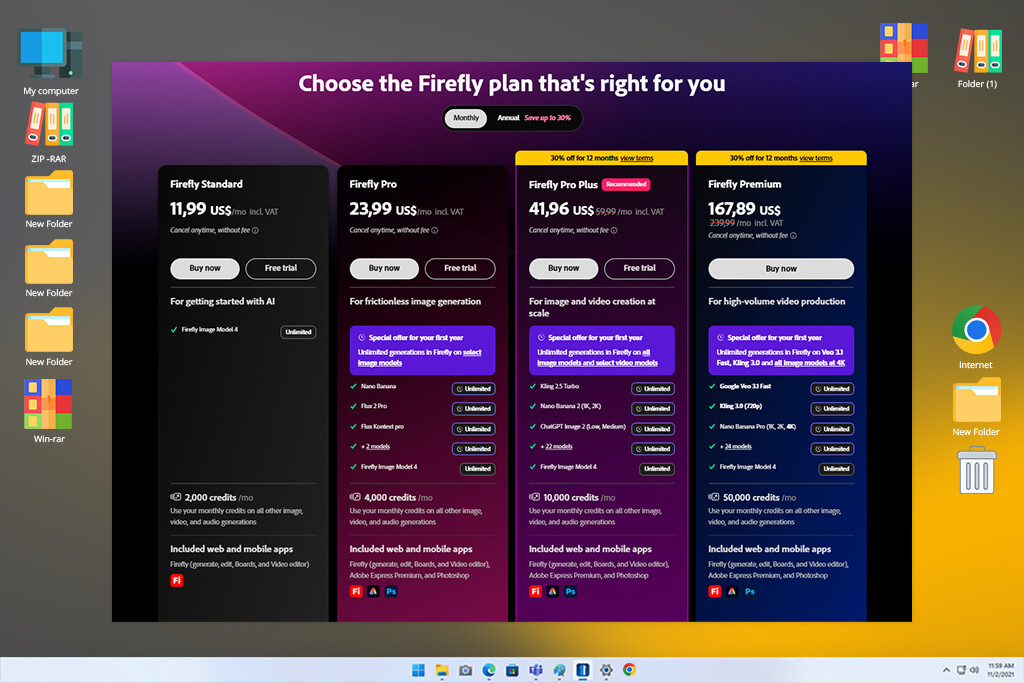
After comparing Adobe Firefly vs Leonardo AI for content creators, it becomes noticeable that the former is hardly suitable for unlimited experimentation. It’s better to use it when you already know what sort of result you want to achieve. If you already use other Adobe software, Firefly will add extra value to your subscription. However, it may not make sense to pay for it as a standalone tool.
| Plan Type | What You Get | Best For |
|---|---|---|
|
Adobe Free / Starter
|
Limited generative credits, basic Firefly access
|
Testing, occasional experimentation
|
|
Adobe Creative Cloud Plans
|
Firefly included + bundled apps (Photoshop, Premiere Pro, etc.) + monthly credits
|
Professional creators, agencies
|
|
Enterprise / Teams
|
Higher or custom credit allocation + collaboration features
|
Studios, production teams
|
When I started to use Firefly, I became impressed by the fact that its value increases if you often use other Adobe apps. If you pay for the Creative Cloud subscription, you get access to an extensive choice of tools and can use Firefly as an extra perk.
The only noticeable shortcoming of this app is that it’s hardly suitable for advanced video or batch generation, as such tasks cost a lot of credits. Firefly is not the best choice for experimenting with content creation unless you already pay for one of the high-tier subscription plans.
When you start using Leonardo AI, you will notice that it has more streamlined pricing plans. You will need to buy tokens (credits) to use the platform. Unlike Firefly, it’s a standalone solution. You must spend credits to generate pictures and videos, perform upscaling, or create multiple variations based on the same prompt.
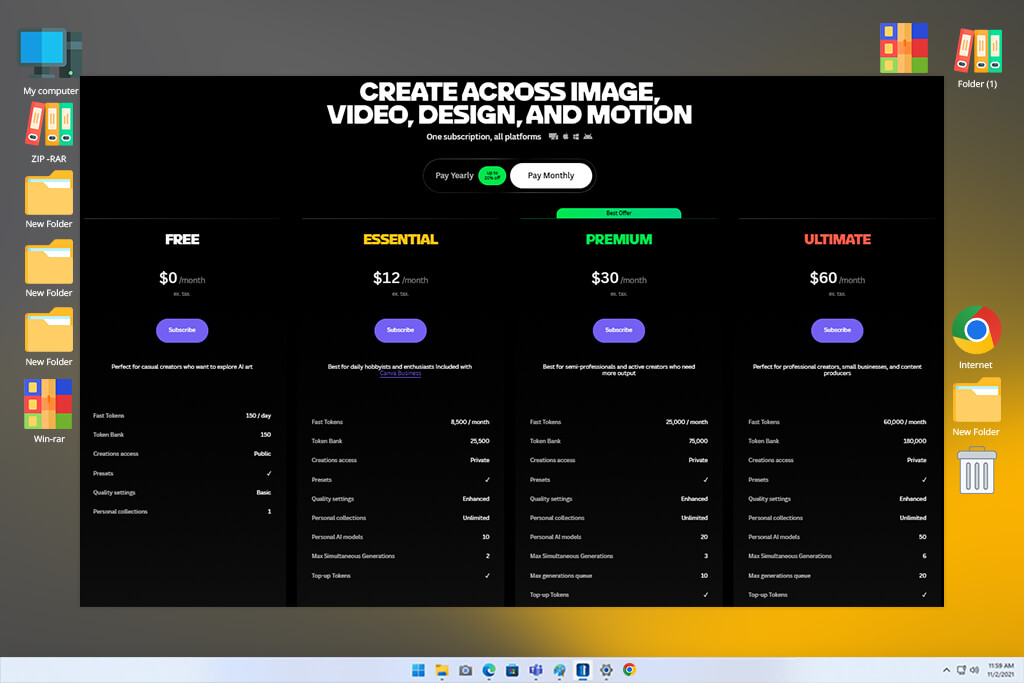
Such a pricing model makes Leonardo AI a more appealing option for independent creators who aren’t interested in paying for other software products.
| Plan Type | What You Get | Best For |
|---|---|---|
|
Free Plan
|
Limited daily credits, basic generation access
|
Beginners, testing different styles
|
|
Apprentice / Creator Plans
|
Higher monthly credits, quick generation, and more tools unlocked
|
Freelancers, independent content creators
|
|
Maestro / Pro Plans
|
Large credit pools, priority generation, and advanced features
|
Advanced users, heavy concept work
|
When one starts using Leonardo AI, it becomes immediately noticeable that this app is more suitable for experimentation. It was built specifically for repeated generation and experimenting with different variations. However, it’s less suitable for video-centered workflow and high-resolution outputs, as such tasks require a user to spend many credits, especially when one needs to iterate several versions based on the same prompt.
The key selling point of this service is that you pay exactly for the app you are going to use without subscribing to a larger bundle of tools. It allows you to reduce or increase credit usage, depending on your needs.



![7 Best AI Baby Dance Video Generators [For Trendy Moms]](http://fixthephoto.com/blog/images/gallery/news_main__preview_29020.jpg)


![Top 7 Bookmark Makers [Printable & Custom]](http://fixthephoto.com/blog/images/gallery/news_main__preview_28951.jpg)


![11 Best AI Tools for Content Creation [Free & Simple]](http://fixthephoto.com/blog/images/gallery/news_main__preview_28962.png)

















