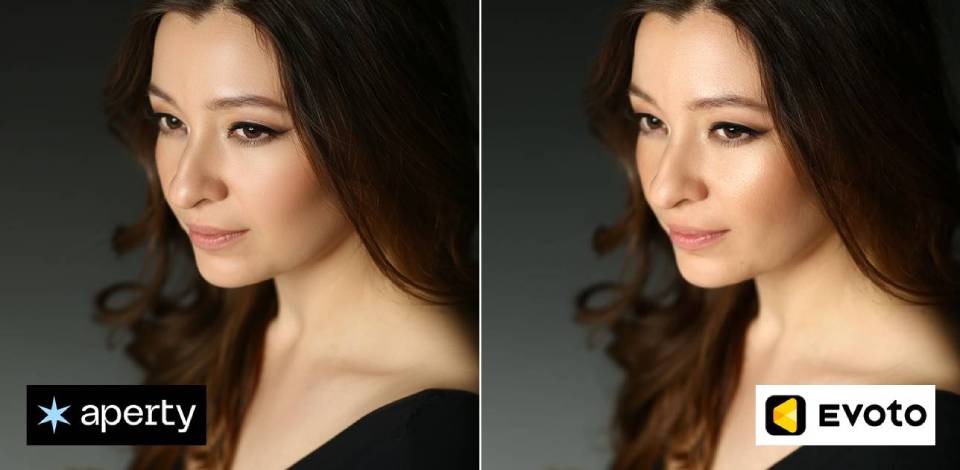
AI tools like Aperty and Evoto AI are gaining traction in portrait editing. They aim to streamline workflows with automated adjustments and intelligent features. At the same time, each tool approaches editing in its own way, offering different capabilities and levels of control.
This comparison examines how Aperty and Evoto AI behave in practical use. It covers key aspects such as portrait enhancement results, handling multiple images, user experience, flexibility of adjustments, and processing efficiency. The aim is to identify each tool’s strengths and determine which users or tasks they fit best.
I’m a portrait photographer, and after one wedding season, I found myself dealing with something I hadn’t fully anticipated. On paper, it was a great season - plenty of bookings, variety, and strong results - but once the shoots were over, the editing workload made it clear just how much of photography happens after the camera is put away.
I opened my drive and found thousands of RAW files from weddings, engagements, studio sessions, and outdoor shoots. Each photo needed work - skin retouching, exposure adjustments across changing lighting conditions, and consistent color grading so every gallery would feel cohesive rather than disconnected.
After a while, applying the same edits to hundreds of images made the workflow feel more like routine than creativity. I was using Adobe Lightroom for general adjustments and Adobe Photoshop for detailed retouching, but the process gradually became repetitive instead of engaging.
That’s when I realized a different approach was necessary. I was no longer interested in minor workflow tweaks - I needed something that could meaningfully cut down on repetitive tasks without compromising quality. Around that time, two tools kept coming up in discussions: Aperty and Evoto AI, both promoted as AI-driven solutions for portrait retouching and faster post-production.
After a bit of research on these tools, I decided to involve my colleagues from the FixThePhoto team. They agreed to help with testing, so we could better understand which tool fits specific tasks and keep the review as objective as possible. We used my previously shot wedding content as a base and started actively exploring the available features.

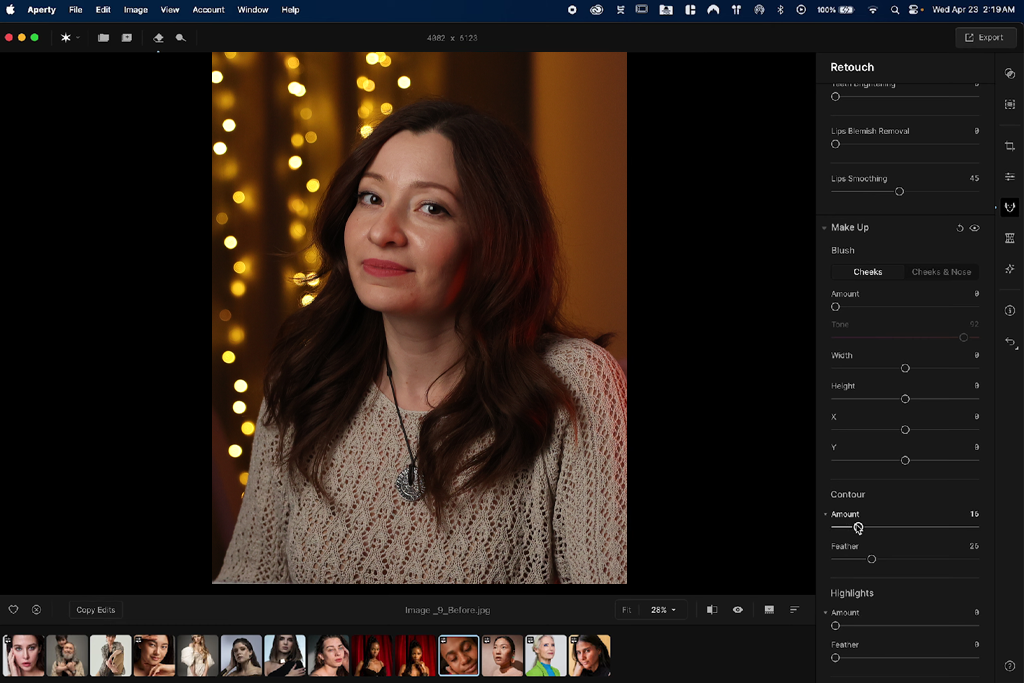
Aperty is presented as a portrait-focused AI photo editor designed to fit into a professional workflow rather than replace it. Its core idea is to help maintain consistent, natural-looking results across large sets of images, especially for photographers working with weddings, studio shoots, and events. Instead of applying strong stylistic effects, it focuses on subtle adjustments that keep skin texture, facial structure, and the overall photographic feel intact.
In practice, Aperty is a tool that focuses on control and steady results. It doesn’t have many experimental effects. Instead, it offers reliable adjustments that work the same way across many photos. This makes it great for when you need all your images to look similar - for example, when editing a whole wedding album or a series of portraits, where consistency is more important than big, flashy changes.
Overall, Aperty works well for professionals who want to spend less time doing the same edits over and over, while keeping a natural and consistent look. It focuses on stable, ready-to-use results rather than trying out new creative effects.

Evoto AI is an AI portrait editing tool designed for quick, eye-catching results, with a strong focus on beauty enhancements and creative control. It helps you transform photos fast using automatic tools for skin smoothing, facial adjustments, lighting fixes, and even more advanced edits. The main focus is on speed and visual impact, rather than keeping everything strictly natural.
In practice, Evoto AI works more like an AI-driven, automatic photo editor. It offers many controls that let you reshape the look of a portrait very quickly. This makes it especially useful for social media, beauty shots, and any situation where a more refined or stylized result is preferred.
But this flexibility can also make it harder to keep a large group of photos looking the same if you're not careful. Although it's great at quickly making single images look impressive, it focuses more on creative improvements and visual wow‑factor than on making all images match perfectly or keeping retouching subtle and natural.
Instead of briefly exploring each app, I worked through a complete editing process - importing a full shoot, retouching images, refining the results, and exporting the finals. This approach helped me judge how quickly the interface became clear, how easily I could adjust the outcome, and how well the tools held up during longer sessions.
The interface in Aperty feels clean and well-organized. It’s not flashy - instead, it’s built to support a smooth, professional workflow. Tools are grouped in a simple, logical way (like skin, face, color, and lighting), so it’s easy to work step by step rather than jump around. If you’re familiar with Lightroom or Photoshop, it feels natural. You make clear adjustments, create a consistent look, and then apply it across your photos.
What stands out about Aperty is how clean and focused the interface feels. There aren’t lots of flashy controls or too many screen options. Instead, it offers a smaller set of clear tools that behave predictably. This makes it comfortable to use for longer sessions (especially when editing large batches), because you’re not constantly searching for settings or guessing what a slider will do. The trade-off is that it’s not very “exciting” or beginner-friendly. It works best if you already have a clear idea of how you want your portraits to look.
“I used Aperty alongside Adobe Lightroom, and the interface felt intuitive right away. Everything is organized in a clear way - skin, face, color - so I didn’t spend time searching for tools. After editing around 300 wedding photos, I noticed I rarely needed to switch between panels. It feels less like a typical app and more like a structured workflow system.”

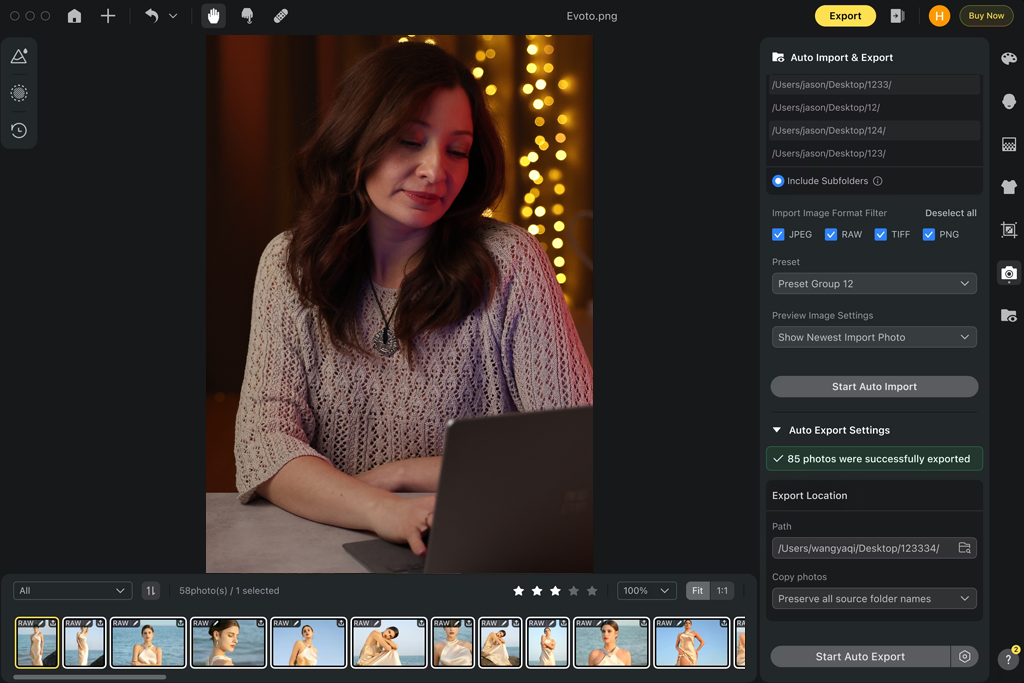
When you first open Evoto AI, it feels very different from other tools. The screen is full of visual controls and sliders for almost everything you'd want to edit in a portrait: Skin Smoothing, Face Reshape, Makeup, Lighting, Color, Background, and more. You just click on a photo, move a slider, and see a big change right away. It's very quick to learn and easy to use, even if you’re new to detailed retouching.
When working with larger sets, I started to notice that the flexibility in Evoto AI can become overwhelming. With so many controls, it’s easy to lose track of adjustments or push edits too far without realizing it. Precise editing also becomes a bit harder, since even small changes can have a strong visual impact. At the same time, during the first 10–15 minutes of testing, it felt very intuitive. You don’t have to think much - you simply adjust settings until the image looks right.
In real use, Aperty comes across as a tool built for controlled, repeatable workflows, while Evoto AI leans more toward quick, visual experimentation. One prioritizes structure and consistency, the other focuses on speed and ease of use.
“I got comfortable with Evoto AI in about 10 minutes. It’s very visual - lots of sliders, instant feedback, just move things until it looks right. But after editing a full session, I realized I had adjusted far more controls than I intended. It’s easy to use, but staying consistent takes more effort.”

Winner: Evoto AI (quicker to pick up, more beginner-friendly, and better for fast results)
To compare Evoto AI and Aperty in portrait retouching, I worked with around 200 images. The set included close-up bridal portraits, couple shots, and full-body outdoor photos. I also added more challenging cases - uneven skin, harsh flash, backlighting, and grainy low-light images - to reflect real-world conditions.
I started with the default AI settings in each app and only made small adjustments. The goal was to keep the process simple and close to how you’d actually edit when working under time pressure.
When I used Aperty, what stood out first was how stable and balanced the results felt. Features like Skin Smoothing, Blemish Removal, Skin Tone Equalization, and Eye Enhancement all worked together without making the photo look flat.
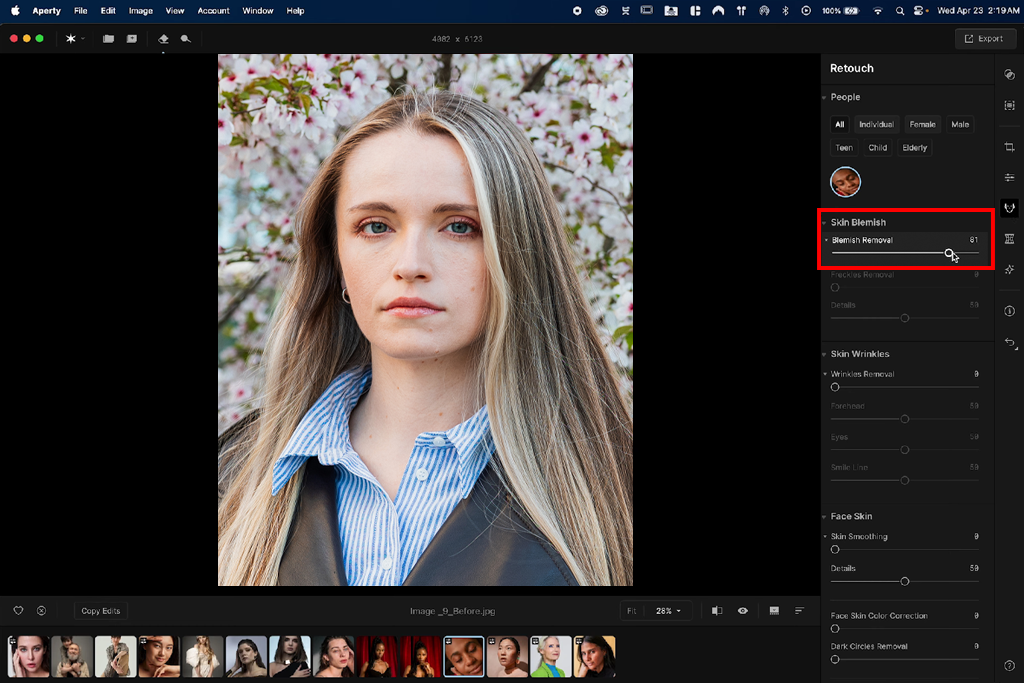
Even when I increased the effect more than usual, this photo editing software for PC still kept natural details like pores and fine texture.
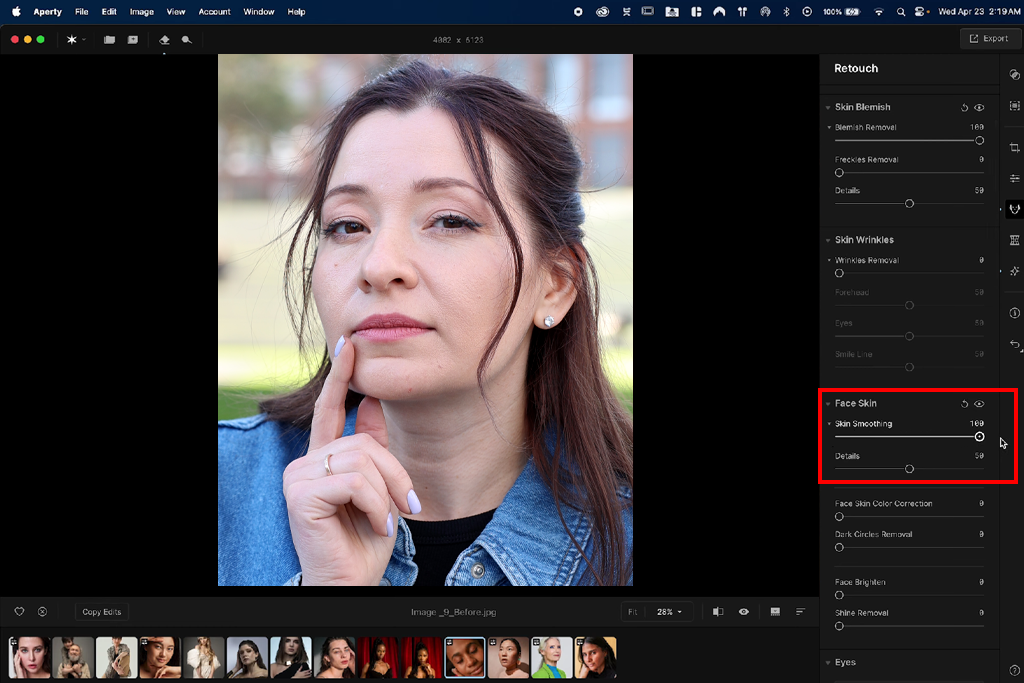
The Face Detection and Segmentation also felt very accurate - it clearly separated areas like skin, eyes, lips, and hair without spilling effects into the wrong places. This was especially noticeable around tricky edges like hairlines and jawlines, where many AI tools usually struggle.
In practice, this meant I could retouch an entire set of wedding portraits without worrying that some faces would suddenly look unnatural. For example, in a series of close-up bridal images, Aperty removed small imperfections and evened out skin tone, while keeping freckles, natural texture, and smooth light transitions intact.
The results were close to what I’d usually try to achieve in Adobe Photoshop - just much quicker. It didn’t push the subject into an over-polished or unrealistic look, which made it reliable for client work without having to double-check every photo.
“I tested it on close-up wedding photos with uneven skin and harsh light. It cleaned up spots and evened out skin color, but kept pores and a natural look. I didn't need to fix anything later in Photoshop, which is very rare.”

Using Evoto AI felt almost like the opposite approach. It has many more tools, and they are stronger by default. Features like Skin Retouching, Face Reshape, Makeup Enhancement, Teeth Whitening, Hair Adjustment, and even Body Reshaping are all easy to find and very quick to respond. When I applied the default settings to the same portraits, the results looked polished right away - smoother skin, brighter eyes, more even lighting - all in just a few seconds.
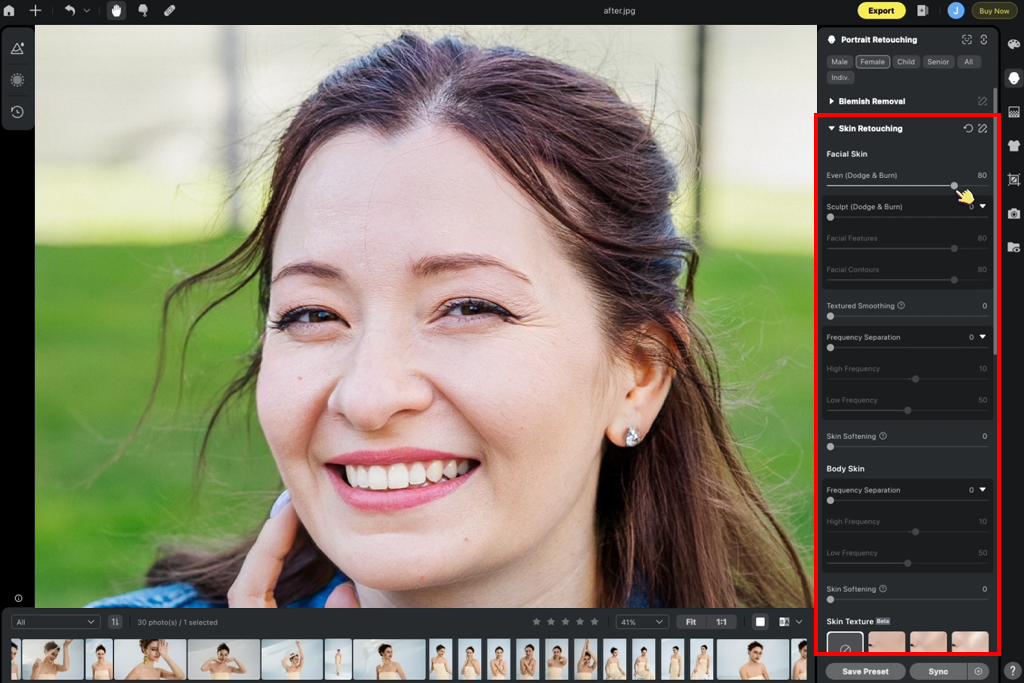
But as I kept testing, I noticed Evoto often makes photos look like they're from a beauty studio unless you turn down the settings. Skin smoothing, in particular, can wipe out natural skin details if you're not careful. In close-up shots, this sometimes made faces look unrealistically perfect, especially when the lighting was heavily adjusted.
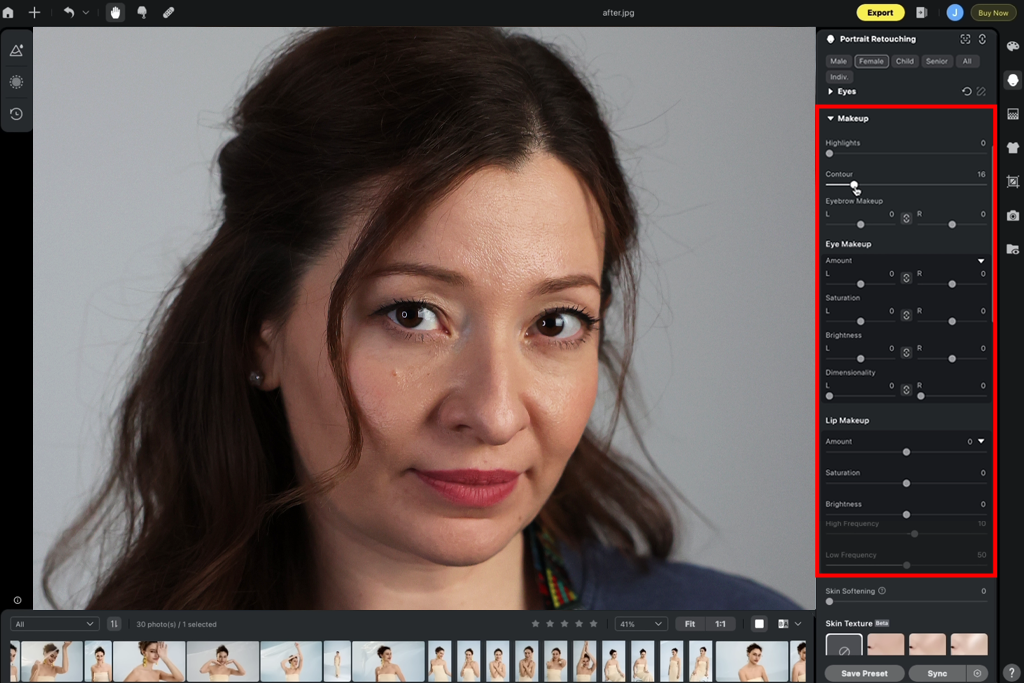
On the other hand, with tougher images - like dark indoor portraits - this free photo editing app actually worked really well, fixing faces with strong lighting and color changes that Aperty handled more cautiously.
Evoto is great because it gives you lots of choices. For instance, with a fashion-style portrait, I could tweak face shape a bit, boost makeup tones, and adjust lighting all in one place. Having that much control can be really helpful, but it also makes it tougher to keep a large set of photos consistent. In my tests, similar shots sometimes came out with slightly different levels of smoothing or color shifts, so I had to double-check the results more often.
So, when you're actually working, the choice depends on your goal. Aperty works like a careful retoucher who wants photos to look natural and consistent across a whole set. Evoto works more like a fast beauty filter that focuses on speed and making each photo look impressive.
“I used this app on a set of headshots, and within seconds the skin looked clean, eyes brighter, and everything polished. It saved me hours of work. But on some photos — especially those with strong lighting - the skin started to look too smooth unless I manually turned down the strength.”

Winner: Aperty (more natural results, better texture preservation, and safer for consistent professional use)

This is where my testing changed from just playing around to something much more serious. Fixing one portrait is easy - but real work means handling hundreds, sometimes thousands of photos that all need to look the same. So, I created a test based on that real-world situation.
I used a full wedding gallery of about 500 photos and another portrait shoot with around 300 images, all taken in varied lighting - warm indoor light, daylight, sunset, and darker evening scenes. The goal wasn’t just to measure speed, but to see how each batch photo editor maintains a uniform look, applies edits across many photos, and delivers stable results when working with large collections.
Batch editing in Aperty feels like a core part of the workflow. Once I created a base look using tools like Skin Retouching, Face Enhancement, Color Adjustment, and Light Balancing, I could apply it to the whole set in one go. What stood out right away was how consistent everything looked. Even photos taken seconds apart, with slightly different lighting, still matched well in skin tone, contrast, and overall look.
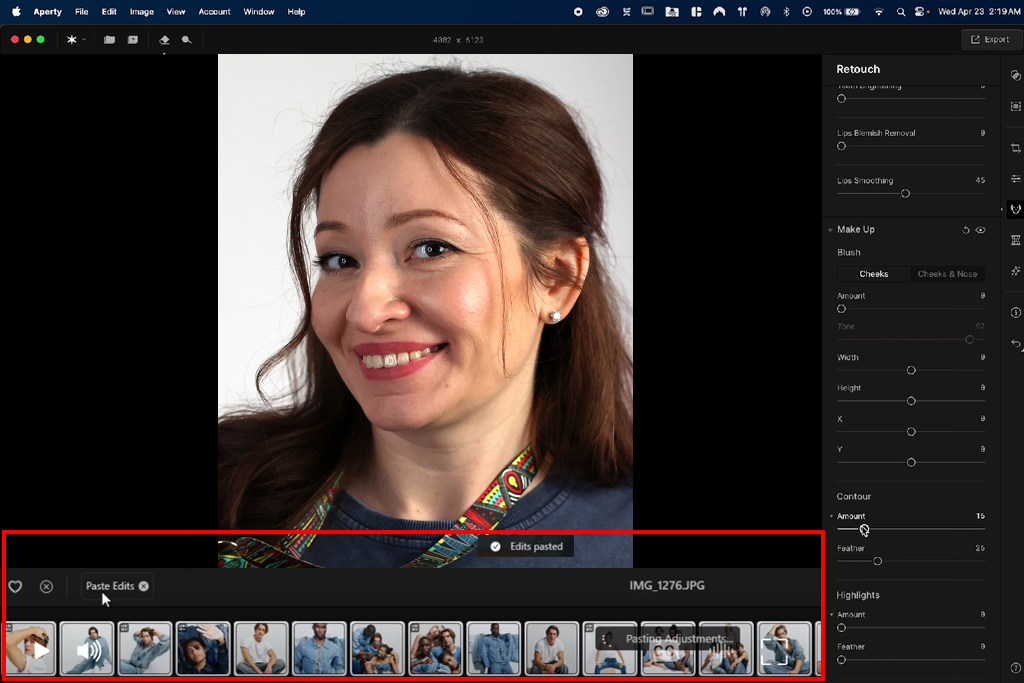
Edit syncing in Aperty feels very stable and reliable. Once you set your adjustments, they apply in a very similar way across matching photos without unexpected changes. For example, in a series of bridal portraits shot at golden hour, skin tones stayed even, highlights looked consistent, and there were no sudden shifts in brightness or smoothing. I still reviewed the results, of course, but I didn’t feel the need to correct every second image, which is exactly what you want when working with large volumes.
“I applied one preset to about 400 wedding photos - covering indoor, outdoor, and mixed lighting - and the look stayed consistent across nearly the whole gallery. I only had to fine-tune around 5-10% of the images, which made a big difference in time saved.”

In this Aperty vs Evoto AI comparison, I noticed that the latter prioritizes speed over consistency. It can process large batches very quickly, and tools like Batch Retouching, Preset Sync, and AI Face Recognition help you quickly apply the same edits to many images. At first, the results look impressive - smooth, polished portraits ready in a short time.
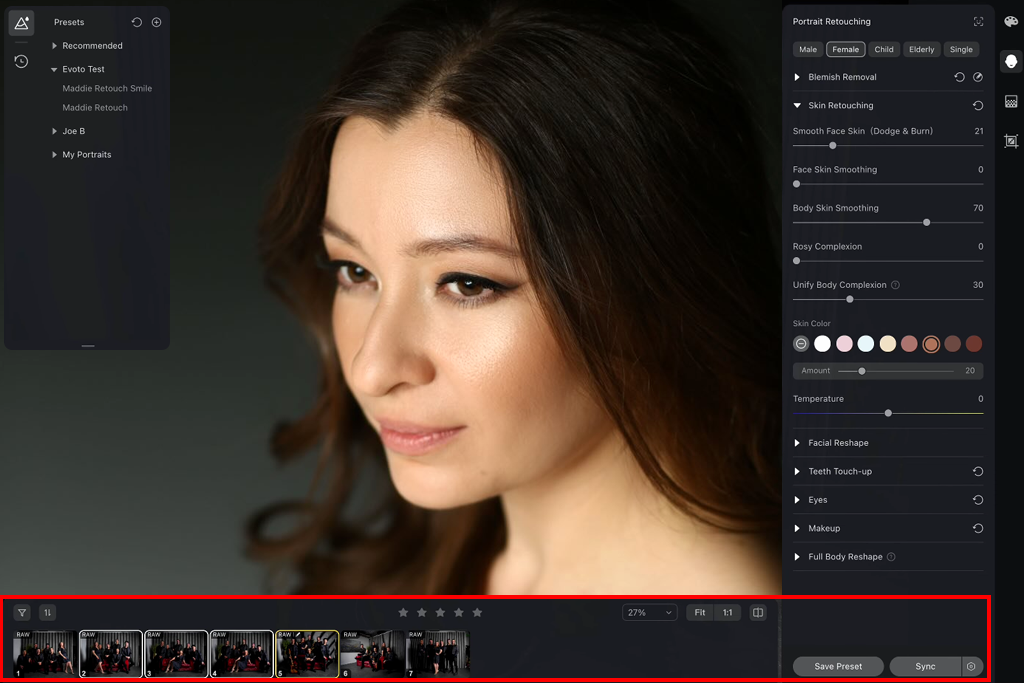
As I worked through more of the set, I began to notice small differences between images. Two photos taken at the same moment could end up with slightly different skin smoothing or tone. This seems to happen because Evoto AI analyzes each image separately instead of applying one fixed set of adjustments.
As a photo editing app for Mac and Windows, it handles images more individually. This isn’t a big issue for smaller batches, but with a full wedding gallery, it means you need to review the results more carefully to keep everything looking consistent.
Working on longer sessions, especially when exporting large batches, I noticed that the credit-based system and partial cloud processing in Evoto AI can interrupt the workflow. It’s not a major issue, but it does take away from that smooth “set it and forget it” experience you’d ideally want when handling hundreds of images.
In the end, both Evoto AI and Aperty can handle batch editing - but they focus on different strengths. Evoto is built for speed and flexibility, while Aperty is designed for control and consistent, predictable results.
“I ran about 200 portraits through Evoto AI at once, and it finished very quickly. But when I took a closer look, there were slight variations - some shots looked softer, others a bit brighter. It’s not a big problem, but I ended up reviewing more images than I expected.”

Winner: Aperty (more reliable, more uniform, and better suited for high-volume professional workflows)
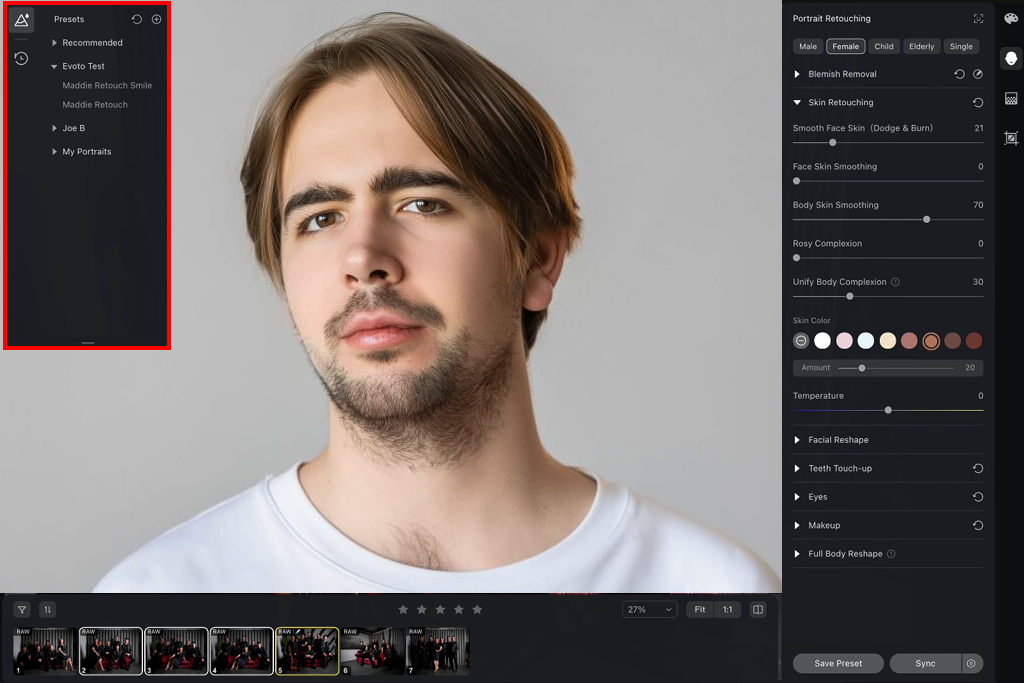
To test this the right way, I used three different photo sets: a wedding gallery with different kinds of lighting, a studio portrait session with controlled light, and an outdoor shoot during golden hour. I made or picked basic presets in both tools, then applied them to each full set to see how consistent the results were without having to adjust every photo manually.
Aperty's presets feel like they were made for serious work. They don't try to impress you right away - they're built to be reliable across many photos. When I used a Luminar preset with Skin Retouching, Face Enhancement, Tone Correction, and Color Balancing, the results looked consistent even in very different lighting. Indoor and outdoor shots still matched, and skin tones stayed the same even when brightness changed.
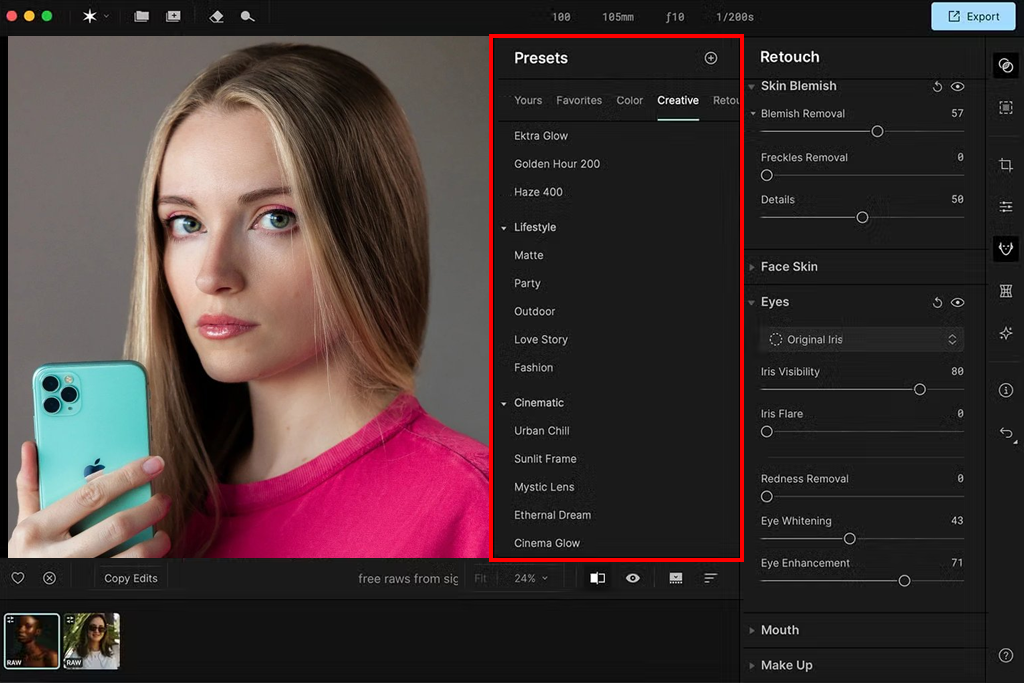
What really stood out was how reliable it was. Once I set a preset, I could apply it to hundreds of photos and know it would work the same way on every single one. For example, in a wedding series moving from daylight to an indoor reception, the preset adjusted naturally without changing colors or contrast in a noticeable way. It felt like a tool made for delivering full albums, not just fixing one picture at a time.
“I created one preset with skin, tone, and color adjustments and used it across three different shoots. It performed almost identically every time, even when lighting conditions changed. That level of reliability is rare to find.”

Evoto AI presets were bolder and more diverse. There's a bigger variety of looks, especially for beauty-style edits, with stronger effects connected to Skin Smoothing, Makeup Enhancements, Lighting Adjustments, and Color Styling. On single images, some of these presets looked very clean and eye-catching immediately.
In mixed environments like a wedding with constantly changing light, I often had to tweak settings for different groups of photos to keep the overall look consistent. This is because presets in Evoto AI react quite strongly to image conditions. The same preset can produce slightly different results depending on lighting, exposure, or skin tone. In studio conditions, though, they worked well and gave more consistent results.
So, while Evoto AI gives you more creative options and stronger visual results, Aperty focuses on what really matters for professional work: consistent and reliable results.
“I liked how Evoto AI presets quickly gave a clean, beauty-style look. But they weren’t always a one-click solution - on outdoor shots, I still had to fine-tune things like brightness and skin smoothing to keep the results natural.”

Winner: Aperty (more reliable, consistent, and better suited for large-scale portrait editing)
To test color and lighting, I chose more challenging photos - backlit outdoor portraits, warm indoor lighting, mixed light from windows and lamps, and some darker reception shots. I avoided perfect images on purpose, since that’s where these tools matter most. I began with the automatic settings, then adjusted things like Exposure, White Balance, Face Lighting, Tone, and Color Balance to see how each tool handled different conditions.
With Aperty, the adjustments felt very natural and easy to control. Tools, such as Light Balancing, Face Exposure, and Color Adjustment, helped improve the image without making it look flat. When I brightened darker faces, it lifted the shadows smoothly instead of overcorrecting the whole photo. Skin tones looked natural and, just as important, stayed consistent across the entire set.
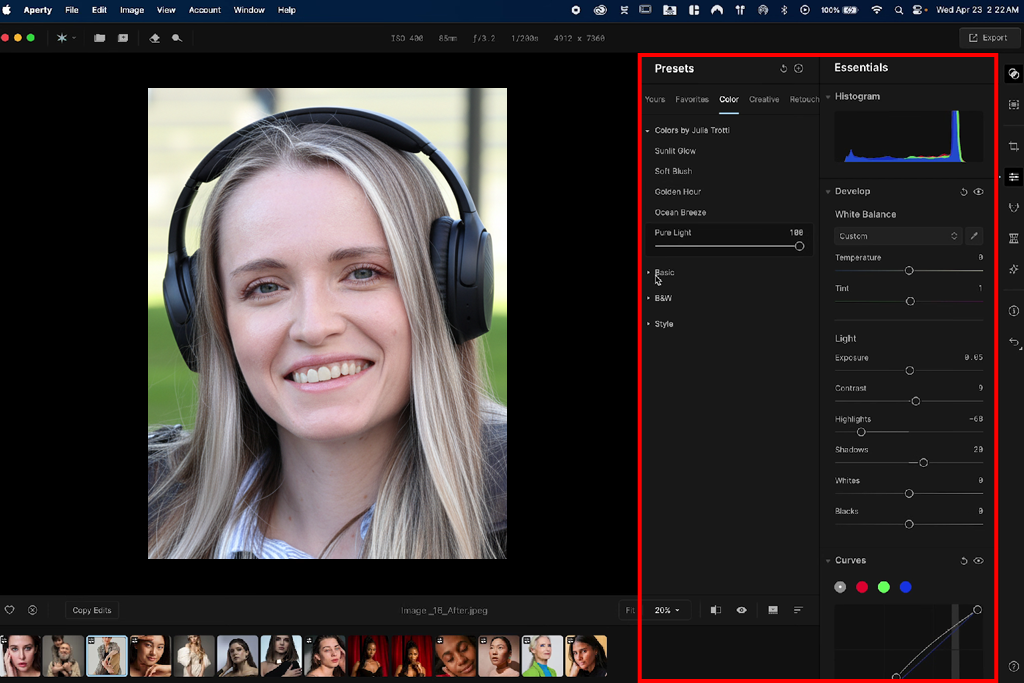
What stood out about Aperty is that it enhances the original look instead of changing it into something different. As an app for photographers, this makes it much easier to keep a consistent mood across the entire gallery.
For example, in a golden-hour portrait series, the warmth and softness of the light stayed intact even after adjustments. The same applied to indoor photos - tungsten tones remained warm, just cleaner and more balanced.
“With Aperty, I was able to lighten faces and correct color tones while keeping the original atmosphere. What stood out most was that sunset shots kept their warm, natural feel - just more polished. I didn’t have to keep tweaking colors between scenes, and the overall look stayed uniform.”

With Evoto AI, the edits felt much stronger and more noticeable. Tools like AI Lighting Adjustment, Tone Mapping, and Color Enhancement can quickly change how an image looks. In tricky situations like dark or flat portraits, this actually worked well. Evoto was able to bring back detail and brighten faces quickly, with more visible results than Aperty.
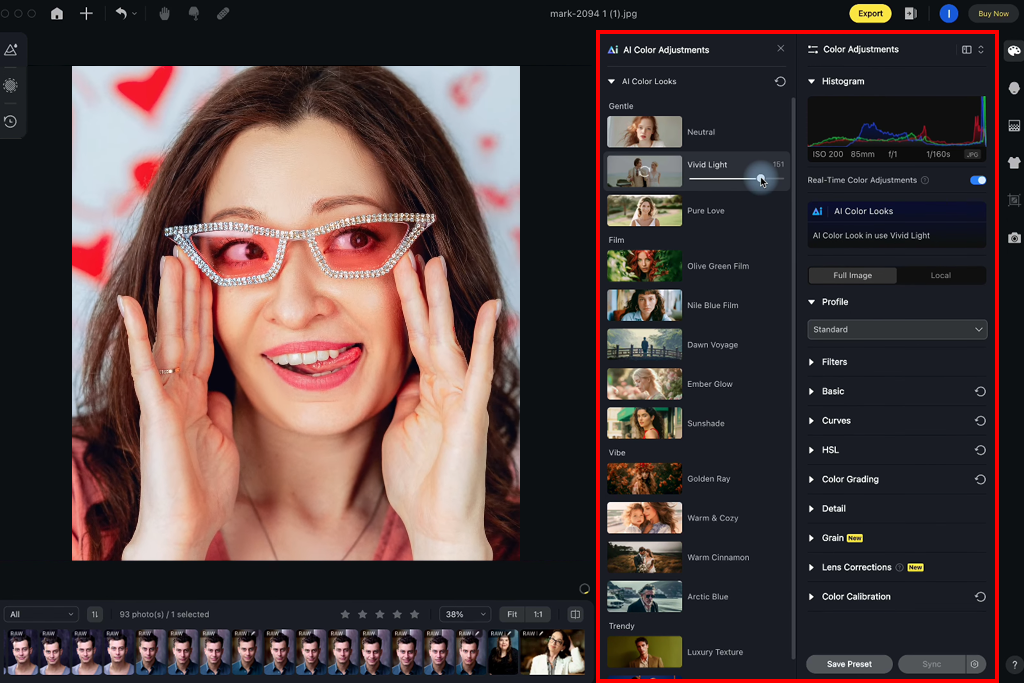
But that strength also has a downside. In some cases, especially with sunset or moody indoor shots, Evoto AI adjusted the image a bit too much. Warm colors became less noticeable, contrast changed more than needed, and the original mood started to fade. The result looked clean and polished, but sometimes didn’t match the feeling of the original scene as well.
So, in real use, the Aperty vs Evoto AI comparison shows that the first option feels like it respects what the photographer wanted, while the second tool focuses on making the image look cleaner and sharper - even if that means changing the mood a little bit.
“A backlit portrait left the face underexposed. Instead of blowing out the background, Aperty's face lighting and tone adjustments brought back detail naturally. The skin tones looked natural - a result that normally requires extra work from me in Lightroom.”

Winner: Aperty (more natural colors, better at keeping the original lighting mood, and more consistent across the whole set)
To really explore the creative side, I moved away from my usual “client work” mindset and tried a more experimental approach. I used a mix of portraits (both studio and outdoor) and pushed both tools beyond simple edits. I tried features like changing backgrounds, applying creative styles, adjusting facial features, enhancing makeup, and transforming the overall look to see how much freedom each tool offers.
Evoto AI really stands out here. It has lots of tools that do more than just basic retouching - like Background Replacement, Makeup Enhancement, Face Reshape, Hair Adjustment, Lighting Effects, and creative filters. You can take an ordinary portrait and turn it into something that looks like a fancy editorial image in just a few minutes.
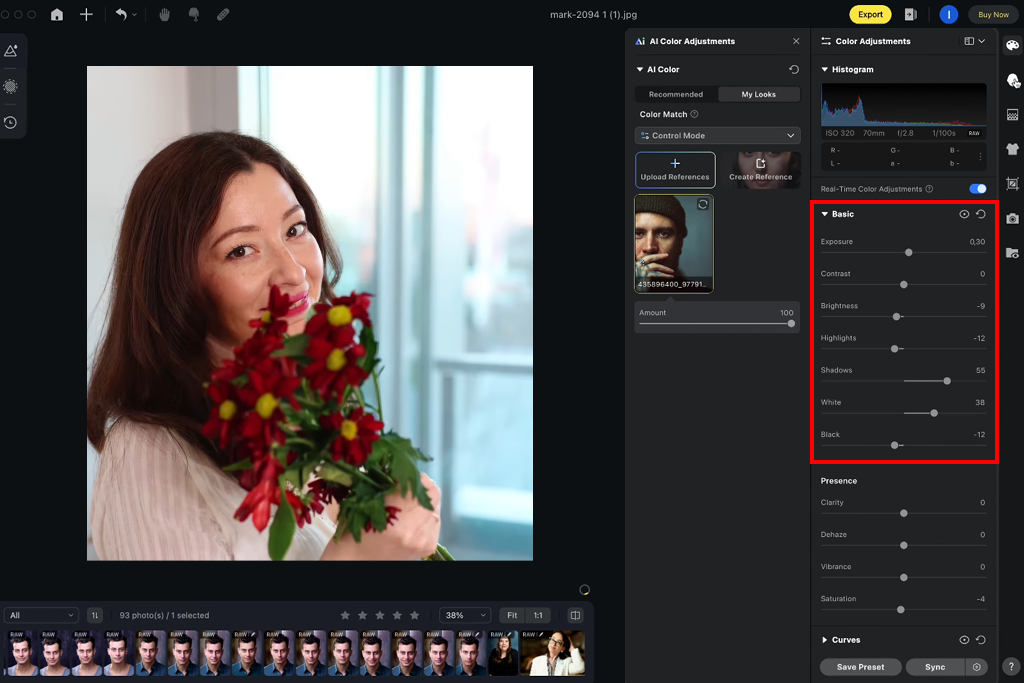
For example, I tested a simple outdoor portrait and was able to slightly change face shape, boost makeup colors, brighten eyes, and even try out different backgrounds - all inside the same filter app.
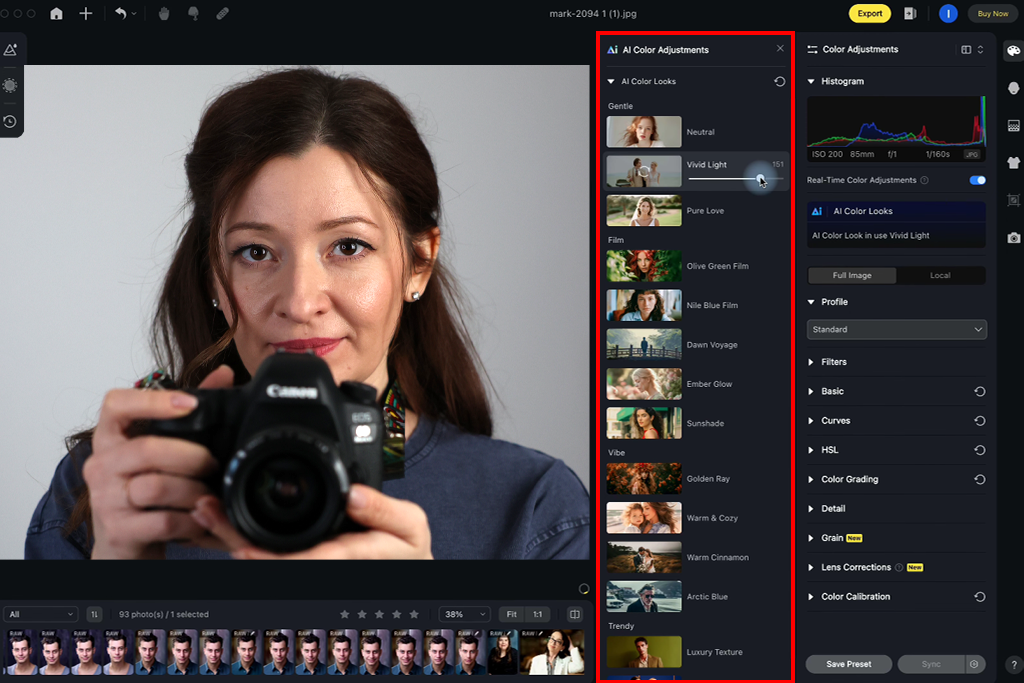
The experience feels smooth and creative. You're not just fixing photos - you're actively changing them. This makes Evoto especially good for social media content, fashion-style edits, or any work where looking impressive matters more than being perfectly realistic.
“Just for fun, I played with changing backgrounds and hair color - and it really felt like a small Photoshop with AI. I even tried different hair colors before an actual shoot. I'd never do that with regular editing tools.”
With Aperty, the approach is clearly more subtle and controlled. There are no strong filters or tools that dramatically change a person’s appearance or the scene. Instead, everything is focused on keeping the result realistic. You can improve skin, adjust lighting, and balance colors, but there aren’t features meant to completely transform the image.
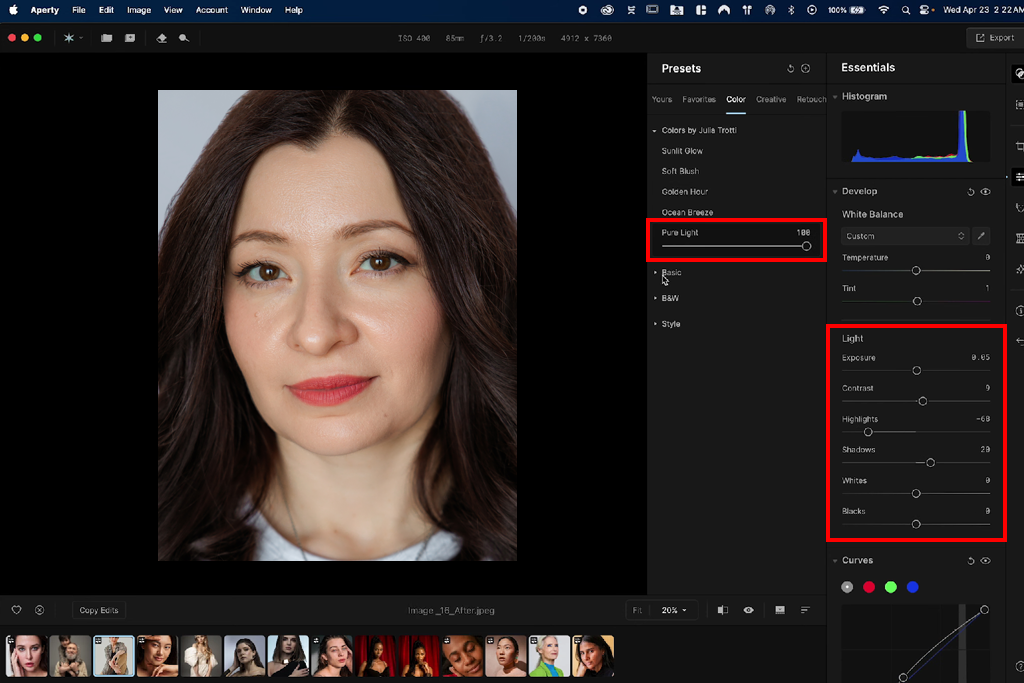
During testing, Aperty felt more focused than flexible when it comes to creative options. Instead of offering lots of experimental features, it keeps you in a professional workflow where the goal is to improve the image, not completely change it. This actually worked as an advantage for client work, since there’s very little risk of pushing a photo into an unrealistic or overly stylized look.
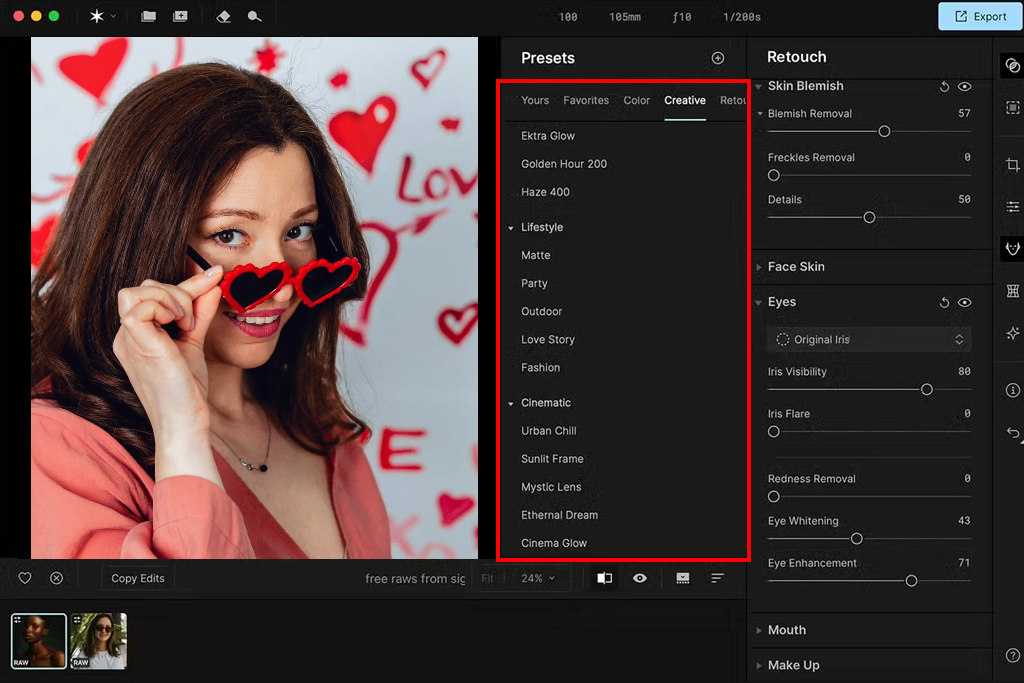
So, the Evoto AI vs Aperty difference is easy to see: Evoto AI gives you more room to experiment and transform images, while Aperty keeps things natural and true to the original.
“I didn’t really come across any 'creative' tools in Aperty - and that seems intentional. It stays focused on realistic portrait editing, which actually made me feel more confident using it across full client galleries.”
Winner: Evoto AI (a broader set of creative tools, more flexibility, and better suited for bold or stylized edits)
Performance is something you don't notice until you're deep into a long editing session, and then it becomes very important. I didn't just test how fast each tool works on one photo. I ran complete workflows: importing large sets (300–500 images), applying retouching, checking results, and exporting final galleries. The goal was to see how each tool performs over time, not just in short bursts.
Aperty's performance was stable and predictable right away. Most work is done on your computer, so after everything loads, it runs consistently. Tools like Skin Retouching, Face Enhancement, and Lighting Correction work smoothly, even on big batches. And during long editing sessions, especially when saving hundreds of photos, there were no unexpected lags or crashes.
The best part is that Aperty works the same whether you edit 20 photos or 500. It never felt like it was struggling or acting differently. This is important for actual jobs, because you want to trust that a batch export will just run on its own without you having to keep checking on it.
“I edited and saved about 600 photos at once, and everything stayed steady. No lags or stops. I just let it work in the background without any trouble.”

Evoto AI seemed quicker at the beginning, especially when using AI for portraits or looking at previews. Tools like AI Skin Retouch, Lighting Adjustment, and Face Enhancement usually work in almost no time, so the start feels very fast. But once I worked with big photo sets and tried to save them, I noticed how much it relies on internet connections and a credit system for each edit.
During longer editing blocks, this occasionally disrupted the flow of work. How quickly things happened could change based on internet strength and how busy the servers were, and saving many finished pictures didn't always feel as steady as with Aperty. The tool isn't always sluggish. In fact, it's often quite quick. But over longer periods, especially when handling many images, it's less reliable.
So, when you're actually using them, Evoto seems fast and snappy for small jobs, whereas Aperty feels stable and trustworthy during extended editing.
“Evoto seems very quick while you're working, with images appearing right away. However, when saving finished files, I saw that it relies on online servers, so occasionally it became slower or seemed less steady.”
Winner: Aperty (more reliable performance, stronger consistency across large batches, and fewer interruptions in professional workflows)
Aperty uses a more traditional pricing model with subscriptions and occasional lifetime options, which makes it easier to plan costs - especially if you regularly work with multiple images.
| Plan Type | How It Works | What’s Included |
|---|---|---|
|
Subscription
|
Monthly or yearly payment
|
Full access to AI retouching tools, batch processing, presets, updates
|
|
Lifetime (if available)
|
One-time payment
|
Permanent access to current version + core features (updates may vary by plan)
|
With Aperty, the pricing is simple and predictable. Once you pay for a plan, you can edit and export as many images as you need without extra charges. This includes:
In real use, this means you can handle a full wedding (1,000+ photos) without thinking about extra charges.

Evoto AI operates on a credit-based model, which differs from traditional pricing. Rather than offering unlimited access, costs are tied to usage - specifically, the number of images processed and exported.
| Plan Type | How It Works | What’s Included |
|---|---|---|
|
Pay-as-you-go
|
Purchase credits
|
Credits are deducted for each exported image or AI-driven processing task
|
|
Credit bundles
|
Larger packages at discounted rates
|
A reduced cost per image when purchasing credits in larger quantities
|
Evoto usually lets you edit photos for free while previewing them, but you need credits to save the final result. Features included:
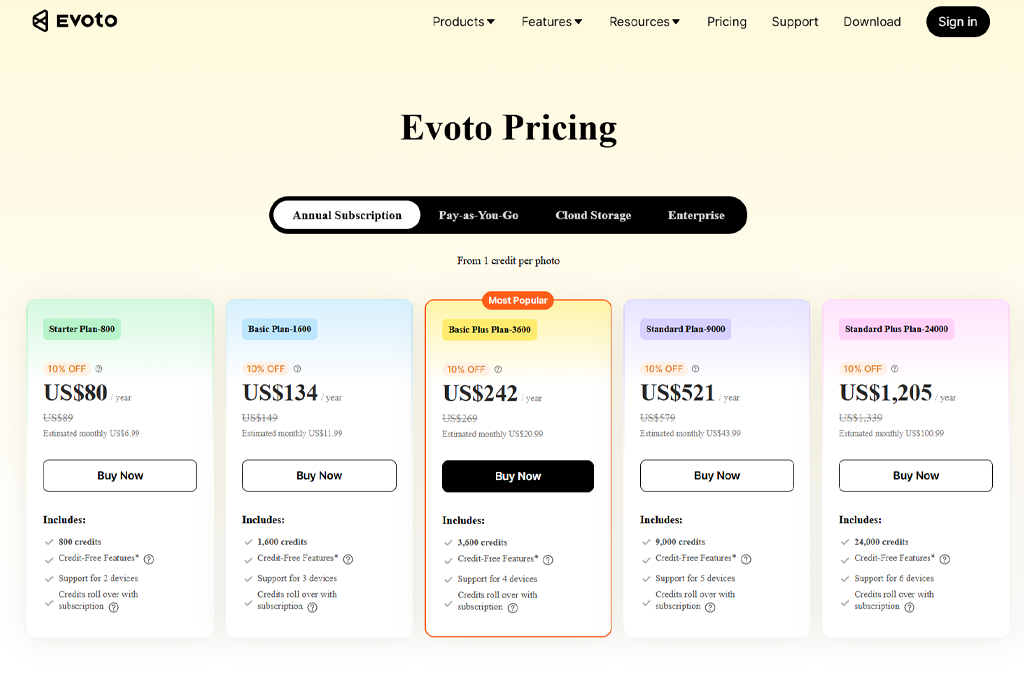
But every saved picture uses up credits, which means the price changes based on how much you use the tool.
For small jobs, Evoto seems cheap and easy to adjust. But when I tried it on complete wedding collections, the gap was very clear. Saving many photos, even hundreds or thousands, requires using credits over and over, which grows fast.
Aperty costs the same no matter how many photos you edit. That kind of certainty is very helpful when you're working for clients and need to know your costs per project ahead of time.
Winner: Aperty (clearer pricing structure and better suited for high-volume professional workflows)
When it comes to which is better, Aperty or Evoto AI, the first option stands out for keeping portraits natural and consistent across large photo sets. It’s designed for professionals who value realistic results and efficient high-volume workflows over dramatic edits.
Select Aperty if:
Evoto AI is a speedy, AI-based tool for editing faces that emphasizes beauty improvements and artistic freedom. It's made for fast outcomes, providing many options for both standard fixes and creative changes.
Select Evoto AI if:





![Add Skeleton Filter on Photo Online [FREE]](http://fixthephoto.com/blog/images/gallery/news_main__preview_28921.jpg)

![7 Best Sketchbook Alternatives [{{%year}} FixThePhoto Choice]](http://fixthephoto.com/blog/images/gallery/news_main__preview_28913.jpg)


![7 Minecraft Banner Makers [Design Examples]](http://fixthephoto.com/blog/images/gallery/news_main__preview_28947.jpg)















