In my day-to-day workflow, I constantly jump between generating visuals, cutting video tracks, designing digital assets, and fine-tuning voiceovers. AI speech engines have become an indispensable part of my toolkit. When several readers reached out asking which voice tools are worth investing time in, I realized there wasn't a comprehensive, field-tested guide available that described these platforms after in-depth testing.
While I had a few personal go-to options, I wanted this breakdown to be as rigorous and unbiased as possible. To make that happen, I brought in my fellow media specialists from the FixThePhoto team to run a comprehensive multi-tool experiment. We evaluated every contender side-by-side using unified criteria: natural speech cadence, customization depth, workflow speed, language variety, commercial licensing clarity, and value across different creative domains.
The platforms that earned a spot on our list produced human-quality vocal tracks while offering real utility for active creators. Depending on your needs, these platforms can transform text into authentic audio, clone voices responsibly, render regional accents, fine-tune emotional impact, and export broadcast-ready files for commercial videos, audiobooks, courses, and corporate media. We selected them because they are dependable, feature-rich, and helpful.
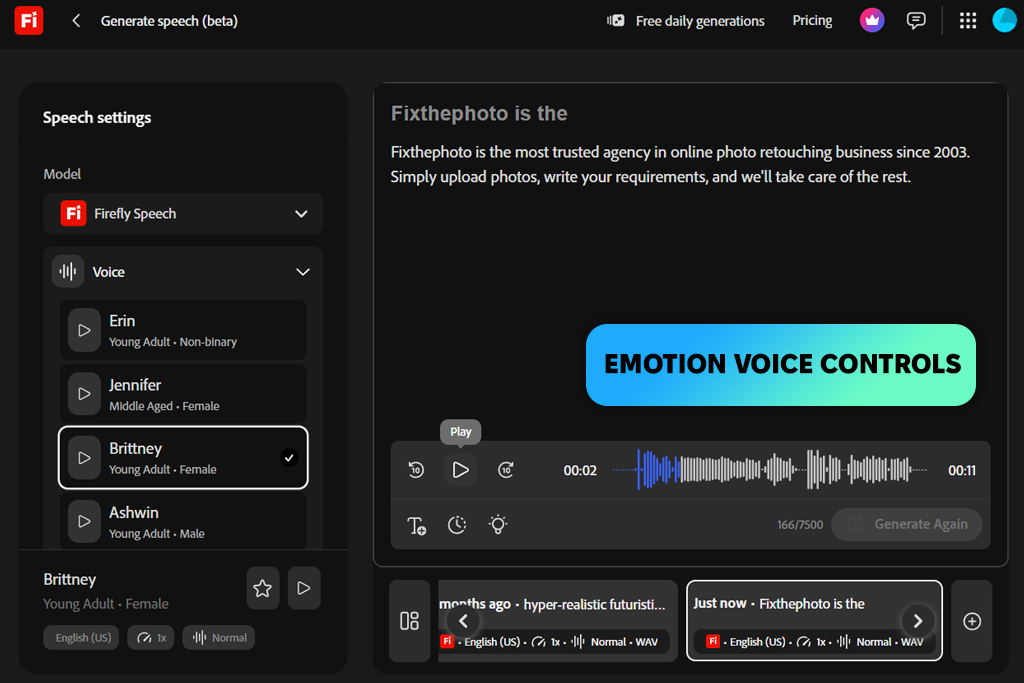
Because my everyday workflow revolves around Photoshop, Premiere Pro, and the broader Adobe ecosystem, Firefly has naturally become the primary AI voice designer I tested. Eliminating the need to jump between standalone tools or re-import, I enjoyed a remarkably swift production.
When drafting script-driven media or social promos, I can draft text inside Firefly, test various voice profiles, and push assets directly into Premiere. I especially appreciate how easily it is to swap gender, age dynamics, tonal warmth, and regional accents without leaving my project space.
“Working primarily in Premiere Pro makes Firefly a logical addition to my setup. I usually build out a few vocal variations prior to cutting video, fine-tuning cadence or inflection rather than re-recording whole tracks.”

The real power lies within its detailed adjustment panel. Rather than re-synthesizing an entire narration because one line feels awkward, I can manually tweak timing, phonetic pronunciation, or pacing until it lands naturally. Accessing ElevenLabs' premium voice library directly within Firefly is also a smart idea.
You will have fantastic vocal variety without paying extra subscriptions. Furthermore, pairing AI voiceovers with digital avatars within the same timeline stream simplifies full-scale video creation.
Another huge advantage of the Firefly Video Model is that generated audio is automatically cleared for commercial application. I never have to second-guess copyright rules when delivering client campaigns. The vast array of vocal styles and micro-settings may occasionally entice you to spend extra time comparing subtle variations, but having creative freedom is a welcome trade-off.
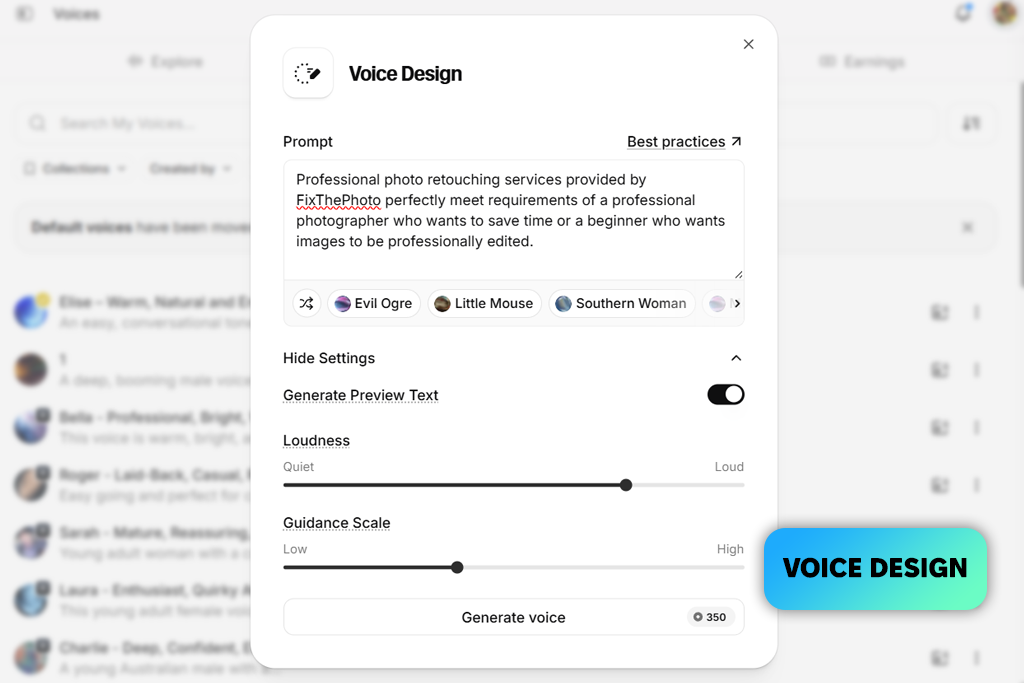
Vadym suggested I explore ElevenLabs, and its huge popularity immediately made sense. The variety of voices in the library is astonishing. I spent considerable time sampling different speaker profiles, regional accents, and tonal styles before finalizing my text.
Once inside ElevenLabs Studio, I used the unified sliders for Stability, Style Exaggeration, and Volume. With them, it was intuitive to refine vocal clips, without altering settings every time a passage needed extra warmth.
“I like adding little notes like pauses or a quiet chuckle because the v3 model picks them up. It's not flawless every time, so it makes sense to play around with the script.”

Exploring further, I learned that ElevenLabs goes far beyond standard text-to-speech. I designed custom voice personas, voiced short video segments, and tested the v3 engine using contextual directives like [whisper] or [chuckle] embedded directly into the text. These subtle prompts produced astonishingly human inflection. I was also impressed by how fluidly the interface adjusts across different media types, whether formatting audiobooks, localized dubbing, or ambient audio.
While exploring ElevenAgents, I noticed how these vocal engines extend into interactive applications, enabling creators to build conversational bots connected to operational tools. This elevates the ecosystem far beyond basic synthetic voice generators and conventional ElevenLabs alternatives. While the packed interface takes a moment to navigate due to its rich feature set, having this much power in one place, makes ElevenLabs the best AI voice designer app for serious users.
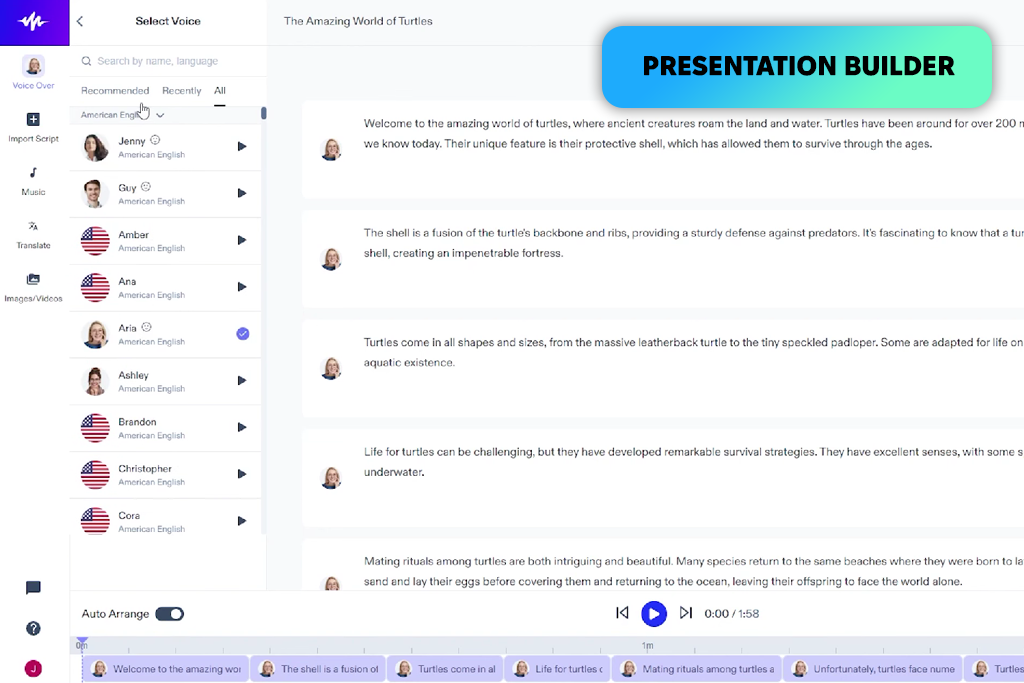
Speechify takes a targeted approach to synthetic speech, and it delivers exceptional results for long-form content. Upon opening Speechify Studio, I imported standard narrative scripts to test various voice options prior to editing. The organic flow of the audio impressed me instantly.
The cadence was balanced, natural pauses occurred logically, and the speech sounded like an engaging human reader rather than an automated robot. For instructional modules and explainers, it rarely required text adjustments to sound natural.
“The timing is often good enough that I don't need to edit many pauses afterward. I also appreciate that I can pair the narration with a quick presentation without switching to a different program.”

Most of my fine-tuning in Speechify involved slight tweaks to pronunciation, pitch, velocity, and pause lengths. The ability to assign multiple distinct AI voices within a single project timeline made producing multi-character dialogues simple. I also tested the built-in presentation creator by combining vocal tracks with background audio. It proved useful for producing fast, narrated slide decks without needing external software.
Similar to top-notch AI sound generators, Speechify also includes voice cloning capabilities, allowing you to create a digital version of your own voice to maintain consistent personal branding. Keep in mind that emotional expression varies across different voice profiles in the library. Try a few options upfront to ensure you find the best match for your project.
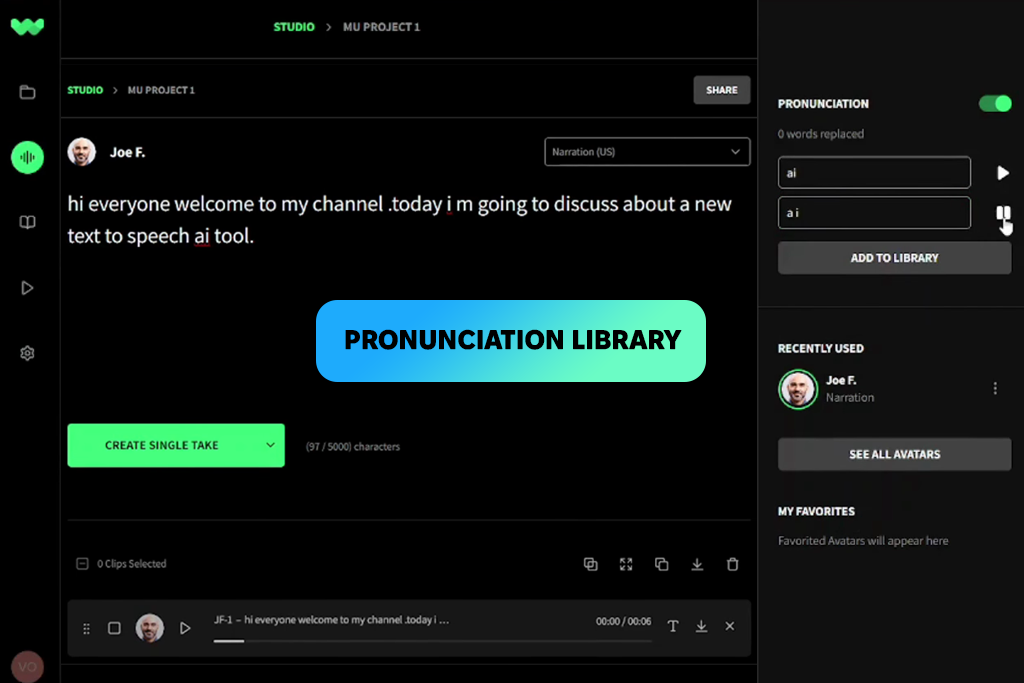
I first discovered WellSaid while evaluating enterprise-focused AI voice platforms for high-volume professional media production workflows. Rather than attempting to serve as an all-in-one general creative suite, WellSaid purposefully focuses on high-stakes business communication, e.g., corporate training programs, employee onboarding modules, educational content, and internal executive messaging.
When I tested the platform using an extended instructional script, it demonstrated remarkable acoustic stability. The generated voice maintained uniform clarity, balanced tone, and natural pacing from start to finish without drifting into robotic cadence.
The platform's word-level pronunciation editor is easily one of its most impressive features. Being able to pinpoint specific technical terms, industry jargon, or unique brand names and fine-tune their phonetic pronunciation guarantees accuracy across all corporate documentation.
On top of that, the shared team phonetic dictionary keeps brand terminology perfectly standardized across multiple projects and departmental contributors. Its native integration with Adobe Premiere Pro makes it one of the best AI voice designers online, eliminating those tedious audio export and import steps.
WellSaid places an emphasis on enterprise data safety and regulatory compliance. Built with ethical voice licensing protocols, SOC 2 Type II certification, full GDPR compliance, and robust protections against unauthorized voice replication, it offers peace of mind for corporate teams handling sensitive internal assets. While its balanced delivery may not suit dramatic audiobooks, it remains an unmatched solution for professional business communications.
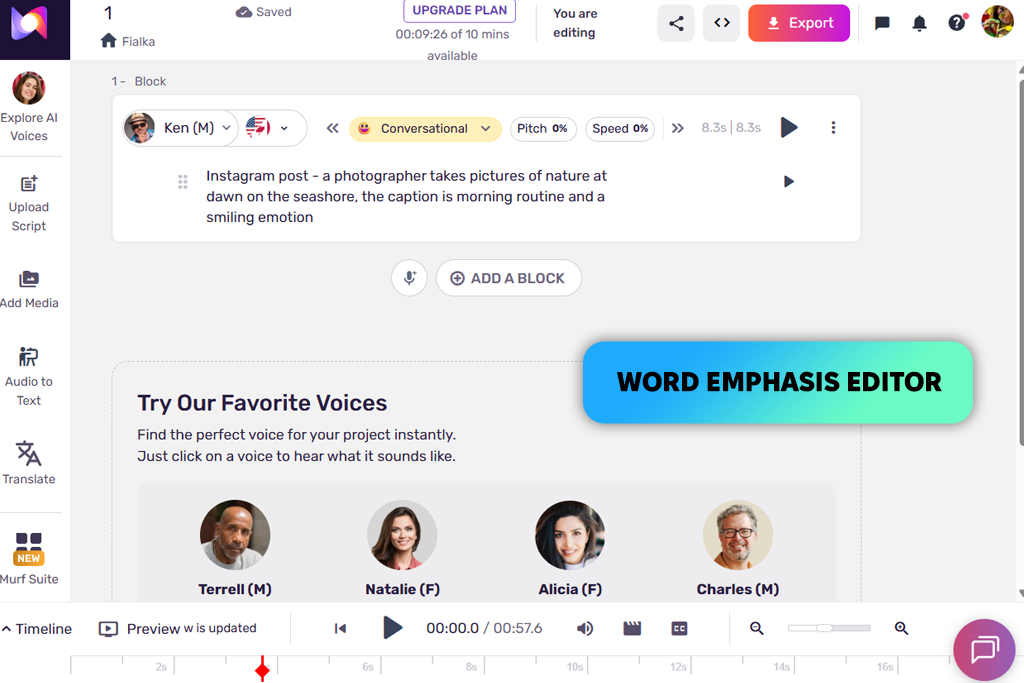
When I first fired up Murf AI, I expected a standard text-to-speech generator. My initial text render was decent, but the process changed completely when I explored the specialized Emphasis tool right next to the playback bar. Once I figured out how to tweak inflection points, I realized I didn’t need to rewrite entire lines to fix an awkward phrase.
Adjusting stress patterns allowed me to fine-tune individual words, adding natural nuances that made the final track sound like an authentic studio recording.
“I didn’t think much about the emphasis controls when I first tried Murf, but they became one of the features I used the most. Changing the way certain words were delivered made the voiceovers sound more natural. I also love that I can create, edit, and add music without leaving the project.”
Expanding the timeline transforms Murf from a simple reader into a full multimedia studio, standing out in the competitive landscape of AI voice cloning software. I layered background music, aligned video tracks, adjusted pitch and pauses, and experimented with narrative styles using the "Ken" voice profile. Even dramatic emotion settings like "Sobbing" delivered surprisingly tasteful, production-ready audio.
Beyond solo creation, built-in language dubbing and collaborative workspace tools make it easy to collaborate with colleagues. Murf functions like an intuitive digital audio workstation rather than a basic generator, and its direct integration with Canva makes adding voiceovers to presentations fast.
While vocal quality can vary across its vast library, meaning you’ll want to stick to its top-tier voice profiles, the platform may be the best AI voice designer for high-quality audio production. Whether you are building marketing collateral, e-learning content, or promotional videos, with Murf getting professional audio is a no-brainer task.
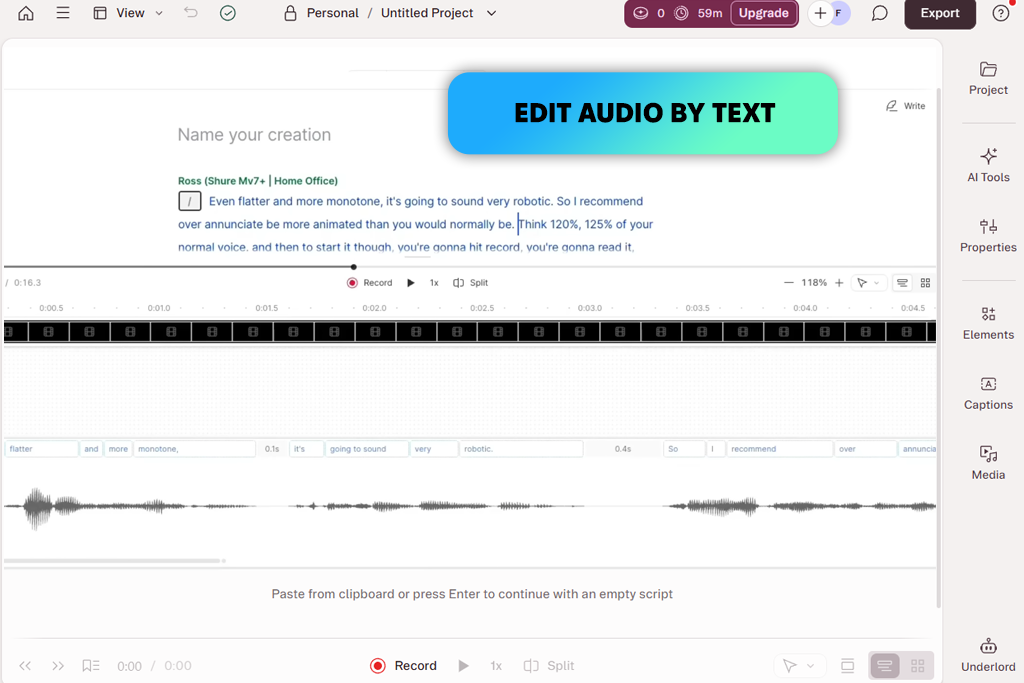
Having previously relied on Descript as a top AI caption generator, exploring its synthetic voice features was like a natural next step. Descript boasts an intuitive document-style workflow. You simply load a video project, edit the text transcript as if it were a standard text document, and the AI generates precise vocal fixes directly inside the editor.
This streamlined approach completely eliminates the tedious hassle of exporting files back and forth between separate audio applications just to make minor script updates.
“The main reason I continue using it is the workflow. I can update a script, regenerate the voiceover, and move straight back into editing without spending much time. For fast-paced projects, efficiency matters more than having a huge library of voices.”
Descript’s main strength is the speed of iterations. Podcasters and video producers can tweak script text, re-render vocal tracks, trim video clips, and adjust visual elements all within a single, cohesive interface. Furthermore, cloud collaboration allows remote team members to leave feedback and edit text without managing separate audio files or dealing with frustrating version control issues.
It’s worth keeping in mind that voice generation serves as a supporting feature rather than Descript’s primary focus, so it can hardly be called the best AI voice generator free option. While its AI voices are more than capable for standard media production and quick audio patches, it doesn't offer the deep acoustic modulation, fine-grained pitch control, or nuanced performance settings found in dedicated speech platforms. However, for modern creators who prioritize editing speed, smooth collaboration, and ultimate script flexibility, Descript is an exceptional, time-saving addition to any toolkit.
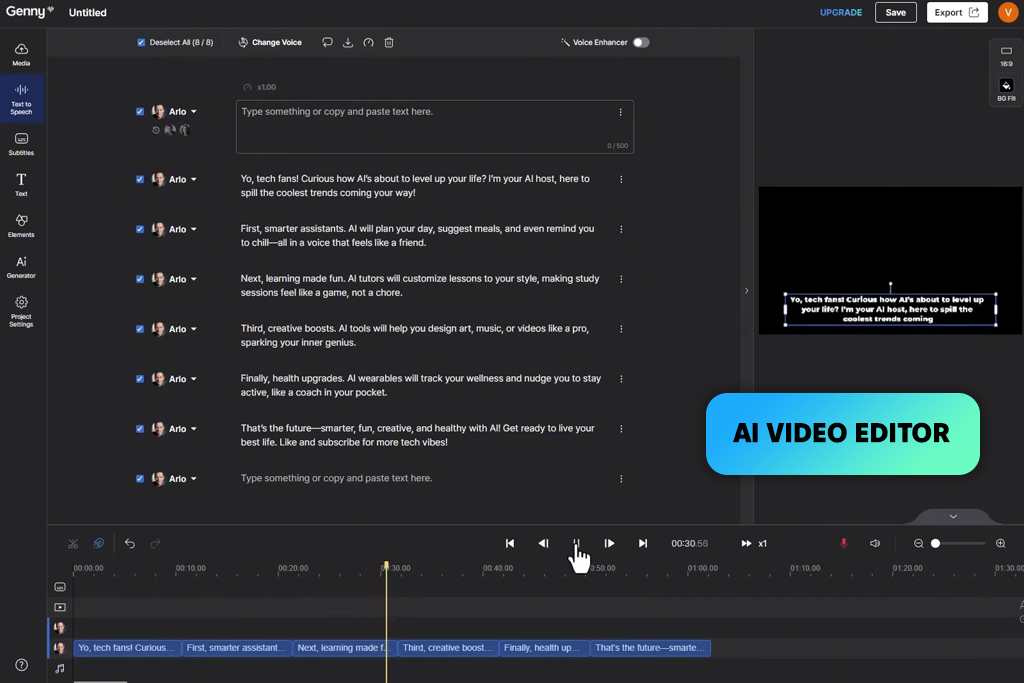
Creating high-performing content on tight deadlines can seem to be a relentless race against the clock. When I pasted a social promo script into Lovo and selected an energetic profile, I had a polished audio track ready in moments. Instead of spending hours fine-tuning every syllable, I dialed in the overall tone and generated multiple variations. For creators managing rapid publishing schedules, finding the right tool is paramount for scaling video production without sacrificing audio quality.
Beyond voice generation, Lovo packs practical visual creation tools ideal for light production. Assembling promo clips, marketing ads, and branded social posts is remarkably intuitive. The platform keeps its interface clean and streamlined, avoiding the clutter of complex enterprise settings. For freelancers, social teams, and digital agencies, this unified setup helps keep creative workflows moving forward without costly delays.
All in all, Lovo is the best AI voice designer for agile content creators who need fast, impactful output. Its flexible pricing plans accommodate growing teams, and the user-friendly interface prioritizes high-speed production over tedious micro-editing. While large organizations with strict corporate governance requirements may need specialized tools, Lovo stands out as an exceptional asset for modern, fast-paced digital marketing.
We began our search for the best AI voice designer by assessing the most vital factor – human-like vocal realism. Instead of testing short sample sentences, we evaluated every tool using actual production scripts from FixThePhoto projects, including video ads, YouTube narrations, tech tutorials, and course lectures. We carefully analyzed natural speech pacing, phonetic accuracy, breathing patterns, and long-form voice stability across extended recordings.
Next, we tested the flexibility and depth of each platform's customization controls. We thoroughly evaluated phonetic pronunciation tools, speed sliders, pitch modulation, pauses, emphasis markers, emotional presets, regional accents, and multi-language capabilities. We also prioritized tools that allowed fast targeted edits without forcing a complete re-generation of the entire track.
“To compare the tools properly, we used identical scripts and refined pronunciation, pacing, and voice parameters across each platform. Rather than relying on initial impressions, we reviewed multiple generations to evaluate the results more accurately. The differences became clearer in longer voiceovers, where consistency plays a key role.”
Workflow was another major factor in our rating system. Vadym evaluated how easily each software integrates into standard media production pipelines, testing video timeline editing, language dubbing, team sharing, and app integrations. He also evaluated overall UI responsiveness and ease of switching between active projects.
Tata analyzed the practical operational details that matter for everyday production. She evaluated commercial rights, voice library variety, team collaboration tools, file export formats, and rendering stability over time. Rather than searching for a single 'perfect' app, our goal was to identify which platforms deliver the best results for specific creative needs – from quick social clips to professional commercial projects.
We tested every AI voice designer tool in real-world production scenarios rather than relying on isolated feature claims. This hands-on testing was paramount because we wanted to provide recommendations that reflected how these AI voice designers perform when managing tight client deadlines, evolving scripts, and professional audio requirements.





![7 Best AI PDF Translators in {{%year}} [100% FREE]](http://fixthephoto.com/blog/images/gallery/news_main__preview_29342.jpg)
![9 Best AI Car Video Generators [{{%year}} FixThePhoto Choice]](http://fixthephoto.com/blog/images/gallery/news_main__preview_29281.jpg)
![9 Best AI Virtual Try On Outfits Tools in {{%year}} [100% FREE]](http://fixthephoto.com/blog/images/gallery/news_main__preview_29082.jpg)



















