Long before my team at FixThePhoto created our own collection of training images, I was already deeply involved with image datasets for machine learning through my work. My daily routine revolves around photo editing. I fix client pictures, perfect details, and experiment with AI creative tools.
Through this, I discovered that AI features that appear so powerful only work well because of the pictures used to teach them. Working with actual photos, such as unprocessed camera files, genuine skin details, and challenging lighting, opened my eyes to a problem. Most image datasets for training AI don’t match the real challenges we face when editing photos every day.
I developed my interest in AI because of necessity. I needed dependable collections of training photos to evaluate our in-house software, test automated selection tools, background-cutting features, and portrait-improving technology.
I searched everywhere, including well-known AI photo libraries, suggestions from Reddit users, discussion boards on Kaggle, and video tutorials on YouTube. None of them captured the messiness of real-world pictures. The publicly available training collections all had the same issues. They were either too basic or too carefully selected. Besides, lots of samples lacked realism.
I wanted pictures that showed the actual problems my FixThePhoto team deals with every day like tough shadows, clashing light sources, blurry spots, grainy colors, wrinkled clothes, cluttered scenes, and genuine human skin texture. That’s how we decided to build our own FixThePhoto AI Photo Edit Dataset.
Before we got down to the task, I wanted to confirm we weren’t just duplicating what was already out there. So, I tested 70+ image datasets for machine learning, talked to my colleagues, dug through Reddit forums for recommendations, and even rallied my entire crew to test every significant dataset we could find rigorously.
We sorted, tagged, ran experiments, and created rankings to find the best AI image datasets suitable for both rookies and seasoned pros. A quality dataset should include:
People often wonder why I emphasize image datasets so heavily. The thing is that AI only understands what it’s been shown. Feed it narrow, skewed, flawless, or computer-generated images, and you’ll get an AI that behaves exactly that way.
This is precisely why quality datasets form the foundation of practically every AI tool in our photo editing arsenal. Whether it’s smart selection in Lightroom, one-click background deletion in Photoshop, or face refinement features in phone apps. They all depend on the images used during training.
The process breaks down like this:
Step 1. We show the AI multiple images.
Step 2. Every image comes with labels, e.g., outlines, masks, segmentation maps, and metadata.
Step 3. AI takes its best guess at identifying what it sees.
Step 4. We check the AI’s answers against the correct ones we provided.
Step 5. AI keeps practicing and correcting itself until it gets things right most of the time.
As it trains, the system picks up how skin looks, what different objects are, surface textures, how light behaves, visual noise, various shapes, human faces, scene backgrounds, settings, unusual elements, and even feelings conveyed in images. When you feed it quality training data, it becomes truly helpful. Feed it poor data, and it becomes unreliable.
That’s precisely the gap that existed. Nobody had put together a high-quality, real-world collection of images that captured the actual problems professional photographers face when editing their pictures.
You’ll typically come across these types of image datasets for machine learning:
Broad learning datasets. Perfect for newcomers and building basic models. They create the starting point for AI art tools that need to understand a wide range of visuals before tackling specific styles.
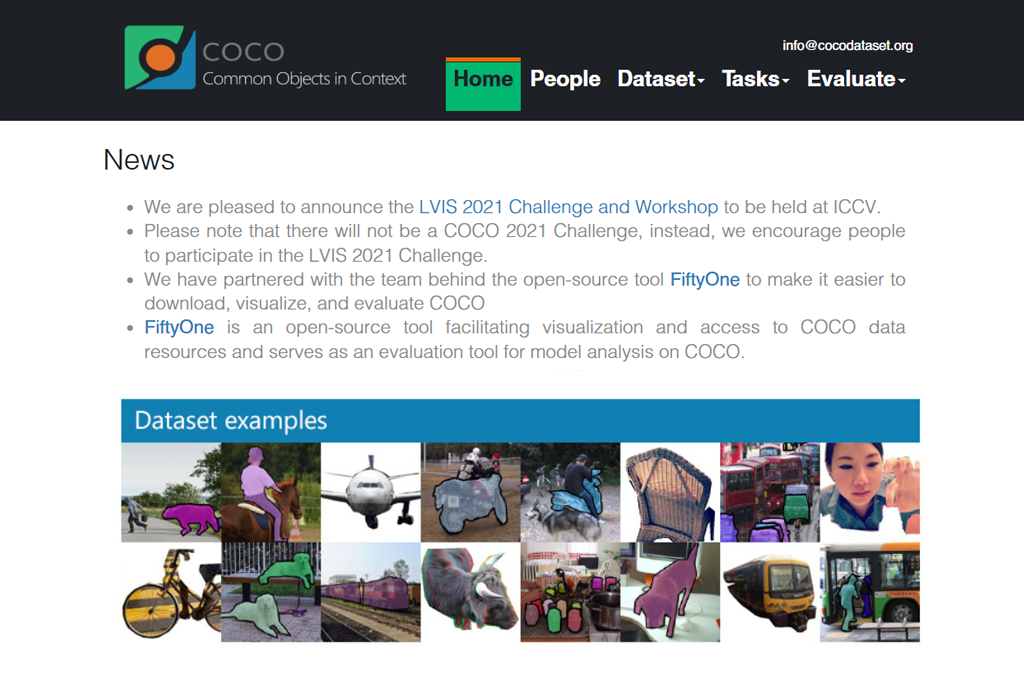
Object recognition datasets. Power tools that remove backgrounds, clean up images, and automatically select areas.
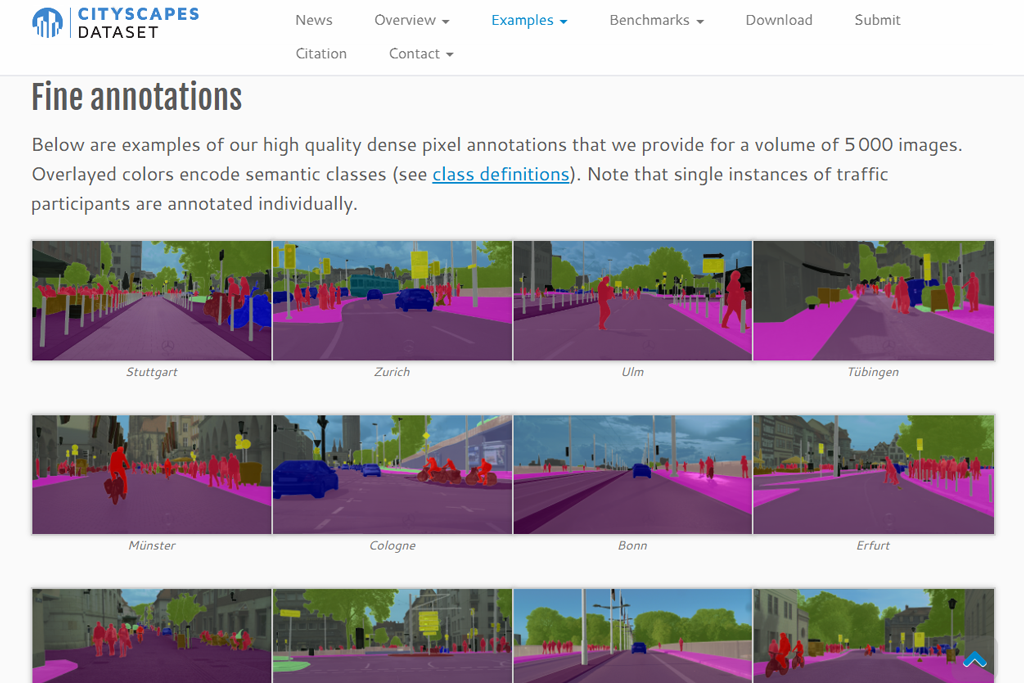
Image separation datasets. Essential for touching up portraits and editing specific parts of photos.
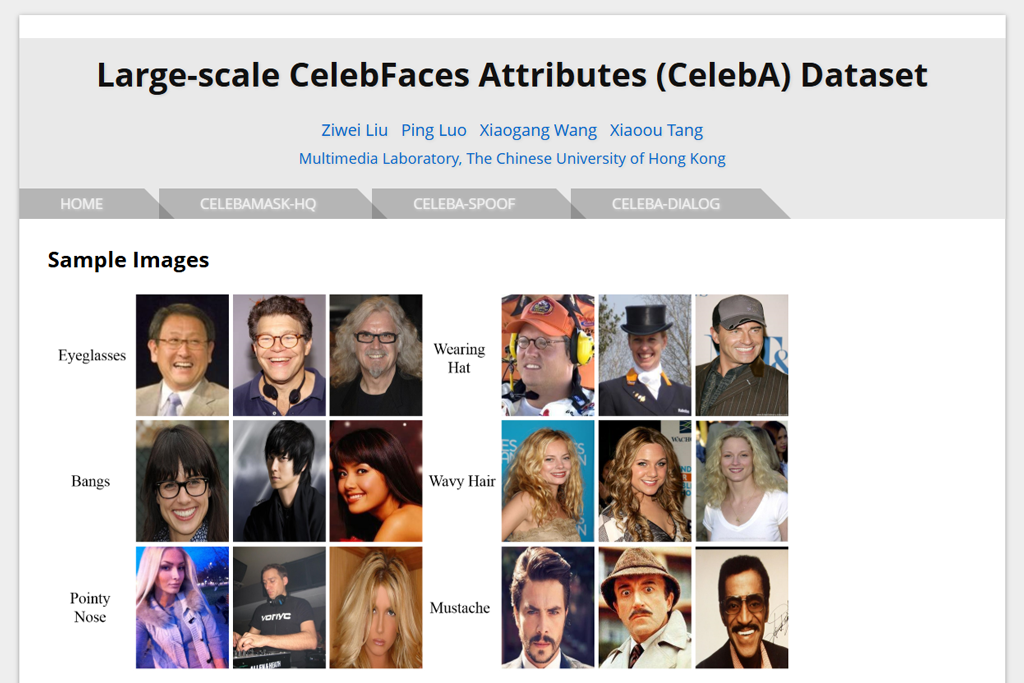
Face-focused datasets. Drives skin refinement, eye improvements, and facial analysis. These are all the key features that an AI art generator needs to work with human faces properly.
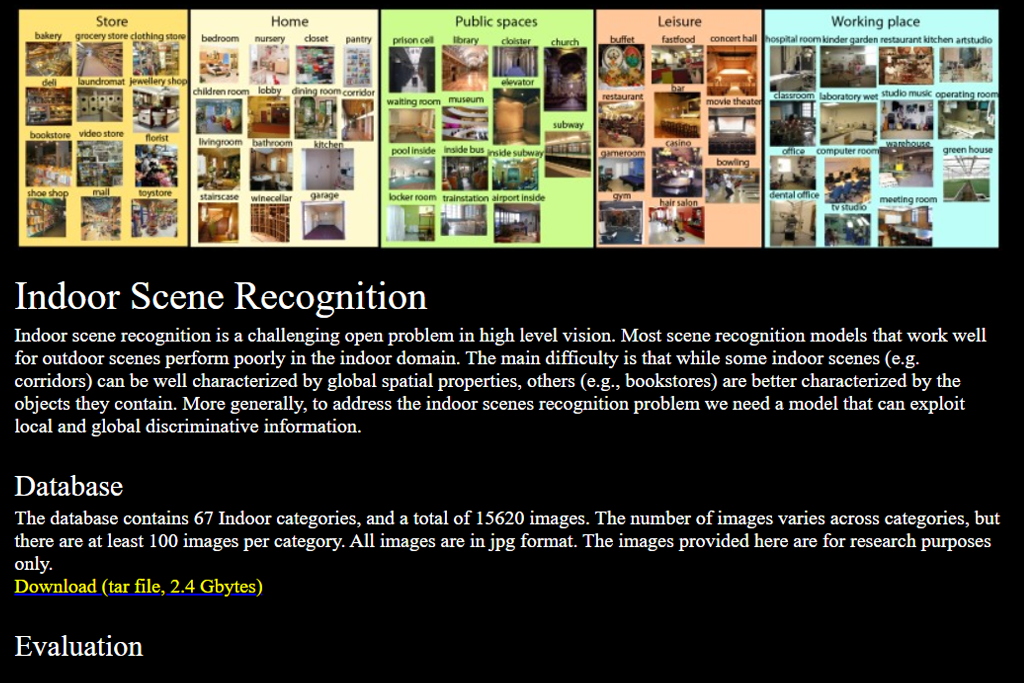
Environment datasets. Helpful for fixing brightness, automatically adjusting colors, and balancing white tones.
Specialized field datasets. Healthcare imaging, aerial photos, cars, and more.
After trying them all out, I discovered that even the largest collections regularly miss what actually matters to photographers.
I spent several weeks with my FixThePhoto team, marking image training datasets, sorting them, and testing them. What we discovered was eye-opening:
Most datasets don’t account for tricky lighting situations. We noticed this when using Photoshop’s AI features on photos with complicated stage lights or harsh backlighting. The tools just couldn’t handle it well.
Most image collections don’t capture actual skin texture properly. The photos are usually blurred, squeezed down in quality, or just too small. So, AI tools designed for photo editing can’t properly learn.
The labeling is inconsistent. One image training dataset may tag hair as background scenery. Another collection may skip labeling mirror reflections completely. And plenty of them just pretend accessories don’t exist.
AI systems that learn only from computer-generated images end up giving fake results. Everything comes out too polished and plastic, missing real textures. This explains why AI tools like Firefly AI art generator in Photoshop give you wildly different results based on how varied their training images were.
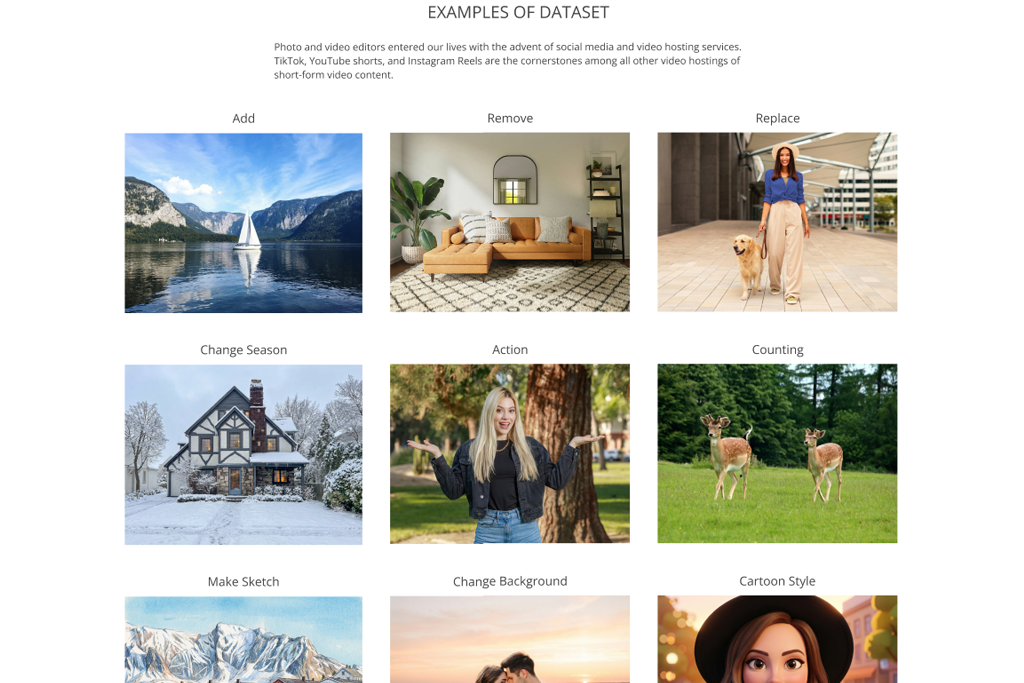
FixThePhoto AI Photo Edit Dataset was created for this exact reason – to work with realistic photo problems and images taken in usual conditions.
During my experiments with background removal models, I noticed that one program consistently removed the veils from wedding photos. It happened because the training data it learned from never showed delicate, see-through materials. The model had no idea these fabrics should remain in the picture.
At that moment, I realized that models can only recognize what they’ve been exposed to during training. That’s why our training data contains examples of:
These small details make a big difference when editing real photos. Many AI editing tools you find on the internet have learned from images that don’t reflect true photography work. They trained on generic stock photos, pictures of random objects, computer-generated images, and selfies with lots of filters applied. It’s no surprise the output often looks fake or unnatural.
If you want AI tools that can help professional photographers, the training materials need to come from real photographers.


ImageNet was among my earliest experiments when I began working with computer vision. It’s huge, covers many subjects, and remains one of the best resources for teaching AI to understand images.
This image training dataset contains millions of pictures sorted into thousands of different categories. So, it is ideal for creating versatile models.
During our internal tests, I appreciated how effectively it teaches AI systems to recognize object forms, surface patterns, and meaning before tackling more focused applications.

MS COCO quickly turned into our team’s favorite resource for testing how well tools could identify and separate objects in images. It is so valuable because it shows everyday scenes with items stacked on top of each other, messy backgrounds, and all the unpredictable elements you’d find in actual photos.
The labels and outlines around objects are really well done and stay consistent throughout, which is very helpful when training AI models. It works particularly well for projects where you need to remove backgrounds or perform content-aware editing.

We created this after noticing that other machine learning image datasets didn’t capture what actual photography looks like, namely, RAW details, different light sources, visible skin details, slightly blurry shots, and background distractions. This is paramount when combining AI and photography.
“This dataset keeps skin looking lifelike when AI adjusts colors. The textures and lighting stay natural. Since it uses raw files, editing feels like working on actual photoshoot images.”

I personally selected thousands of images, worked with my team to label everything properly, and ensured it covered the kinds of photos people actually edit: headshots, room shots, wedding pictures, casual lifestyle images, and product photography for businesses. This is exactly the resource I needed but couldn’t find when I started out.

I believe Open Images is one of the top image databases for deep learning out there. It is huge, carefully organized, and full of realistic photos that capture everyday scenes.
During my team’s testing sessions, I frequently pulled examples from this collection since the labeled boxes and outlined shapes work remarkably well, especially considering how big the dataset is.
It’s perfect when you want diversity. There are images of humans, items, cars, meals, and outdoor views. This is basically the wide mix that strong artificial intelligence software need to make accurate guesses.

Visual Genome exceeded my expectations. It goes beyond simply identifying things. It explains how different elements connect with one another. When you need models that grasp context, connections, or a richer understanding of what’s happening in a picture, this image training dataset stands out from the rest.
I tried it while working on description-based functions and was genuinely amazed at how much the models improved once they learned from its connection-focused labels. It’s among the rare resources that truly show AI how entire scenes function, rather than just listing what appears in them. This feature significantly enhances how well today’s generative AI tools perform.

DepositPhotos a came in handy when I required a large, legally safe material library to train AI models rather than collecting random visuals from various sources. I investigated it as a prospective data source for projects requiring photos, videos, audio tracks, templates, and metadata in one location, particularly where model accuracy and commercial compliance are critical.
The collection's size and variety stuck out to me the most. DepositPhotos provides 290 million+ photos, 17 million+ videos, 3 million+ SFX and music tracks, and 190,000 templates, making it suitable not only for computer vision applications, but also for generative AI, speech and audio processing, and recognition workflows.

I love using the Places dataset, particularly when I want AI models to recognize settings and surroundings instead of focusing only on individual items. During my testing, I quickly saw how effectively it picks up on feelings, ambiance, and the overall situation. This is extremely useful for photography-related work.
“Places stands out with its scene-recognition accuracy. It copes well with unusual interiors, e.g., industrial kitchens and backstage dressing rooms.”

This image dataset for machine learning contains numerous pictures showing different inside and outside spaces. With it, our team could better understand the delicate background work when doing complicated photo edits.

Cityscape is my favorite collection of images when working on projects that require urban scene segmentation. It features sharp, street-view photos that are carefully labeled at the pixel level with great detail.
When I test models that detect objects, I’ve found it particularly helpful for teaching systems to recognize cars, people walking, and city structures like buildings and roads. I am amazed by how accurate the labels are. There are barely any mistakes, so it is ideal for work that needs precise identification of urban elements.

I was very impressed by how well-organized and reliable this image dataset turned out to be. It covers 37 different types of cats and dogs, complete with category tags, outline masks, and facial feature points.
When I tried it out for testing classification systems that need to spot fine details, I noticed the models picked up on small visual distinctions surprisingly fast. The dataset is compact enough that you can run experiments without waiting forever, yet it’s precise enough to give you useful outcomes. So, I believe it is perfect when your training systems need to recognize specific details.

CelebA is one of the best machine learning image datasets for recognizing facial features, including hairstyle, glasses, facial expressions, lighting conditions, and similar characteristics. My team and I relied on it extensively when building tools for editing portrait photos. I didn’t expect the labeling to be so dependable.
“CelebFaces stabilizes face-detection even when lighting or angles are far from perfect. The labeling is very accurate and consistent across the collection.”

The dataset includes a wide range of people, covers numerous different individuals, and provides thorough descriptions of their features. Even though many researchers have used it for years, it remains valuable for current machine learning projects and real-world uses.

LFW is one of the best-known facial image collections I’ve used. It was created to handle everyday face identification scenarios, e.g., regular lighting conditions, random camera positions, and authentic facial looks.
While evaluating face-matching systems, I appreciated their difficulty and raw nature. The photos aren’t heavily polished or staged, so you can get practical machine learning outcomes. It remains useful even now for checking how well face recognition systems perform under varied conditions.

CASIA WebFace was among the earliest big facial AI image datasets I worked with while evaluating identification systems. It contains more than 10,000 different people, gathered from actual internet photos, creating massive differences in brightness, facial angles, age ranges, and image clarity. This diversity is precisely why it’s so valuable.
During my tests, systems trained with CASIA performed much better on everyday photos compared to those using professionally shot images. It’s excellent for any practical face detection project.

FERET may seem dated, but it remains extremely useful for researching faces under controlled settings. During my testing, I was pleased by its uniform lighting, camera angles, and backgrounds. It works great for checking detailed face-comparison methods.
“FERET is my favorite option for controlled facial variations and testing how models handle angle and lighting shifts. It shows even minute flaws in pose estimation.”

While it doesn’t offer as much variety as modern image datasets for deep learning, its organized setup makes it perfect for measuring performance or training systems to recognize faces without interference from messy backgrounds or inconsistent conditions.


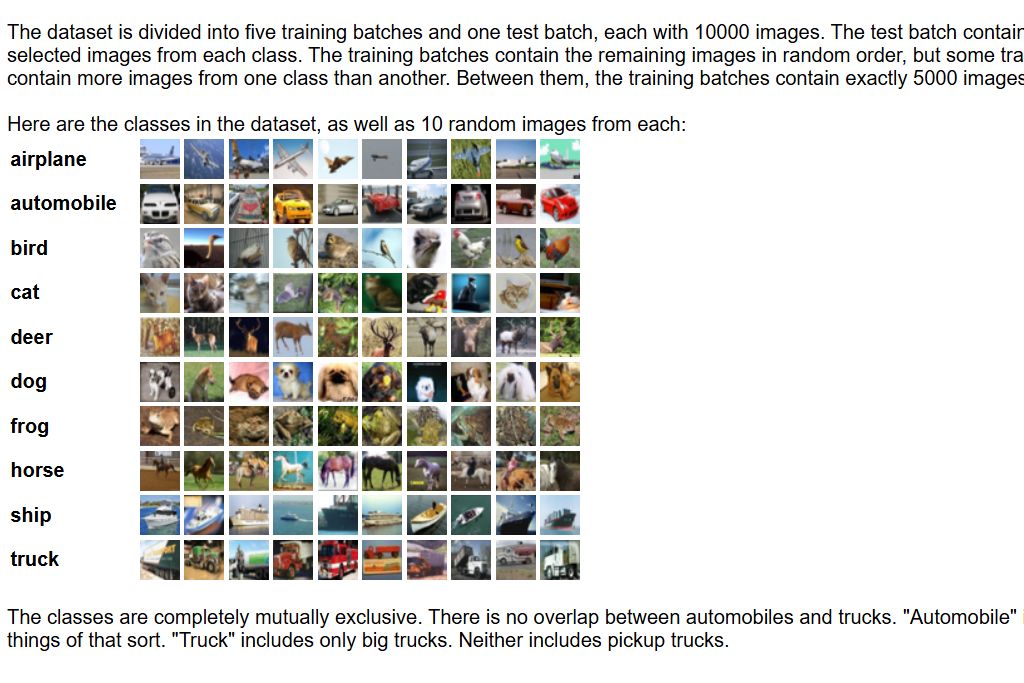
Almost everyone related to machine learning works with CIFAR eventually. I relied on it when I needed to test new model ideas quickly. The images are only 32×32 pixels, which seems really small, but that small size is actually what makes it great for fast experiments.
CIFAR-10 works well for newcomers since it’s straightforward. Plus, CIFAR-100 gives you more challenge when you’re ready. I find them both useful for checking if my model designs work properly before I move on to working with larger, full-resolution images.

Fashion-MNIST became my go-to image training dataset when I wanted something more practical than regular MNIST digits while keeping things simple. It features black-and-white pictures of clothes and accessories, which turned out to be very useful when testing how models handle different textures and patterns.
During testing, it helped me evaluate my models effectively before jumping into working with detailed, high-quality product photos. It’s well-organized, reliable, and a nice change from the usual datasets.

I frequently worked with Caltech-256 because it’s a solid medium-scale image dataset for studying how computers identify everyday objects. Unlike many earlier collections, this one offers greater variety and contains 256 different types of items with lots of natural differences.
It appeared specifically helpful when I was building systems that had to deal with weird camera positions, poor lighting conditions, and objects that weren’t perfectly centered. It’s great for checking how well your model performs under challenging conditions, without needing to work with datasets containing millions of pictures.

I turned to SVHN whenever I needed to see how well my number-reading systems handled real-world scenarios. While MNIST gives you clean, simple digits, SVHN pulls numbers straight from street photos of house addresses, meaning they’re messy, have lots of color variations, and sometimes things block part of them.
“SVHN can handle serious testing challenges. It isn’t scared of noisy street digits and messy scenes.”

When I trained my models using SVHN, they became much better at reading numbers in actual everyday situations. The image dataset is quick to use and really helps you check if your system can handle normal outdoor conditions and lighting.

LSUN is one of the largest AI image datasets I’ve used, and it’s incredibly powerful for models that create pictures. Whenever I experimented with image-generating technology, LSUN helped produce the most lifelike results, particularly when building the core of an AI image generator.
The dataset contains millions of photos showing both inside and outside environments, which makes it excellent for teaching AI about different visual styles, surface patterns, and complete scenes. It’s perfect when you need to train on huge amounts of diverse material.


YouTube-8M can understand not only pictures, but entire videos. However, the features it provides for individual frames are extremely valuable for machine learning projects.
I tried it out while experimenting with AI editing software that needed to keep things consistent over time. The labels for identifying actions and objects were very detailed and comprehensive.
This image dataset works great for AI models that need to understand what’s happening across multiple frames in a row. It’s especially helpful when you’re building or testing supporting tools, like an AI image upscaler, as such tools have to keep each frame flows smoothly into the next without visual jumps or inconsistencies.

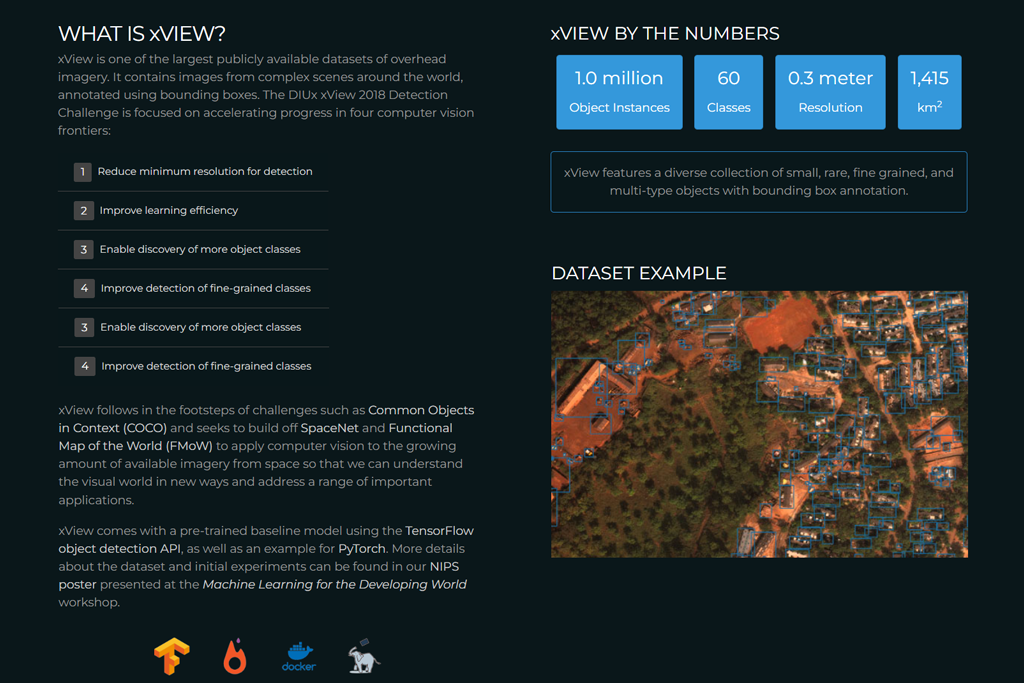
xView turned out to be tougher than I thought it would be. This dataset features crystal-clear satellite photos with carefully marked objects in them. Using it, I learned how much aerial images differ from regular photos taken at ground level.
It’s a fantastic image dataset when you need to spot small items from above, be it vehicles, structures, and machinery. The accuracy of its labeling was beneficial when I was testing AI models that struggled with objects of varying sizes.

IMDB-WIKI is the biggest free image training dataset you can find for guessing people’s ages from photos. I used it a lot when building AI models to improve portrait images.
“IMDB-WIKI is the best source for age-estimation models. The images vary in quality, letting you train models in a proper way.”

The dataset pulls celebrity pictures from IMDB and Wikipedia, giving you faces across all age groups, lighting setups, and photo qualities. I like that it is very authentic and diverse. The images look like actual portraits people take in real life, rather than carefully selected or staged photos you find in other datasets.

This dataset quickly became one of my favorite resources while developing tools that understand backgrounds. It includes thousands of pictures from common indoor locations, including kitchens, corridors, workspaces, and bedrooms.
While testing my models, I found it especially useful for teaching AI to tell apart rooms that look similar to each other. The wide variety of lighting situations in the photos was particularly helpful for editing projects where the AI needed to accurately recognize what type of space it was looking at.

At FixThePhoto, I work with visuals, labeling, and photography projects every day. Together with my colleagues from the FixThePhoto team, we tested image datasets. We wanted to find datasets that train models to perform well in real situations, not just score high on tests. Because we handle portrait editing, real estate photos, and more, we approached these datasets like we test any tool.
Before creating our final list, we reviewed many well-known image datasets for deep learning. SUN397, MIT Places, DeepFashion, and VisDA didn’t please us. Though popular, they had issues. Categories were too limited, labels were inconsistent, or images were too artificial for real-world use. Some had quantity but lacked variety.
I filtered datasets based on current ML tasks like image classification, object detection, segmentation, scene understanding, face recognition, and AI enhancement. My team and I downloaded each dataset and examined its structure, annotations, and licensing. We tested compatibility with PyTorch, TensorFlow, and augmentation libraries.
I personally verified annotation accuracy (bounding boxes, masks, and labels), because one mislabeled image can cause visible problems in final results, which highlights the difference between AI vs professional retouchers. We trained small models with each dataset to check training speed, performance quality, and label accuracy.
Our AI team tested them on segmentation and detection using our retouching tools, where errors in masks or object edges show up instantly. We also checked the image dataset quality. Some appeared large but contained duplicates, compression issues, or wrong labels. Others had excellent organization and clear metadata, which is essential when training models at scale.
Performance mattered too. We measured loading speed, augmentation ease, and user-friendliness of each dataset. Collections requiring excessive preprocessing or confusing formats scored lower. Those that worked smoothly with our pipeline stood out immediately.
We also reviewed licensing and usage rights. Some datasets weren’t clear about commercial AI training permissions, which is a critical issue for our production work. If usage rights weren’t completely transparent, we excluded them from our final list.





![7 Best AI Background Generators [Real Tests]](http://fixthephoto.com/blog/images/gallery/news_main__preview_28187.jpg)


![7 Best Design Wizard Alternatives [{{%year}} FixThePhoto Choice]](http://fixthephoto.com/blog/images/gallery/news_main__preview_27934.jpg)

















