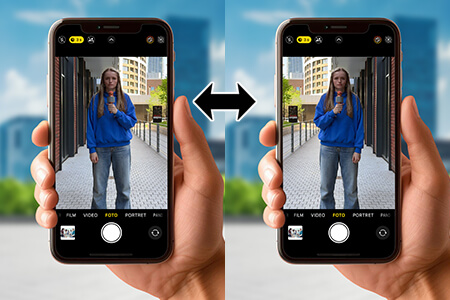
Content pillars for photographers are where my journey really started. As a senior retoucher at FixThePhoto who recently chose to build a small photography business on the side, I thought the toughest part would be taking photos and editing them. But the real challenge was figuring out what to post, where to share it, and how often, so that people would notice my work and book my services.
By the second month, I tried to get more “organized.” I created a color-coded content calendar, picked three main topics, and promised myself I would post every day. I shared polished reels, before-and-after edits, and carousel posts explaining retouching techniques, but my engagement stayed uneven. People were watching, yet very few turned into real clients.
So, I changed my approach and relied on what I do every day at FixThePhoto, solving client problems with clear, helpful content. I tested a new strategy, and over 90 days, I shared a better mix of educational posts, social proof, and behind-the-scenes content.
As a result, inquiries increased by about 35%, my reach grew to around 800,000 accounts, and I gained roughly 3,200 followers who actually contacted me about photo shoots. Those results weren’t a fluke - they came from staying consistent, being clear about the purpose of each post, and choosing the right platforms for what I wanted to achieve.
| Photographer | Pillar 1 | Pillar 2 | Pillar 3 |
|---|---|---|---|
|
Wedding
|
Planning tips
|
Real weddings
|
Vendor collabs
|
|
Portrait
|
Styling + prep
|
Posing + BTS
|
Client transformations
|
|
Event
|
Day highlights
|
Logistics + timing
|
Testimonials
|
|
Commercial
|
Case studies
|
Process (brief→final)
|
ROI/results
|
|
Landscape
|
Location guides
|
Timing & gear
|
Editing before/after
|
I found out the hard way that nice photos by themselves don’t lead to bookings. You need content with a clear goal, and content pillars to guide it.
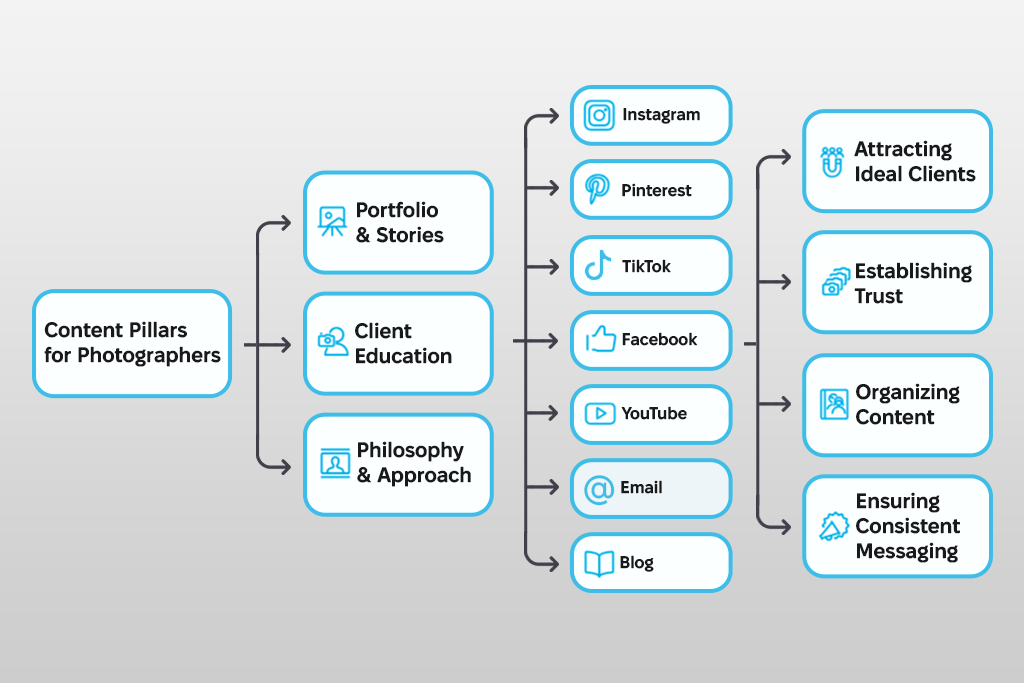
Content pillars are the main topics that all your posts should connect to. You can think of them as the base of your brand’s story – not strict rules, but a guide that helps keep your content useful and consistent with your brand.
From my work at FixThePhoto, I learned that content pillars prevent random posting. Before that, I shared nice-looking posts that didn’t guide people toward the next step, booking a shoot, visiting my website, or sending a message. Content pillars changed this approach. They make you ask simple questions like, “What is this post for?” and “What problem does it solve for my audience?”
How many pillars should you have? There’s no fixed rule, but in real use, 3 to 6 works best. Fewer than three can make your content feel repetitive, while more than six can make your message unfocused and confusing.
For wedding photographers, I usually suggest 4-5 content pillars, such as planning tips, real wedding stories, vendor collaborations, and client reviews. For portrait photographers, 3-4 pillars work well (for example, styling advice, before-and-after results, client stories, and common questions) to keep the content focused and easy to relate to.
My own tip from experience: I recommend using one content pillar to show the human side of your work - personal stories, how your team operates, or details you notice as a retoucher. Posts like these help create trust and make your brand stand out and stay memorable.
When I first became a professional photographer, I thought simply posting “good photos” was all I needed. One day I’d post a nice wedding photo, the next a before-and-after edit, and then a random behind-the-scenes clip just because I felt bad about not posting regularly.
The outcome was predictable: my feed felt messy, my message wasn’t clear, and people didn’t really understand what I was offering.
Everything changed when I began using photography content pillars. In my work as a FixThePhoto retoucher, I’ve always followed clear systems - working step by step with color, texture, shape, and final polish. But I had never applied that same structure to photography marketing. Once I did, the whole process suddenly made sense.
Here’s why a content framework is essential for photographers and forms the core of a brand that can grow and attract clients.

I used to spend hours looking at my screen, wondering, “What should I post today?” Does that sound familiar?
Pillars eliminate that. Once you define 3-6 main themes, you create a repeating flow of ideas. Instead of starting from zero every time, you just choose from your existing content categories.
For example, one of my main topics is client education. This includes content like what to wear for a shoot, session timelines, and posing advice. Whenever I run out of ideas, I return to this category and think of new ways to present it. I’ve stretched a single photo shoot into 5-7 different posts simply by creating content based on my key topics.
Outcome: no creative blocks and no late-night panic of “I need to post something” at 11 PM.
This really changed my perspective. When your audience sees consistent themes again and again, trust builds naturally over time.
People are more likely to follow and hire photographers who feel dependable. When someone opens your Instagram or website and sees clear topics like weddings, styling advice, behind-the-scenes content, or client reviews, they immediately understand:
But if one day you’re sharing elopement tips and the next day you’re talking about your favorite pasta recipe, people get confused - and confusion stops them from booking.
Pillars keep your message clear, focused, and centered on your clients.
Running a photography business already means balancing many things at once, including:
When you add content creation to the mix, it’s easy to feel overwhelmed and close to giving up on social media altogether. Content pillars solve this by giving you a clear, repeatable structure to follow.

Once you know what belongs where, you can:
One engagement shoot can easily become:
All within your established pillars. This approach helped me reduce my weekly content workflow time by almost 40%.
When my content is built around clear themes, I always test what actually works. Focusing more on those strong pillars makes growth steadier and easier to predict.
You stop posting at random and start posting with a clear strategy.
For example, if you’re a wedding photographer and regularly share content about:
Google, Instagram, and Pinterest begin to clearly understand your niche and are more likely to recommend your content to people who are actively looking for exactly that.

People book you when they trust you They trust you when they understand what you do
And they understand you when your message stays clear and consistent.
Content pillars fast-track that clarity. After I started using content pillars, I saw a clear rise in inquiries - not because my photos suddenly improved, but because my message became easy to understand.
In short, content themes for photographers are helpful:
They turn random posting into a clear strategy that helps you make money with photography, even when life gets busy, and for photographers, it always does.
When I first began taking social media seriously, I approached it like a creative experiment, following my instincts, posting spontaneously, and not worrying too much about structure. That freedom works well for editing styles or testing new lighting ideas, but it doesn’t work when your goal is to build an audience that trusts you.
After many late and exhausting nights scheduling posts at 2 a.m., I learned that a clear structure is what allows creativity to thrive. Creating social media content pillars isn’t about limiting yourself - it’s about building a reliable roadmap, a steady rhythm, and a focused direction that keeps your content aligned with what your audience truly values.
These are the steps that moved me from posting randomly to posting with purpose.

The advice “know your ideal client” is common, but after a decade in the photography industry, I see a clear gap: most photographers believe they understand their ideal client, until I begin asking the following questions:
For example, when I photograph destination weddings, my ideal couples value emotion, storytelling, and a beautiful setting. They look for guidance, elegance, and a smooth experience. This focus directs all of my content, from the guidance I offer to the behind-the-scenes glimpses I choose to share.
If you’re unsure who your ideal client is, think about your favorite past client. Then ask yourself:
Your content pillars should be based on what your audience cares about, not on what you feel like posting.
I’ll be honest - this step used to bother me. I didn’t want to pay attention to what others were doing because I wanted to focus on my own creative path. But once I began studying competitors the same way I study color, texture, or exposure, my mindset changed. The goal isn’t inspiration - it’s to notice patterns:
When I reviewed my competitors, I noticed that very few photographers in my niche talked about the emotional side of guiding couples, something I’m especially good at. So, I made that one of my main content pillars.
Think of competitors not as rivals, but as sources of useful information.
Trends in photography change incredibly fast - sometimes faster than a bride updates her Pinterest board. From what I’ve seen, photographers who grow steadily aren’t the ones who follow every new trend, but the ones who adjust trends to fit their own style and voice. Here’s how I stay up to date without feeling overwhelmed or pulled in all directions:
Trends help you stay current, but photography marketing pillars help people recognize you. Use trends to support your content, not to control it.
This part always takes me back to when I first started with the FixThePhoto team. In our brainstorming meetings, we’d throw out every idea we had - the good, the bad, the unclear, and the strange. Only after that would we go through them and pick the best ones.
Here’s what to do: open a Google Doc, your Notes app, or grab a whiteboard. List everything that your perfect client would find helpful, interesting, motivating, or would put their mind at ease.
Don’t think too hard. Your only task right now is to make a list.
Once you have your huge list of content ideas for your photography business, begin to organize them. You’ll see that they naturally group. Your main are already hiding in those groups. My own main topics are the following:
Your social media photography successful pillars might include:
Most photographers usually settle on 4-7 content pillars. More than that feels messy, while fewer can limit what you share.
This is the important secret part. Your main topics are not permanent rules - they’re just a starting point to test. Now, you need to check:
Sometimes a topic looks great in theory… but feels forced when you share it. That’s fine. Tweak it. Grow it. Replace it.
I tried creating a topic about “gear reviews” because so many others were doing it. But I didn’t enjoy it, and my audience didn’t connect with it. So, I dropped this social media marketing idea after just one month.
Your content pillars should inspire you, not wear you out.
This is where my FixThePhoto strategist side steps in. Take a moment to ask yourself:
Your content pillars should reflect where you want your business to go, not only where it is right now.
When I began moving toward higher-end, more emotional wedding photography, I changed my content pillars to focus more on storytelling, building trust, and connection, rather than only technical topics.
Your content pillars should change as your goals change.
Even the strongest content buckets won’t work unless you use them as a system. Here’s how my workflow looks today:
My rule: If a topic doesn’t fit into a pillar, I don’t post it - unless it genuinely adds to my brand or connects me to my audience on a personal level.

Things change. Photography changes. Clients change. Social media changes. Your main topics should change, too. Every three months, I grab a coffee, check my numbers, and ask myself:
This way, your content supports your business growth instead of slowing it down.
After I set my content pillars, the next step is to use them on the platforms where my clients are actually active.
From my years at FixThePhoto, I’ve learned that you don’t need to be on every social media for photographers. What matters is showing up consistently on the platforms where your content works best and where your ideal clients already spend their time.
| Best for | What to post | Quick tips |
|---|---|---|
|
Instagram
|
Visual portfolio + personal brand
|
Reels, BTS, carousels, client stories
|
|
Pinterest
|
Evergreen discovery + website traffic
|
Vertical pins, galleries, blog pins
|
|
TikTok
|
Organic reach + rapid discovery
|
Short BTS, tips, before/afters
|
|
YouTube
|
Longform authority + SEO
|
Tutorials, full BTS, client Q&As
|
|
Facebook
|
Local bookings + groups
|
Albums, testimonials, events
|
Here are general tips that work everywhere:
Below is the exact plan I use for each platform, what works best there, and what I’ve learned along the way.

Instagram is the platform where clients truly get to know you. Most people who end up booking me (whether couples, brands, or other creatives) say they watched my Reels or browsed my carousel posts before deciding to get in touch.
Best for: Show your style, build trust, and give a look behind the scenes.
What content works best:
My practical tips:

Pinterest is a quiet but strong source of clients. Remember, it’s a search engine first, not a social feed. This changes your whole approach.
Best for: Getting blog traffic, staying visible long term, and inspiring destination, wedding, and portrait photography.
What content works best:
My practical tips:
TikTok caught me off guard. I first thought it was only about trends and dancing, but when I began sharing day-to-day moments, client preparation advice, and reaction videos, I quickly saw how much the platform values real, honest content.
Best for: Content focused on personality, storytelling, fast tips, and wide reach.
What content works best:
My practical tips:

Even though Facebook isn’t considered trendy, my visual content marketing still works very well there for local photography services. In fact, most of my mini-session bookings come from there.
Best for: Local visibility, community groups, event posts, and tagging clients.
What content works best:
My practical tips:
YouTube grows more slowly than Instagram or TikTok, but it builds much stronger trust. I’ve had clients book me just because they watched my location tours or editing videos.
Best for: Tutorials, in-depth content, SEO, and demonstrating expertise.
What content works best:
My practical tips:
Best for: Building relationships with clients, sharing exclusive advice, promoting new services, and driving traffic.
What content works best:
My practical tips:
Every platform leads people to one main place: your website. This is where your content ideas for photography business turn into complete, polished resources. You can use full website pages, blog posts, or landing pages to grow your photography and your clientele.
Best for: Digital marketing, long-form guides, and evergreen authority.
What content works best:
My practical tips:
When I speak with other photographers on my team at FixThePhoto, I always share one key point: Instagram is still the simplest way to introduce yourself and your style before people even visit your website.
The key isn’t posting more often, but posting in a smarter way. Over time, I’ve created a content system that combines timeless topics with current trends, so I always have fresh photography business content ideas to share.
Below are 50 Instagram ideas that I personally use or suggest. They include a healthy mix of Reels, posts, and Stories to keep your profile active, even during busy weeks when you’re overloaded with edits and client work.
1. Share a breakdown of your signature editing style, showing the steps behind your color look without revealing all your secrets.
2. Write a story-driven caption about a memorable shoot - clients enjoy learning about the real moments behind the photos.
3. Post a client transformation carousel using a seamless Instagram multi-post - show the journey from being nervous at the start to confident in the final photos.
4. Talk about your favorite lens and explain why you like it, based on real experience rather than technical specs.
5. A post about mistakes you made as a beginner — it usually gets good engagement and shows your experience.
6. Seasonal photo shoot ideas for clients, like fall couples, spring flowers, or snowy portraits.
7. A location highlight, such as parks, rooftops, beaches, or city streets.
8. Explain your approach to posing - natural, guided, or a mix of both.
9. Post a photo set from one shoot with 5–8 images that tell a short story.
10. Share your favorite editing color palette and why it matches your brand.
11. Talk about a tough lighting situation you faced and how you solved it.
12. Write about things you wish clients knew before a shoot - helpful advice that can prevent mistakes.
13. Talk about your favorite props and how you use them, like hats, jackets, flowers, or reflective items.
14. Explain why you enjoy shooting during golden hour or blue hour - it’s something many people relate to.
15. Share your real journey as a photographer, not a generic story, but what actually happened.
16. Explain why you do or don’t include black-and-white photos in your galleries.
17. Explain the style behind your brand voice, such as emotional, clean, playful, or documentary.
18. Share your top five tips for photographing children or shy clients.
19. Tell a meaningful story behind a photo - people connect with emotional moments.
20. Show a strong before-and-after retouching example that looks natural and professional.
21. Add an “Ask me anything about your upcoming shoot” question sticker.
22. Create a poll like “Which edit do you prefer?” to increase engagement.
23. Give a quick look inside your camera bag - people love seeing your gear.
24. Show what you’re wearing to a shoot to mix practical tips with personal style.
25. Share client reactions to their finished gallery (screenshots or short videos), with permission.
26. Create a short posing tutorial and show 2–3 simple prompts.
27. Show your real editing process, including your workspace as it really looks.
28. Share a “day in the life” story, from morning coffee to uploading photos.
29. Highlight your favorite local vendors, like venues, florists, or makeup artists.
30. Post a countdown to an upcoming mini-session date.
31. Share your favorite podcasts or music playlists you listen to while editing.
32. Post your lighting do’s and don’ts - very helpful content people like to save.
33. Show printed products your clients receive, such as albums, canvases, or photo boxes.
34. Create a weekly highlights reel with your favorite recent photos.
35. Share your photography bucket list, including dream locations, ideas, and styles.
36. Explain how you look for and choose photo locations, and take viewers along with you.
37. Share your honest opinions about common photography myths, like RAW files or camera gear.
38. Post a small behind-the-scenes moment from your real life.
39. Create a simple checklist to help clients get ready for a shoot.
40. Share a motivational quote that truly reflects your own experience.
41. Create a “photographer POV” reel that shows you shooting, mixed with the final photos.
42. Show the “expectation vs reality” of a photoshoot - it’s usually funny and relatable.
43. Explain how to pose with flowing fabrics or capture movement in dresses.
44. Share simple, visual tips for taking soft, dreamy golden-hour portraits.
45. Show how you arrange a flat lay - calming to watch and useful to learn.
46. Show the full behind-the-scenes process of an engagement shoot.
47. Display your editing process in a quick 5-8 second clip that’s smooth and satisfying to watch.
48. Share your most emotional moment with a client, with their permission.
49. Explain why choosing a professional photographer is important, based on real experience.
50. Compare your older work with your current work to show growth - this type of content always connects.