
I used to think Ideogram was unbeatable for creating images with text. For years, whenever I needed to design posters, advertisements, or product visuals that required strong typography and well-balanced layouts, Ideogram was always my first choice.
Recently, I noticed that Ideogram's output quality began declining. The text within images showed alignment problems, the edges lacked sharpness, and the spacing between letters didn't match my standards. This meant I had to open every generated image in Photoshop for corrections. That’s why I started to look for Ideogram alternatives.
My position involves evaluating design software at FixThePhoto, so I decided to approach this as a structured research project. I gathered input from my coworkers, examined conversations on Reddit, reviewed numerous YouTube analyses, and collected over 15 Ideogram alternatives for personal testing. To ensure the comparison was fair, I ran each tool, Ideogram included, through the identical prompt.
“Create a clean, minimalistic product poster for an organic skincare brand with the text ‘Pure Glow. 100% Natural. Made with Love.’ in elegant modern typography.”
I selected this prompt because it addresses practical concerns that matter in actual design work. It is important to maintain visual brand identity, ensure text readability, and arrange elements effectively within the frame. When I evaluate alternatives to Ideogram, I prioritized:
I tested and compared multiple tools, and eventually selected these 5 Ideogram alternatives. I valued their result quality, ease of use, range of styling options, and effective typography management.
Since its release in 2023, Ideogram has become one of the most discussed AI image generators available. From my perspective, its main advantage is that it handles text rendering inside images better than other comparable tools.
I believe Ideogram serves as an excellent solution for designers working on tight deadlines and needing branding assets, ad designs, or typography ideas. It works well because it combines visual processing with language understanding, so it can recognize and reproduce letter forms more accurately than most other AI image tools and even dedicated AI font generators. Here are the main strengths and weaknesses I've noticed:
I tested Ideogram with the phrase "Pure Glow. 100% Natural. Made with Love." and received five different outputs. While they appeared acceptable at first glance, I noticed clear problems while examining them closely. In two versions, the "100%" text was distorted. In others, the word "Natural" was displayed with inconsistent spacing between letters. The overall layout and visual composition were appealing, but the text rendering was unpredictable and unreliable for professional use.
To my mind, Ideogram can be useful for quick mockups and designs intended for personal or internal purposes. However, if you have professional design assignments, especially those destined for print or public marketing, you’d better choose Ideogram free or paid alternatives.
I've learned that text rendering in images requires a different approach than standard image generation. The challenge is that AI must grasp precise letter structure and positioning, not merely visual design. Fonts are governed by strict rules. Letters need correct sizing, alignment, and connections to each other.
When an AI model hasn't been specifically trained on typography, small flaws become obvious and make the text look poor. Based on my testing, these are the most effective techniques for improving text quality in AI image generators:
Ideogram deserves recognition for launching the era of text-aware image generation. However, the market has evolved, and I'd recommend considering newer Ideogram alternatives. Adobe Firefly, Midjourney, and Flux.1 outperform Ideogram in typography precision and professional functionality. These competitors offer greater flexibility for design work while maintaining stronger text handling capabilities.
Best for: beginner and mid-level designers
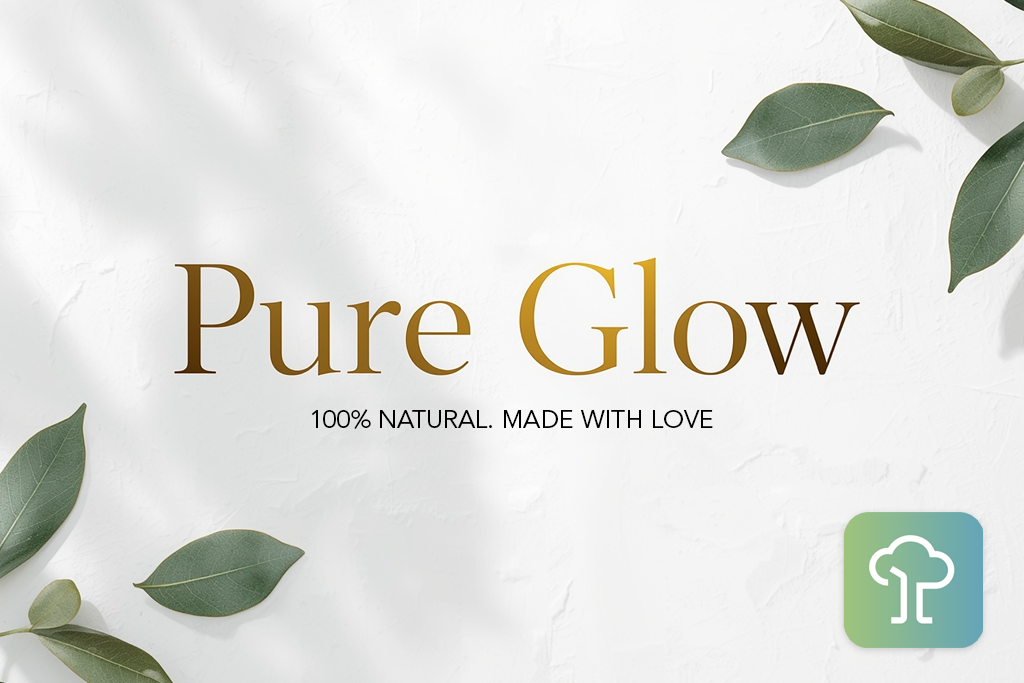
In my opinion, Flux.1 deserves more recognition as Ideogram AI free alternative. I first encountered it on Reddit in a thread comparing Ideogram analogs. Users specifically praised the program for text handling capabilities against premium-tier AI art generators. I felt compelled to evaluate this myself.
Flux.1 is indeed impressive, especially considering its recent launch. The platform appeals to me because of the clean user interface, the contemporary visual design, and most importantly, the quality of outputs available in the free version. I was absolutely stunned by the speed at which it processes requests. I tested it using the same prompt I had run through every other tool I evaluated.
“If you want to get readable text and eye-pleasing visuals, use short, brand-specific prompts, e.g.,“luxury skincare ad,” and specify “white background” or “studio lighting”. Flux.1 processes such requests easily.”

Test prompt results: Flux.1 delivered impressive results in just seconds. The four designs looked very professional. The text was crisp, properly aligned, and well-distributed. Ideogram doesn’t deliver this quality. The overall aesthetic reminded me of premium advertising work, featuring refined gradients, thoughtful color balance, and refined lighting.
I like Flux.1's design approach. It clearly understands contemporary minimalist principles. Rather than overcrowding compositions, it maintains restraint and balance. In contrast, Ideogram tends to add excessive styling and sometimes compromises text legibility.
Flux.1 always delivers unified visuals. I now rely on it for generating clean design assets for FixThePhoto prototypes and exploring compositional variations before transferring concepts to Illustrator. While it offers fewer customization options than Firefly, it remains one of the most reliable Ideogram AI generator alternatives I've evaluated.
Pricing: free with limits, from $9.99/mo, from $95/year
Best for: professional designers, brand creators
I discovered Adobe Firefly through industry discussions on Reddit and within Adobe's community channels. Several colleagues at FixThePhoto were already experimenting with it for design concepts. That’s why I decided to include it in my comparison of Ideogram alternatives. Since I work regularly with Adobe's software, it is very helpful that Firefly integrates with Photoshop and Illustrator.
At first glance, Firefly appears to be another standard AI image generator. In fact, it has some important distinctions. The bragging point is contextual awareness. Rather than producing arbitrary text renderings, Firefly genuinely comprehends typographic principles and intent.
“Opt for “Text Effect” mode in the program if you need creative typography or logos. “Generative Fill” works best for quick layout fixes. If you combine them, you can minimize post-editing.”

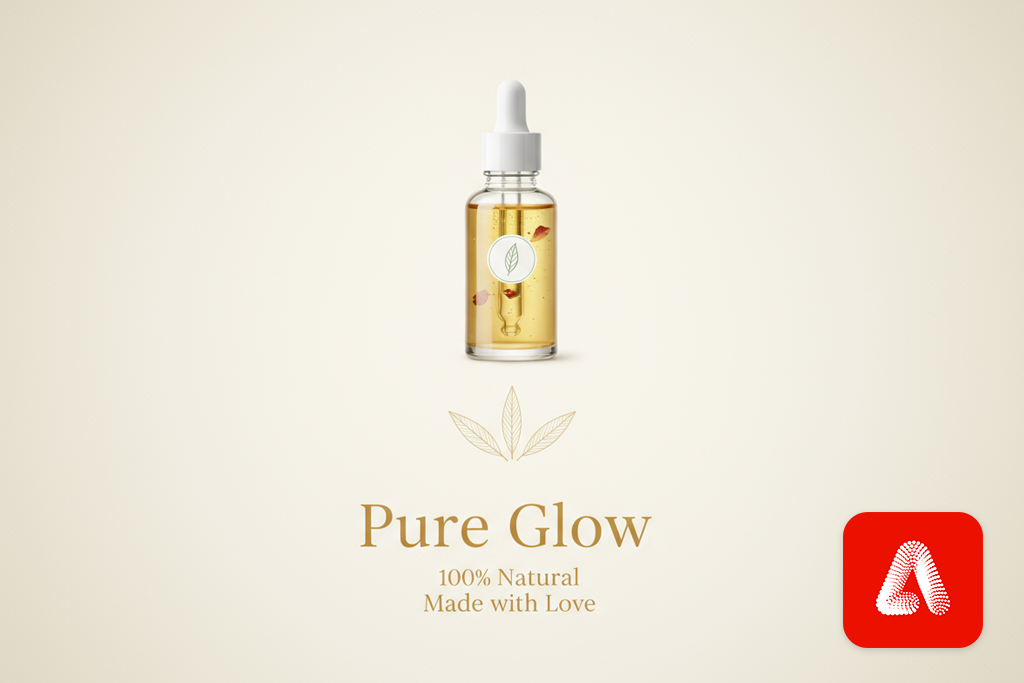
Test prompt results: The designs it created looked clean and polished. The text was actually readable, which doesn't happen often with most AI tools. The fonts were neat, and the light effects worked seamlessly with the text itself.
I created Ideogram, Stable Diffusion vs Firefly comparison, and liked that Firefly didn't scramble or misplace the words. I also tested several variations using different text positions, e.g., centered alignment, bottom right placement, and text overlaid on a bottle label. Every single result looked like professional work that I would show to my clients without hesitation.
Firefly lets you adjust text effects instantly as you work. You can generate multiple versions with colors that match exactly what you need, and you can blend AI-created fonts with your own brand elements right in Photoshop. It's clear that Adobe designed this tool with designers in mind.
Still, Firefly does have some limitations. It can take longer when you use complex prompts, and the free version restricts the number of designs you can create each day. However, if you're a professional who values precision with text and top-notch visuals, I genuinely believe this tool is a terrific alternative to Ideogram AI image generator.
Pricing: free with limits, from $4.99/mo, from $49.99/year
Best for: creative professionals, concept designers
I've been using Midjourney since way back. I started with it mainly for creating concept art and surreal artistic photos. When I got around to testing other Ideogram AI alternatives, I wondered how well Midjourney could actually handle putting text into images. It's pretty good at it, but there are certain things to keep in mind.
While Firefly and Ideogram seem built for text design, Midjourney prioritizes overall image quality and style instead. Yes, you have to use Discord to operate it, which is clunky at first, but I actually appreciate that you can fine-tune results through carefully crafted prompts.
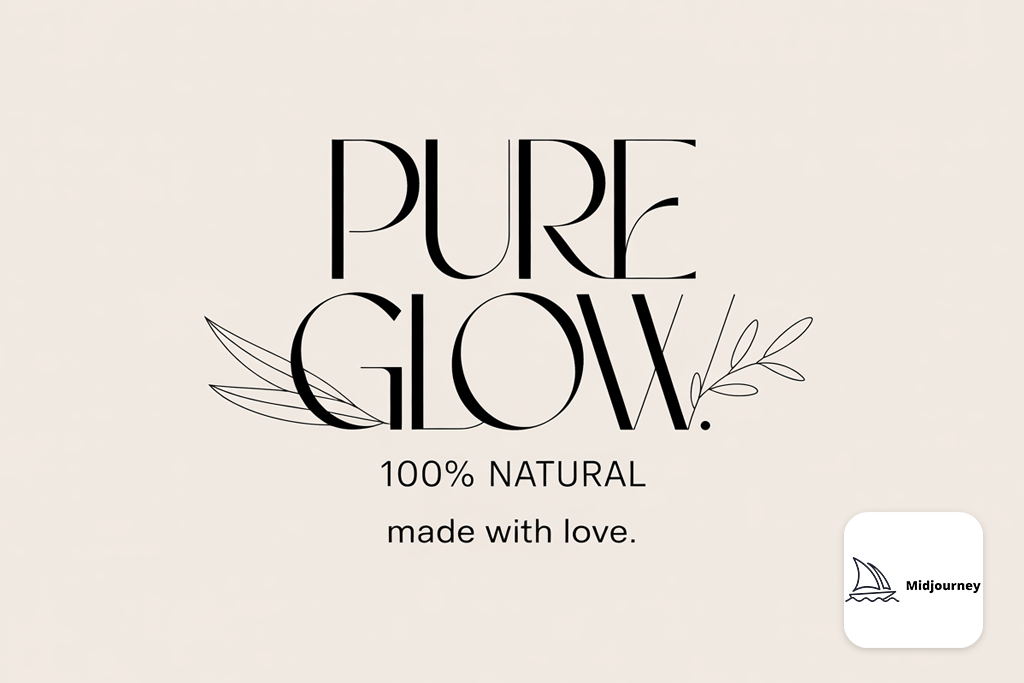
Test prompt results: The images came out looking very professional. However, the text handling was inconsistent. Sometimes the main text, like "Pure Glow," showed up crystal clear and readable. Other times, the smaller text bits just turned into a mess. They looked nice and polished, but you literally couldn't read what they said.
Despite this big flaw, I have to admit the images themselves were so well-made that I'd still recommend it as one of the best Ideogram AI free replacements.
“Be precise and write "clean typography, centered logo text, ad-style layout" in your prompt. When you're happy with the basic version, use the v6 model to enlarge and refine it.”

In my opinion, Midjourney outperforms other programs with its understanding of composition. When the text doesn't work out, it's not jarring. The result looks intentional, like it was part of the overall design strategy rather than an error. This helps me a lot in background artwork, mood boards, and client presentations where I'll improve the text later using Photoshop.
The contrast with Ideogram and some free Midjourney alternatives is pretty clear to me. Ideogram gets the typography right first, whereas Midjourney specializes in creating images with visual impact and narrative depth. So, if you want to capture the right mood and aesthetic rather than achieve perfect text accuracy, Midjourney is genuinely the better choice.
Pricing: free trial (limited), from $10/mo, from $96/year

Best for: social media creators, marketers
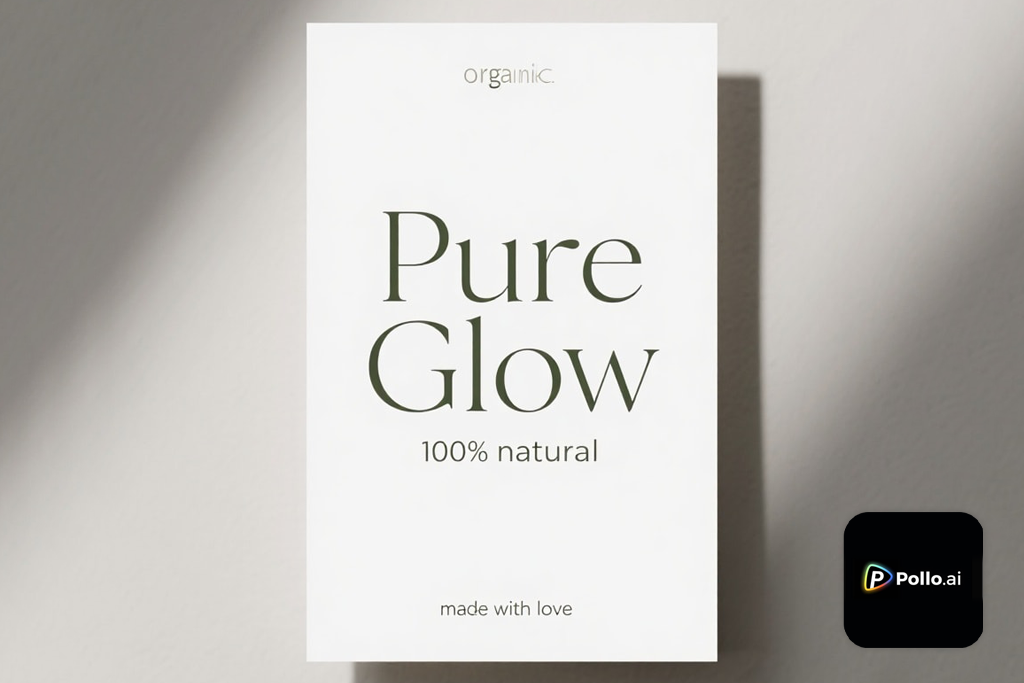
I found out about PolloAI through a smaller YouTube channel. The author talked about AI image generators that didn't get much attention. He described it as the most underrated Ideogram AI app alternative, so I got interested. I was skeptical about whether it could really match up with the popular options, but I decided to test it out.
I should admit I was wrong to be skeptical. Pollo AI turned out to be genuinely one of the most user-friendly AI design tools I've tried. It's particularly great for creating quick social media graphics and ad-style layouts.
When you first look at Pollo AI, the design is pretty minimal, and may even appear almost bare-bones. But I think that's exactly what makes it work. You're not wasting time digging through settings or hidden menus. Just write your prompt, select a style preset, and the results pop up instantly. I tested it with my standard prompt.
“Stick to short phrases between 2 and 5 words, and make sure you're using the "Poster" or "Ad Layout" option. When you follow this approach, the images look genuinely commercial and professional.”

Test prompt results: Pollo AI delivers clean, well-balanced designs that look like they belong on Instagram straight away. The text mostly comes out readable, even if it's not perfectly sharp. The speed and output quality are honestly impressive if you need to create ad previews quickly or experiment with social media layouts.
I particularly like the built-in template alignment. Instead of constantly tweaking alignment and spacing, Pollo AI does it for you automatically. Your design is professionally arranged without the extra work. That's a huge advantage over Ideogram, where I'd typically generate multiple versions just to nail the right framing.
Still, this isn’t the best alternative to Ideogram AI art generator if you're working on serious branding or projects that depend heavily on perfect typography. It's simpler and lighter than that. But if you need a quick, reliable solution for everyday design tasks, Pollo AI is genuinely worth using.
Pricing: free with limits, from $7.99/mo, from $69/year
Best for: hobbyists, artists, and concept creators
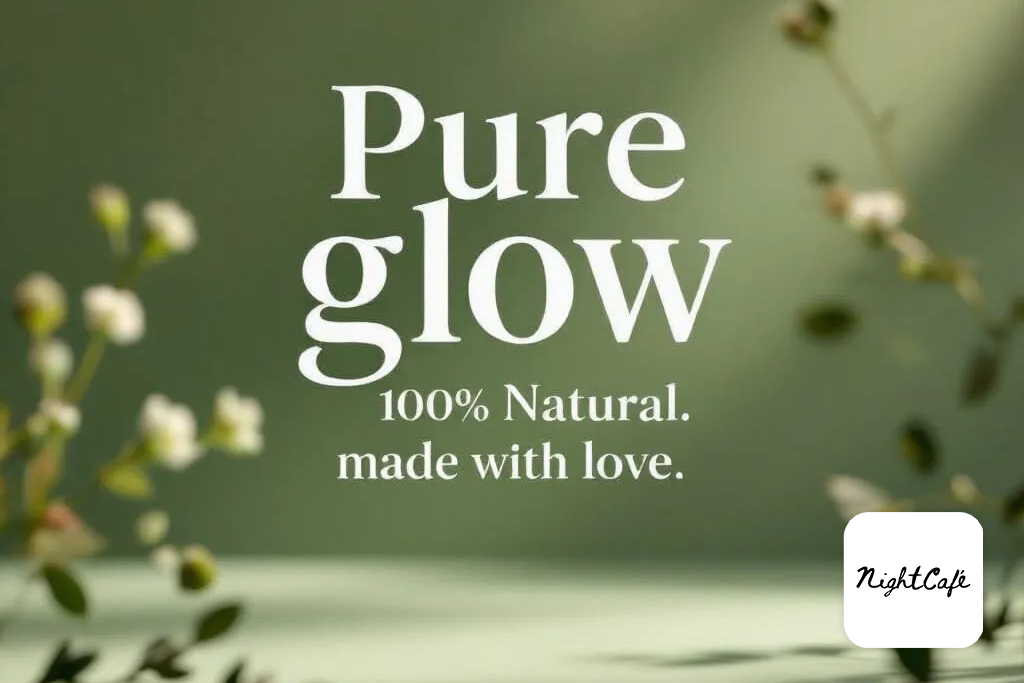
I learned about NightCafe several years ago when I was comparing various AI art tools. It was pretty rough back then, but it has developed over time. Instead of being just one tool, it's evolved into a serious platform where you can access multiple AI engines, including DALL·E, Stable Diffusion, and CLIP-based models. They are available from the same interface, which is very convenient.
Test prompt results: I thought NightCafe probably wouldn't handle text very well, but it performed better than I expected. Most free Ideogram AI online tools struggle with this, but NightCafe managed it pretty respectably. The results looked more like paintings rather than photos, but the text was clear enough that you could actually read what it said.
“If you're working with text in your images, go with the "Coherent" or "Vibrant" preset option. Thus, your text will be sharper and the overall colors will look more balanced and appealing.”

If you're deciding between Nightcafe vs Adobe Firefly or Ideogram, here's what makes NightCafe different. It encourages you to experiment. Instead of just creating one image and being done, you can blend artistic styles, apply filters, and then feed your creation through another AI model to see a completely different interpretation. I tried this myself. I started with SDXL, applied a poster art style, and ended up with something that looked like a professional boutique advertisement.
The community gallery deserves special praise. You can scroll through a gallery of other creators' work, look at the exact prompts they used, and try modifying those prompts to see how the results change. It's basically a learning tool built right in, which Ideogram doesn't offer. Then there's the credit system. You can earn free credits by participating and contributing, so you're not forced to spend money if you're just starting out. For beginners, that's a huge advantage.
Still, NightCafe is not designed for professional branding work. Besides, if you add too much text, it gets warped or fades out. So, if your goal is to sketch out design ideas, create fun artistic posters, or make quick visuals for social media, it's a good alternative to Ideogram AI art generator.
Pricing: free with credits, from $9.99/mo, from $79/year
I spend my days at FixThePhoto constantly trying out new creative tools. There are AI photo editors, color grading apps, and more. It's just part of the job. But recently, I decided to find solid Ideogram alternatives that could handle text-heavy designs. That's the tricky part most tools fail to cope with.
I pulled in some colleagues from the FixThePhoto team, and we started testing these alternatives together. We didn't pick random options, but went with tools that actual users were recommending on Reddit, YouTube, and design forums. We did our best to find tools which could create gorgeous visuals and handle text layouts that you'd actually want to use.
There were some tools that caught my eye initially, but we didn’t include them on the list after tests. I tested Bing Image Creator, Playground AI, Leonardo AI, BlueWillow, and Craiyon through thorough tests, but they didn’t meet professional standards. The problem was, they all had serious flaws. Some couldn't handle text properly, others produced messy-looking images, and a few were painfully slow to use.
I used a checklist of five things that matter to me as a professional when testing each Ideogram AI alternative.
I didn't do this alone. Two other designers at FixThePhoto reviewed all the results with me. We checked how the text blended into the images, whether the spacing was correct, and if everything looked like it came from the same brand. Firefly and Flux.1 produced professional-quality images without any hassle. The others weren’t so efficient. We usually have to regenerate images multiple times before we achieve something acceptable.
I think it's really important to consider the accessibility of such tools for people who are just starting out. A lot of freelancers and small design teams don't have huge budgets, so I made sure to find platforms that offered solid free options. In my opinion, if a tool costs money upfront with no free trial, it shouldn't even be considered in this comparison.
While testing different tools, I didn’t want to just list the best Ideogram alternatives available. My goal was to find tools that could actually work as a good replacement to Ideogram for real design projects.
After spending weeks testing all these options, here's my honest opinion on what to use if Ideogram isn't working for you:
Adobe Firefly is the one I'd pick if you're serious about your work and need something you can count on. The text looks great, and if you already use Adobe stuff, it just fits right in.
Midjourney is incredible if you're an artist or someone who loves storytelling through visuals. Sure, the text may not be perfect, but the aesthetic quality is unreal.
Flux.1 is my pick as the best Ideogram AI free alternative. It gives you clean, minimal designs and does a solid job with text.
NightCafe is perfect if you like experimenting with different creative projects.
Pollo AI is ideal if you want beautiful results fast, and you don't have any special skills.
All in all, they each do different things well. But if you specifically need readable images with nice text that you can actually use for real projects, go with Firefly or Flux.1.



![8 Best AI Tattoo Generator Tools [+Good Prompts]](http://fixthephoto.com/blog/images/gallery/news_main__preview_28202.jpg)


![Remove Logo From Clothes AI App [FREE]](http://fixthephoto.com/blog/images/gallery/news_main__preview_27732.png)
![7 Best AI Wallpaper Generator Tools in {{%year}} [Reviewed & Tested]](http://fixthephoto.com/blog/images/gallery/news_main__preview_28192.jpg)



















