Want to turn average photos into eye-catching, high-quality images without wasting hours behind a screen? Thanks to special Luminar discounts, you can slash up to 77% off feature-packed editing software driven by AI. It is possible to replace dull skies, retouch portraits, enhance natural colors, erase unwanted clutter, and reveal crisp textures using simple single-click tools.
Luminar
Luminar streamlines your creative process without sacrificing precision. It is a perfect option for beginners, globetrotting photographers, and social creators alike. Your investment is completely risk-free, too, backed by a 30-day money-back guarantee. Why pay standard prices when you can unlock professional image editing for less? Check out the active Luminar discounts today and improve every shot you take.
Looking for a seasonal Luminar Neo deal? Skylum’s Black Friday offer – up to 77% OFF now includes the following promotional prices:
Whether you work on a PC or across many devices, compare the available plans to find the one that best suits your editing routine. The partner announcement does not specify an offer end date or whether other coupon codes can be used with these prices, so before making a purchase, review the features that are included and the final checkout total.
Seasoned photographers rarely pay full price, especially when Luminar runs seasonal promotions on top software plans and standalone editions.
Take their recent Summer Upgrade campaign, which slashed costs by as much as up to 77%. Anyone securing their access before August 31, 2026, unlocked guaranteed access to the highly anticipated Fall 2026 Feature Update.
This major upgrade introduces next-gen creative tools:
Together, these upgrades maximize creative expression without clogging up your editing workflow.
During the Summer Upgrade event, Luminar featured discounts of up to 77% across its product lineup. Final costs depended on the precise edition selected alongside any promotional credits applied at checkout.
When evaluating a purchase, review each tier. Pick those that align with your working routine and complement your editing process. Current license holders need to look into dedicated upgrade rates, while first-time buyers should compare edition features and ownership models carefully.
Note that special pricing usually involves firm deadline dates, qualification requirements, and restrictions regarding offer stacking. Always review the final total before completing your purchase.
“Luminar’s Summer Upgrade campaign caught my attention with savings of up to 77%. I compared the available plans before choosing one for my photography work. Since not every discount applies to every plan, it’s worth checking the checkout price carefully. A quick comparison can help you find the most cost-effective option.”

Skylum honors service members by providing a special discount program. Verified military personnel can unlock 50% savings on software, making it easier to discover great Luminar Neo deals.
You can use modern tools to improve travel shots, refine family milestones, or level up your editing expertise. Thanks to this unique financial opportunity, advanced photography tools become more accessible to everyone.
To receive discounts for military personnel, take several simple steps.
Step 1: Provide evidence of your military service.
Upload a current military ID or official document issued by your service branch to confirm your status. Ensure your documentation satisfies all requirements before sending off your request.
Step 2: Go through the confirmation review.
After uploading your file, the verification team reviews your submission. Staff members will inspect your details to ensure you meet every eligibility criterion for the offer.
Step 3: Collect your savings coupon.
Once your status is verified, check your inbox for a up to 50% promo code. Store this message safely so you can easily access the voucher during your order.
Step 4: Redeem the code at checkout.
Head to the plans page to secure the Luminar Neo best price option for your needs, then click “Buy Now”. Within the checkout window, choose Enter Promotional Code, apply your code, and finalize your purchase.
Always double-check that your reduced total appears before paying.
The Luminar military discount gives eligible service members exclusive savings on advanced photo editing software. To secure this special pricing, you must upload valid proof of service and clear the verification process.
If you are on active duty, a veteran, or retired, visit the official Luminar Military Discount page to review current requirements and approved documentation. Always check the official program guidelines to verify that your specific status qualifies.
To learn more about required documentation, submission procedures, or how to redeem your Luminar Neo coupon code, check the main website before submitting your application to ensure a smooth checkout experience.

As a returning customer, you can unlock exclusive loyalty savings whenever you decide to upgrade your tools or boost your creative potential. Skylum created these special rewards to appreciate your ongoing support while helping you refine your editing workflow seamlessly.
Luminar Neo sale offer is a wonderful opportunity to get access to advanced AI tools without paying full price. Head over to the official Luminar Loyalty Discount page to check your eligibility, discover active promotions, and follow the simple steps to claim your discount before making your next purchase.
As a student or educator, you can access high-quality creative tools without straining your finances. Fortunately, Luminar provides a special academic discount, allowing qualified individuals across the educational community to obtain powerful image editing software at a significantly lower cost.
“I like that using Luminar, I can quickly turn an ordinary photo into something more refined. Instead of spending ages adjusting individual details, I use its AI tools to do much of the work. It gives me room to experiment with different looks, too. If you want to try the program, checking current discounts is a smart way to save on the cost.”

Step 1: Confirm your academic status
Submit official proof of active enrollment, such as a valid student ID card or academic transcript, demonstrating that you qualify for educational pricing. Alternatively, if you reside in Australia, the United Kingdom, or the United States, you can complete quick verification directly through Student Beans.
Step 2: Wait for application review
The support team usually needs 48 hours to examine manual submissions and issue your promotional approval. However, if you chose verification via Student Beans, your single-use code generates immediately on their portal once your status is successfully recognized.
Step 3: Redeem your promo voucher
After obtaining your code, navigate over to the main Luminar store page, select your preferred software tier, and advance directly to payment processing. Find the promo code field during checkout, paste your voucher, and unlock exclusive Luminar discounts meant specifically for students and educators. Those using Student Beans should follow the on-screen prompts to redeem properly.
Step 4: Review your total and purchase
Ensure the adjusted total reflects your savings before inputting payment details. Once verified, finalize your transaction and enjoy the full capabilities of the discounted software.
If you're a student or instructor looking to edit photos on a budget, Luminar’s educational savings program offers an accessible path forward. To qualify, you need to submit documents that confirm your current academic standing.
International creators outside Australia, the United Kingdom, or the United States, where Student Beans operates, can take advantage of direct document verification. Always verify regional eligibility criteria prior to submitting your application.
Additionally, specific software packages or subscriptions may carry distinct promotional restrictions. Confirm which product tiers are available to you before applying for your Luminar Neo coupon code.
To explore full program guidelines and alternative verification pathways, check the official Luminar Student Beans details page.
Software savings matter most when the program delivers tools tailored to your workflow. Luminar pairs AI with practical adjustments to help you elevate photo quality, fix flaws, and explore new creative looks.
Consider these core capabilities:
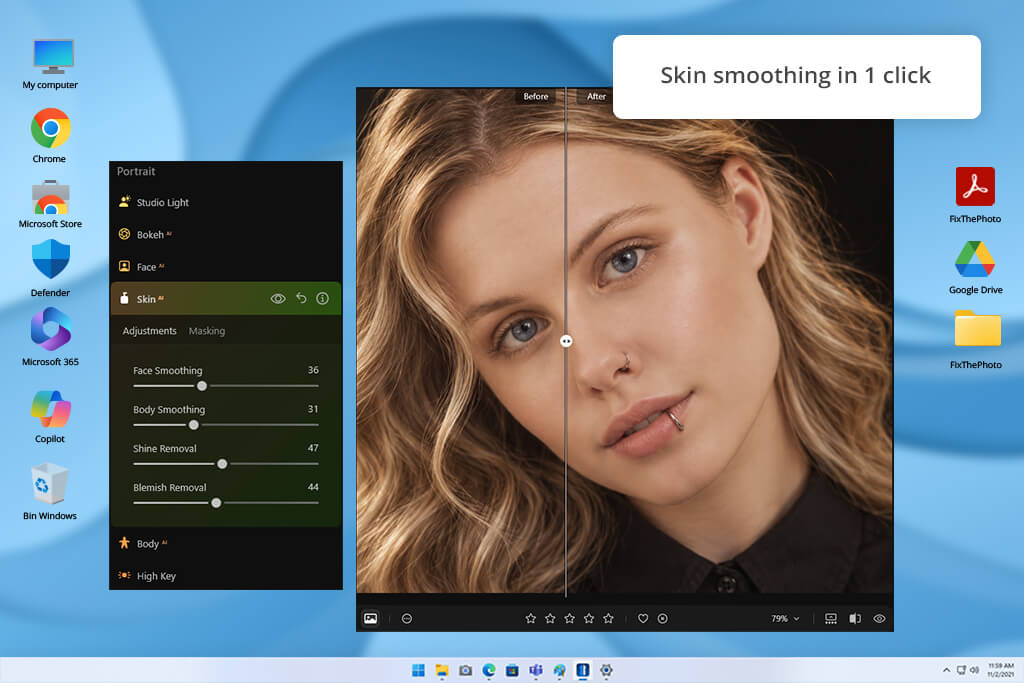
Quick photo corrections. Improve picture quality fast with the help of AI tools for content creation. Rather than spending hours on tedious manual edits, you can balance scene exposure and highlight essential focal details with minimal effort.
Precise pixel control. Take full command of fine details, color tones, and textures. Adjusting these specific elements, you can transform raw captures into refined visual art that matches your artistic vision.

Revive vintage images. AI photo restoration tools let you improve old photographs and fix specific flaws. You preserve precious family memories for future archiving or display.
Master scene composition. Trim away distracting edges and adjust frame boundaries. You pull focus straight toward your primary subject.
Enhance crisp fine details. Targeted clarity controls highlight key textures across your image. You create sharp, defined pictures without harsh digital artifacts.
Eliminate digital grain. An AI background noise remover cleans up low-light or high-ISO shots. You remove unwanted grain while clear visual detail stays intact.
Clean up unwanted objects. Erase stray elements to make clutter-free scenes. This feature is particularly beneficial for travel, street, landscape, and everyday photography projects.
Make dynamic lighting effects. Atmospheric controls shape realistic depth across your frame. You highlight important subjects and set a unique mood.
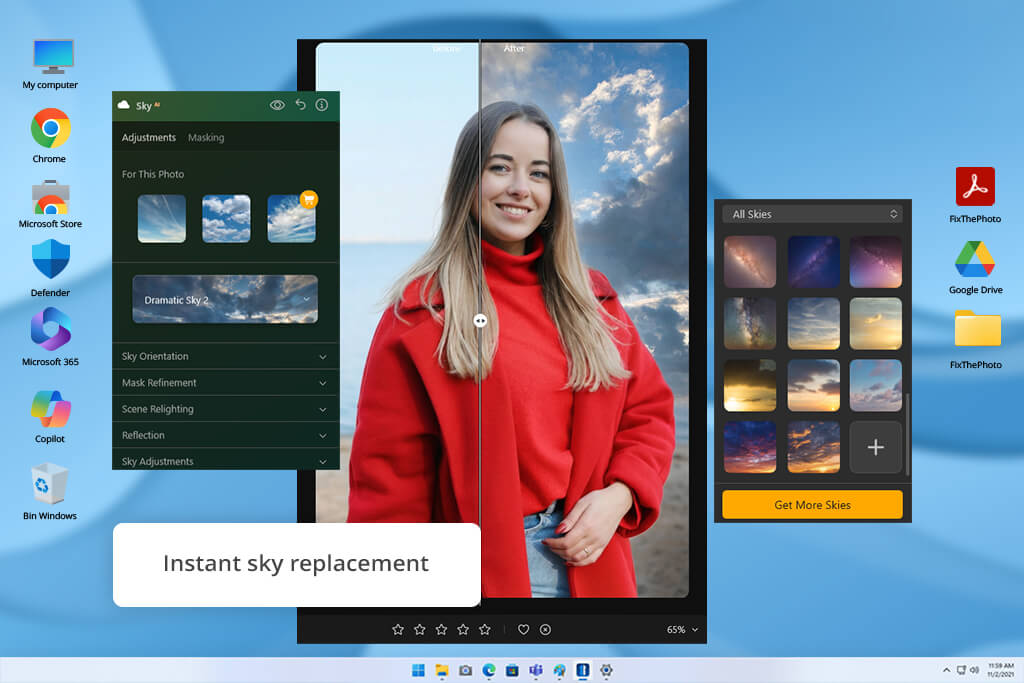
Transform sky backgrounds. Sky replacement tools instantly alter horizon backdrops. You redefine outdoor atmospheres for scenic landscapes and creative edits.
Work across multiple hardware platforms. Thanks to cross-platform support, you can work on your edits across compatible hardware. You should double-check specific plan license terms to ensure complete device compatibility.
To celebrate a decade in business, Skylum promotes an exclusive 10% markdown for your initial purchase.
This promotional offer cuts costs across all three available plans, subject to eligibility criteria. Always check current Luminar Neo pricing online to ensure your chosen package qualifies for this active deal.
What total price reduction can you expect? Based on standard catalog rates, a 10% voucher lowers final plan costs by these exact amounts:
| Plan | Original price | Potential savings | Est. discounted price |
|---|---|---|---|
|
Desktop Only
|
$99.00
|
$9.90
|
$89.10
|
|
All Platforms
|
$129.00
|
$12.90
|
$116.10
|
|
Max
|
$159.00
|
$15.90
|
$143.10
|
These projected rates reflect an estimated 10% discount. Final cost reductions depend on promo terms, eligibility, and availability at checkout.
To get your Luninar anniversary deal:
If current Luminar Neo pricing excludes your selected plan from promotional markdown, double-check active event guidelines or consult customer service for support.
To secure the best price on photo software, you need to select an offer tailored to your status. There are different Luminar discounts suitable for different user categories:
When you select a suitable offer, apply your Luminar Neo promo code at checkout and review the adjusted cost prior to payment. Read terms carefully if you meet criteria for several promotions. Never assume that Skylum allows code stacking on a single transaction.
Luminar photo editing tools become more affordable through several dedicated discounts for photographers, students, educators, military members, and returning customers.
Active service members get an impressive up to 77% price reduction upon swift verification of their credentials. Scholars and instructors can secure tailored pricing via a quick submission form. Furthermore, loyal customers access reward perks alongside sitewide holiday promotions throughout the calendar.
Start by browsing the main promotional pages to collect your required documents. Select a plan that fits your exact workflow and complete the application steps. Finally, read all deal terms carefully and confirm your lower price displays in the total summary prior to final purchase.

Luminar presets are commonly referred to as “Looks.” You can use them to enhance your pictures in a few clicks and make them look as if they were taken by a pro. They will come in handy for those who want to adjust the exposure, make the colors more saturated, and fix other issues.
Luminar has an integrated collection of presets. However, their usage is rather limited. To extend the functionality of this software, you can download other free and paid presets for Luminar created by professional photographers.
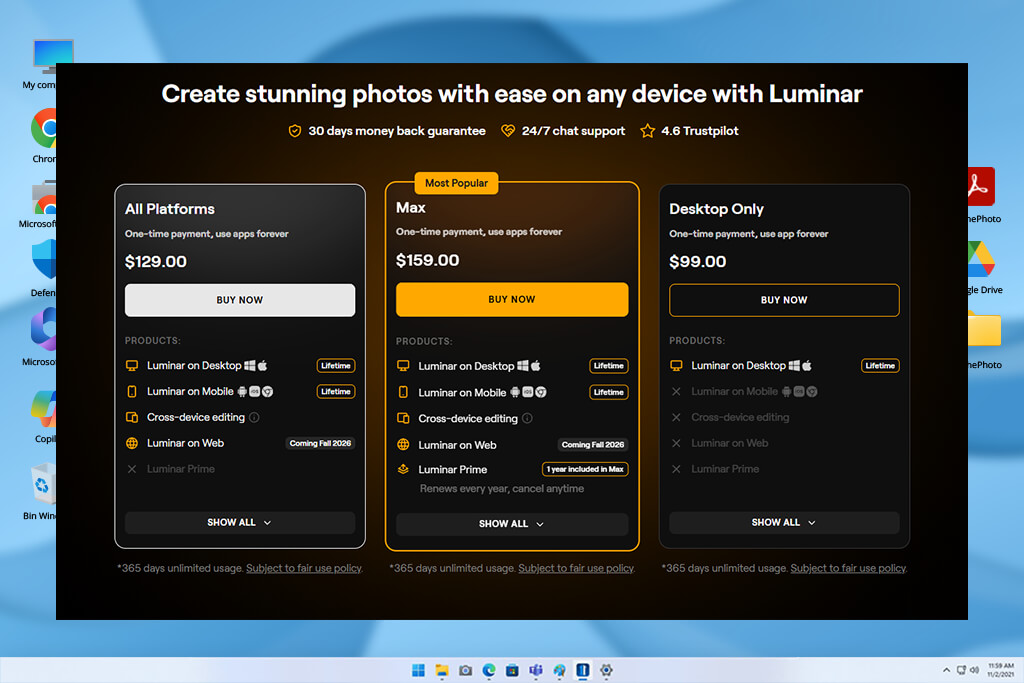
You can buy the All Platforms, Max, and Desktop Only options through a single payment. However, Luminar Max bundles one year of Luminar Prime, which renews every twelve months unless you cancel it. Review the policy details so you recognize potential recurring fees for Prime.
At $99, Desktop Only costs less than any other plan. You receive the main computer software, but you forfeit mobile edit tools and sync features across devices.
You get lifetime access to the desktop program on all listed tiers. All Platforms and Max also provide perpetual mobile software rights. Note that this covers the core program licenses, not a promise that future tools, online services, or upgrades remain active forever.
You gain access to desktop software, mobile tools, and cross-device syncing with the All Platforms or Max packages. The Desktop Only plan restricts your use strictly to computer platforms.
The Max plan makes sense if you value the included Luminar Prime benefits. When you prefer to skip Prime, the All Platforms option saves money and still offers full desktop, mobile, and sync features.