Many people ask, “Can you sell AI-generated art?” At first, I did not even consider such images seriously. When working at FixThePhoto, we often need to test new programs and tools. At some point, we decided to give AI a try to see whether it could help us come up with new concepts, create mockups, and visualize ideas for our clients more quickly.
However, after testing AI tools a couple of times, I was pleasantly surprised by the quality of the outputs. The visuals I managed to create looked polished and quite professional. Even though AI tools are hardly suitable for every task, you can use them to create backgrounds, textures, abstract visuals, and even product concepts. In these cases, AI solutions saved us a lot of time.
This is when we realized that AI opens a lot of new possibilities. I discovered that I no longer needed to spend hours trying to implement a single idea. Using AI, I could create several variations, compare them, and choose the best option. By embracing AI solutions, I was able to change how I see design and content creation.
When testing AI tools, I discovered that most people do not want to buy pictures that look great. They prefer to pay for visuals they can use for a specific purpose. While AI art may seem quite eye-catching, it’s virtually worthless if it does not solve a real problem and if nobody buys it, even if you use the best AI art generators to create it.
The visuals that became high-selling were the ones that looked like a finished product and not a quickly generated slop. This is why it’s important to create images suitable for a particular purpose that can be hung on the wall, used for branding purposes, or become a part of a product. Such images are easier to sell.
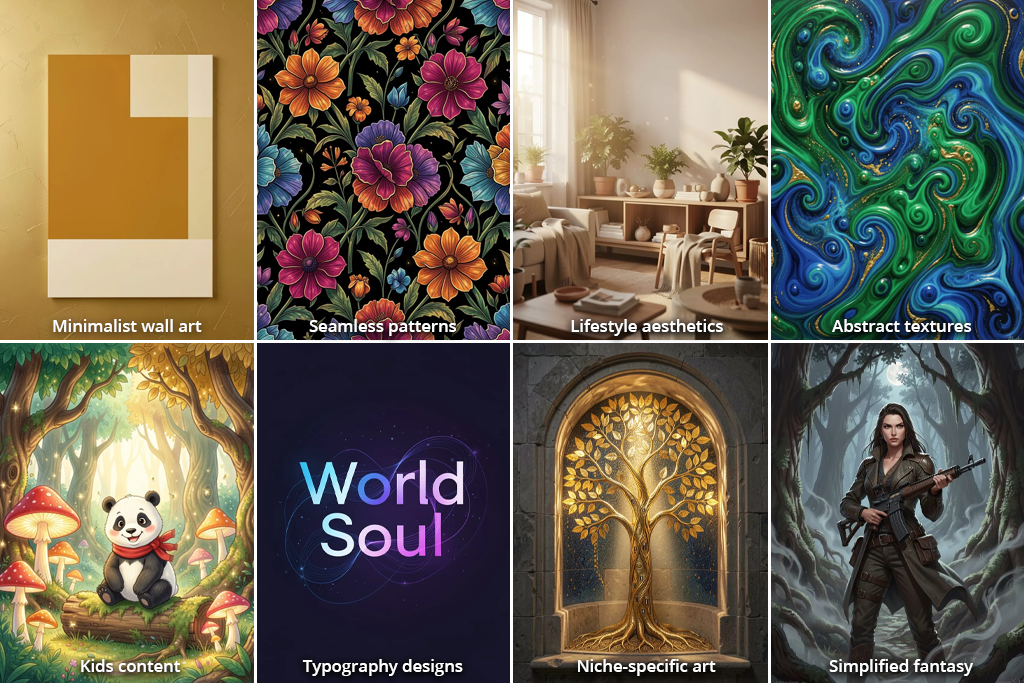
Here are the visuals that are in high demand:
The main idea is clear. If your AI image looks like a finished product, it’s more likely that you will sell it. Nobody is interested in random images. However, if there is a powerful idea behind a visual and the output looks structured and well-balanced, people are more likely to consider buying it.
If you want to actually earn money from selling your AI art, you need to follow a well-structured approach. Implementing a consistent strategy step by step is more important than choosing the right tools. You can achieve impressive results by combining AI and photography. By using AI images as a base, you can make them more realistic during post-processing.
The first thing you need to do is to find a suitable niche. Do not focus on one-time ideas, as they are no more than passing trends. A good niche will help you embrace a more structured approach. You will understand what other designs you can create in the same style.
For instance, it’s better not to generate generic-looking posters. Instead, try being more specific and creating minimalist, abstract, or typography-based posters. After choosing a particular style, you can experiment with different variations to achieve consistency.
The most important thing is to choose an idea that can lead you to the next one. It will allow you to create visuals united by a common style or theme. This strategy will help you expedite your workflow and organize your processes better.
It’s always better to generate 10–20 variations than a single image. You can tweak your prompts a bit by focusing on different colors, composition, and mood. For instance, if you are creating a poster, create one version with warm tones, another one with shadows, and another one with textures.
After comparing different options, it will be easier for you to choose the one that suits your needs best. In most cases, you will pick only 2–3 images out of 20 that will be suitable for post-processing.
After choosing suitable images, you can continue them in Photoshop to remove unnecessary details, fix lighting, and upscale resolution so that your artwork looks like a finished product. At this stage, you can remove defects, adjust contrast and other settings, and make other edits to produce visuals that look polished.
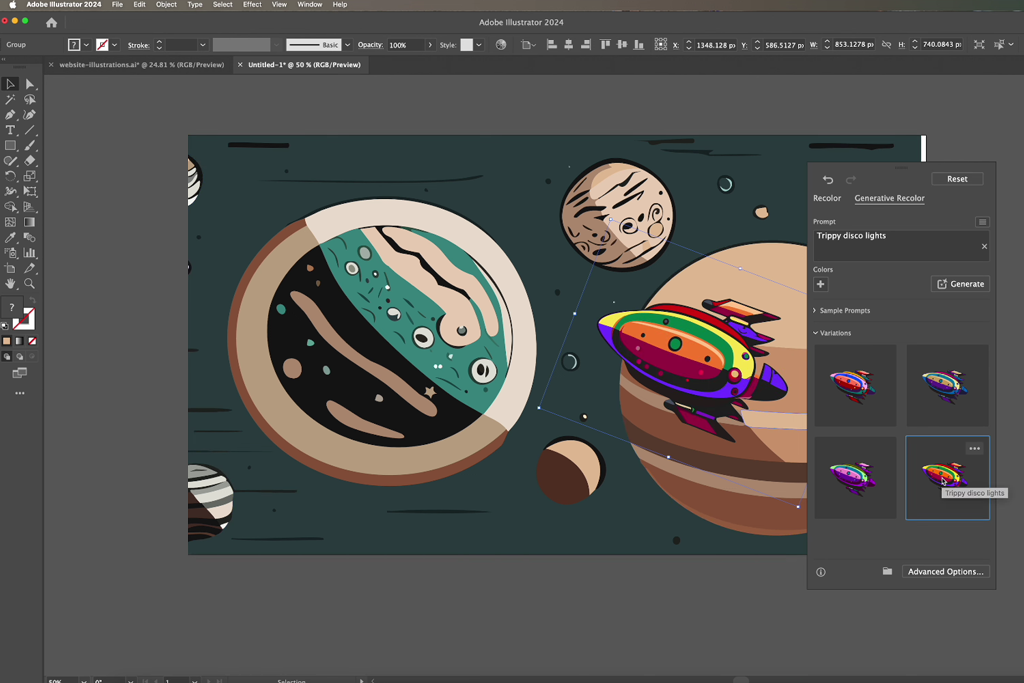
If you are more focused on structure and layouts, you can use Illustrator to edit images in vector formats. It will allow you to organize elements, align typography, and make your layouts cleaner. This software is perfect for those who need to work with repeat patterns, create packaging, and achieve higher precision.
Adobe software, especially the solutions that have been updated recently, can also help you expedite your workflow. With Adobe Express, you can change the size of your images to ensure that they can be uploaded to different platforms.
It’s also useful for those who are interested in selling AI art on Etsy, social media, and in printed form. This editor has handy tools for generating and styling captions. While using it, you will be able to generate preview content or promotional images.
Adobe Acrobat facilitates working with multiple images. It allows you to organize your files into PDF spaces, so that you won’t need to merge them into a single document.
This approach will help you work with different versions, variations, or product sets. Acrobat also allows users to use prompts to create presentation slides in multiple languages. Its tools will allow you to produce polished product presentations and client previews.
With the help of such tools, you can use AI visuals to create polished designs ready for presentation and speed up your workflow.
Once the design looks finished, this is where you turn it into something actually sellable. A lot of people skip this step, but this is exactly what separates a random AI image from a real product, even if you’re using the best AI art prompts generators.
Start by preparing your files for actual use. Do not focus only on export settings. You need to ensure that people will be able to use them in different situations:
If you want to sell your images online, be sure to include different sizes in one package. Buyers are more likely to choose such options, as they won’t require them to resize anything manually. Such designs are more valuable in the eyes of potential clients.
Next, create mockups. They will allow people to understand how AI images can be used in a real environment. For instance, you can show:
The main objective is to produce an output that looks finished. Your potential clients should try to imagine how it might look as the final product. The most important task is to create a design that had practical use.

Try uploading your images to one platform only at first. It will allow you to understand whether people are interested in them enough to buy them. Each platform has its unique target audience and requirements, so it’s better to use only one site at first to understand the processes better.
Be sure to create a comprehensive listing. Do not use abstract names, as your title should accurately describe the image you are trying to sell. Instead of using generic phrases like “aesthetic digital art,” write something like “minimalist wall art print” or “customizable wedding invitation template.”
A potential buyer should be able to make a decision about a purchase after looking at a preview. This is why there is no need to write long descriptions. Polished mockups, well-organized layouts, and high-quality images are more important than text.
| Platform | Best for | Examples of what to sell |
|---|---|---|
|
Etsy
|
Digital products
|
wall art prints, planners, wedding templates
|
|
Redbubble
|
Print-on-demand
|
posters, t-shirts, stickers
|
|
Society6
|
Home decor POD
|
canvas prints, wall art, home items
|
|
Adobe Stock
|
Stock assets
|
illustrations, backgrounds, textures
|
|
Creative Fabrica
|
Design resources
|
patterns, SVGs, fonts, bundles
|
|
Gumroad
|
Direct sales
|
digital packs, collections, niche products
|
After you learn how to make the most out of one platform, you will be able to use a similar approach to develop a result-yielding strategy for other platforms.
Upload a batch of 10-20 designs and analyze the number of views, clicks, and saves. If you notice that certain images are more popular, create several variations in the same style.
For instance, if many people buy your poster with soft beige tones, don’t experiment with posters in different styles. It’s better to create several posters in the same style with minor variations. It will allow you to achieve consistency and boost your sales.
As you gain more experience, you will learn how to repeat your best-selling designs by tweaking them slightly. This approach will help you sell more AI-generated images.
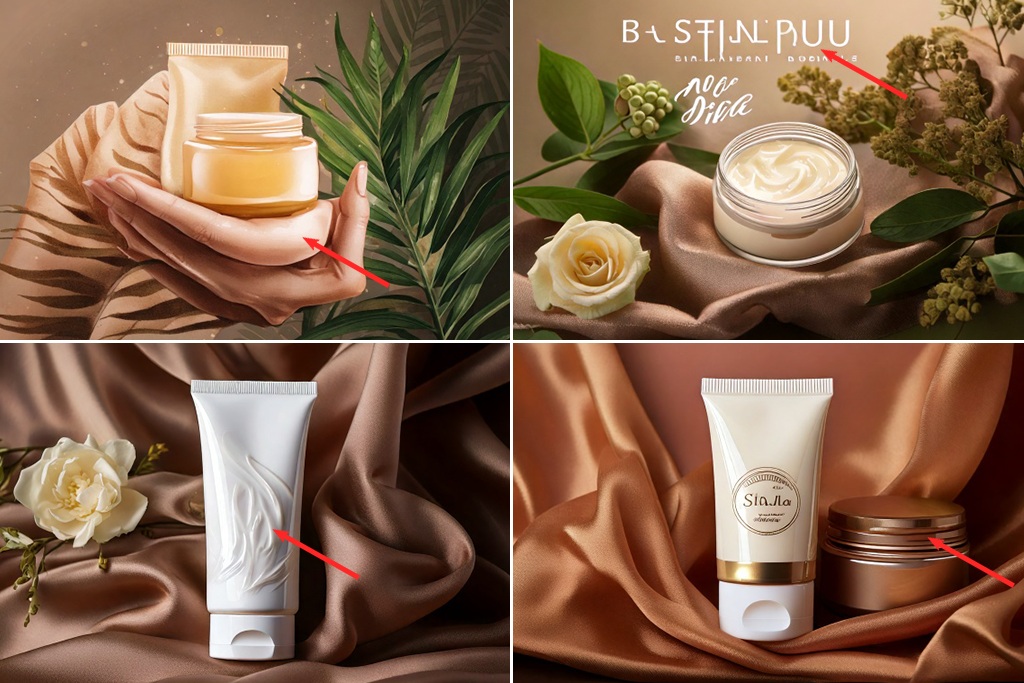
Many novices mistakenly think that their failure to sell AI art online can be attributed to the wrong choice of a platform or poor luck. However, low sales are typically associated with common mistakes made by beginners. AI tools facilitate creating images, but do not guarantee that these visuals will have any practical value.
Random visuals. While you may be able to use AI to generate some eye-catching images, pictures that do not have practical use won’t be sold. It’s better to avoid abstract compositions without clear structure or unusual color combinations that don’t fit into modern interiors or look strange when printed on products. Such images are not popular because buyers do not understand where to use them.
Convoluted designs. Some beginners create overly complicated scenes with many elements, hoping to generate interest. They may create a fantasy-theme image with a large castle and ten distracting objects in the foreground. Even though such pictures may look eye-catching, they have limited use. A stylish sky gradient poster or clean abstract shape will sell much better.
Trend copying. Some people think that if they generate images in a popular style, they will be able to produce something unique. They use words like “Pinterest aesthetic” when writing prompts for posters, but do not pay enough attention to spacing, the balance between typography elements, and color harmony.
Lack of post-processing. Raw AI visuals often have blurry areas, distorted lines, or strange shadows. It’s recommended to use Photoshop or a dedicated AI photo editor to fix issues with hands and other problems you may notice. Buyers discover imperfections quickly, so it’s important to upload only polished images.
Inconsistent style. If you experiment with designs in different styles and upload all of them to your online store, they won’t look like a part of the same collection. People trust artists who create visuals in a recognizable style and know how to achieve consistency.
Shortcut strategy. Another common mistake is to upload one AI-generated image and expect that it will sell. You can earn money only by testing variations, tweaking details, and creating many images in the style preferred by your target audience.
The main thing is to remember that high-quality AI art looks like a finished product, while random AI visuals look like AI slop.
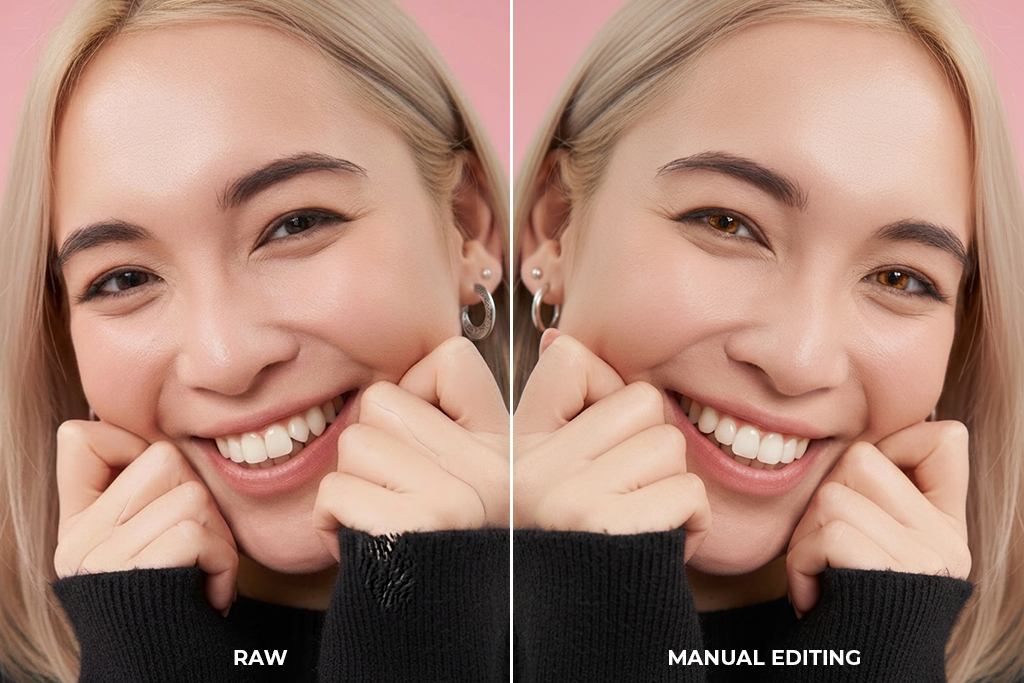
Many people wonder whether enhancing AI-generated images makes sense. They may feel like editing images takes a lot of time compared to the speed of image generation. However, if one tries uploading raw images, they will immediately realize why more experienced digital artists prefer to use Photoshop AI tools to enhance their visuals. Pictures that look finished sell better.
Many people wonder: “Is AI art copyrighted?” When using edited images, it will be easier for you to prove your authorship. If you upload unedited AI images, people will immediately notice it. While they may not look bad, there will be some issues that are hard to miss, including strange details, unnatural lighting, or distorted edges. After noticing these defects, most potential buyers will simply scroll past.
Raw AI images. Even though nothing could be wrong with them at first glance, many of them have issues like poorly aligned textures, weird shadows, or distorted details. When a person notices such imperfections, they lose trust in a designer who produced these outputs.
Subtle manual refinement. Even if you spend 2-5 minutes per image in Photoshop, it may help you make your visuals more polished. You can adjust contrast and colors, fix edges, or remove defects to give your images a professional feel. There is no need to perform heavy editing. It would suffice to make your images look finished.
Full manual rework. If you need to generate patterns, posters with typography elements, or create product packaging, you may need to edit your design in Illustrator to make it easier to use. In this case, you can use an AI-generated image as a base and use dedicated software to achieve professional results.
When editing your images, you don’t need to focus on perfection. However, you need to achieve the desired output. There is no need to spend too much time on every image, but avoiding the editing step will lower the quality of your outputs.
While it’s important not to edit images too much, you should not skip the post-processing stage altogether. This step will help you turn your raw images into pictures that can be sold online.

You need to choose the right strategy to actually earn money from selling AI art. It’s not enough to chose a platform that sells that visuals. However, the same image might perform differently on different sites because of the target audience and format. This is why you need to focus on the best platforms to sell AI art.
At first, you can reasonably expect to earn around $10-$100/month. If you are just getting started, be sure to experiment with different styles to understand which images sell better. Besides, it’s important to learn how to present your artworks in the best way.
After finding a suitable niche, start creating images in a consistent style. Many people want to know: “Can you make money with AI art?” Gradually, you can expect to increase your income to $300-$1000/month. Forget about uploading random images. It’s more important to create collections united by something, be it a style or theme.
When you understand what images sell better and scale your store by adding more designs and products in different formats, your income may reach $1000-$3000+/month and higher. At this stage, you need to develop a system that will help you keep selling high volumes of images.
The choice of a platform is also important. Some services facilitate achieving stable sales, while others are more suitable for increasing sales volume and ensuring passive income.
| Platform | Income potential | Why |
|---|---|---|
|
Etsy
|
$500-$3000+/month
|
Perfect for digital products and high-selling niches, flexible pricing
|
|
Print-on-demand (Redbubble, Society6)
|
$50-$800/month
|
Intuitive functionality, but it has lower margins and high competition
|
|
Adobe Stock
|
$100-$1000/month
|
Passive income from downloads. It requires high volume and upload consistency
|
|
Creative Fabrica
|
$200-$1500/month
|
Suitable for bundles, patterns, and design assets
|
|
Gumroad
|
$100-$2000+/month
|
High profit per sale, depending on the audience and positioning
|
Online marketplaces like Etsy and Gumroad allow you to earn higher profits due to higher margins per sale. If you decide to use stock and print-on-demand services, your income will mostly depend on a high volume of orders.
The most important thing is to choose a suitable niche, develop a consistent style that is easy to recognize, and choose the right platform for selling your images. This approach will help you use AI art to increase your profits and make your income stream more stable.
The U.S. Copyright Office issued official guidelines to explain that copyright law should be interpreted in terms of human authorship. It means that if a person uses AI to generate images and does not edit them manually, such art, unlike traditional art, won’t be protected by AI art copyright laws.
Digital artists can still sell their AI images. However, holding AI art commercial use rights does not mean that creatives retain full ownership in a traditional sense. Most platforms with AI image generation tools permit commercial use under certain terms. This is why it’s necessary to check the available licenses and AI art ownership rights before uploading your images to stock sites.
Many modern marketplaces and stock platform have their specific rules. Some of them require users to add labels to AI-generated content or meet specific quality criteria and originality requirements. Even if the AI-powered tool you have used allows you to sell your outputs, stock platforms may still reject your upload if they do not meet their criteria.
When dealing with AI, consider how you are going to use the generated outputs. This is why it’s important to avoid any references to brands, copyrighted characters, or easy-to-recognize artist styles when writing prompts, as it may lead to copyright infringement. AI tools can generate artworks in the style of a certain artist. In this case, it might be impossible to prove that your content is unique.
It’s much safer to use concepts instead of references when writing prompts. Specify the color palette, mood, composition, and structure instead of copying existing art. This approach will help you create truly unique outputs. If you understand what license to choose and do not use other people’s art as a reference, AI tools will help you produce original content.
AI-generated art is not something you can create just for fun. AI tools facilitate creating and selling digital products when one learns how to use them correctly.
If you don’t want to waste your time trying to refine random outputs and want to achieve consistent results, you need to choose a specific niche, understand the requirements set by online platforms, and take the design stage seriously. It will allow you to produce professional products instead of generic visuals.
You should be aware of AI generated images legal issues to stay compliant with current regulations. Be sure to create a polished presentation and strive to achieve consistency when using AI tools.
AI can expedite your workflow, but you will need to understand how to make the right decision to produce AI art that sells. Consider what image you want to create, how to present it, and which online platform to choose to sell it.
Digital artists who learn how to streamline their workflows and generate AI art on topics that are high in demand manage to secure stable income streams from selling their digital artworks.
Yes, you can sell AI art if the platform you used allows commercial use. When uploading your artworks to stock sites, be sure to format them in accordance with requirements.
Every AI platform has its own ownership structure. In most cases, a user who buys AI-generated images gets usage rights based on the site’s AI art licensing rules.
Some services require authors to maintain transparency. When using some stock sites and marketplaces, an artist may need to add a label that indicates that their uploads were generated with the help of AI. Such labels allow users to stay compliant with a platform’s policies.
Yes, AI art is extremely popular on platforms like Etsy or POD services. Many people purchase such posters, wall art, patterns, and digital prints. You just need to learn how to sell AI art.
No, such types of prompts are associated with potential copyright risks. It’s better to describe style by mentioning the desired colors, mood, and composition instead of asking AI tools to produce images in the style of real artists.
Novices typically make $10-$100/month, while more experienced digital artists can reach $500-$3000+/month depending on the area they specialize in, consistency of uploads, and the platform they use.
It’s not always strictly required. However, in many situations, it makes sense to subtly tweak lighting, details, and resolution to give images a polished feel and make them stand out among the rest to increase sales.





![Best Design Magazines Worth Subscribing [Print & Digital]](http://fixthephoto.com/blog/images/gallery/news_main__preview_27834.jpg)



















