


For my test, I picked a couple of different pictures: a selfie, a portrait of a bride, a fitness-themed photo, and a studio image with glare caused by glasses. I imported the same photos into both apps and requested identical changes to ensure a level playing field.
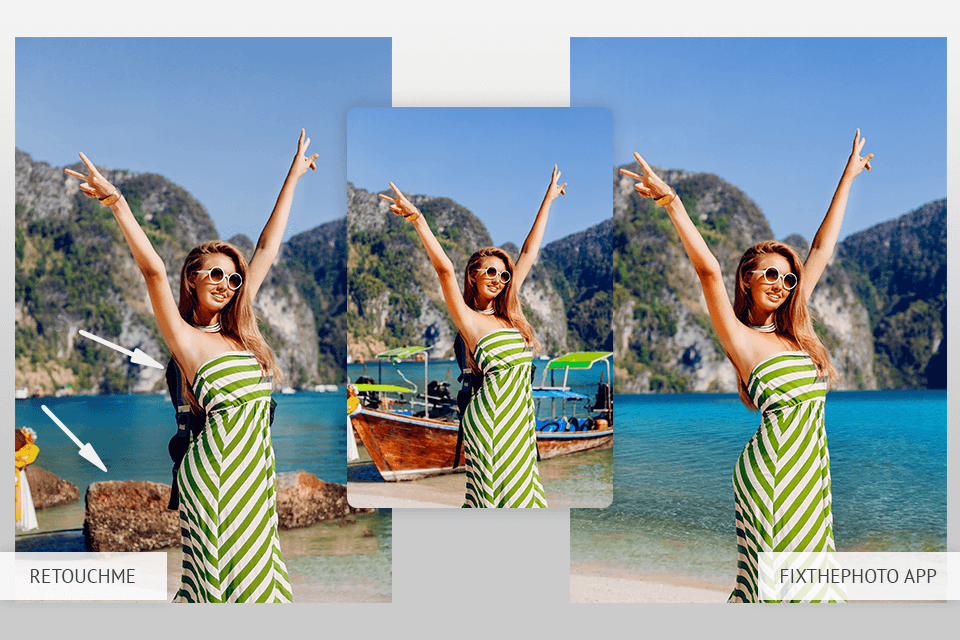
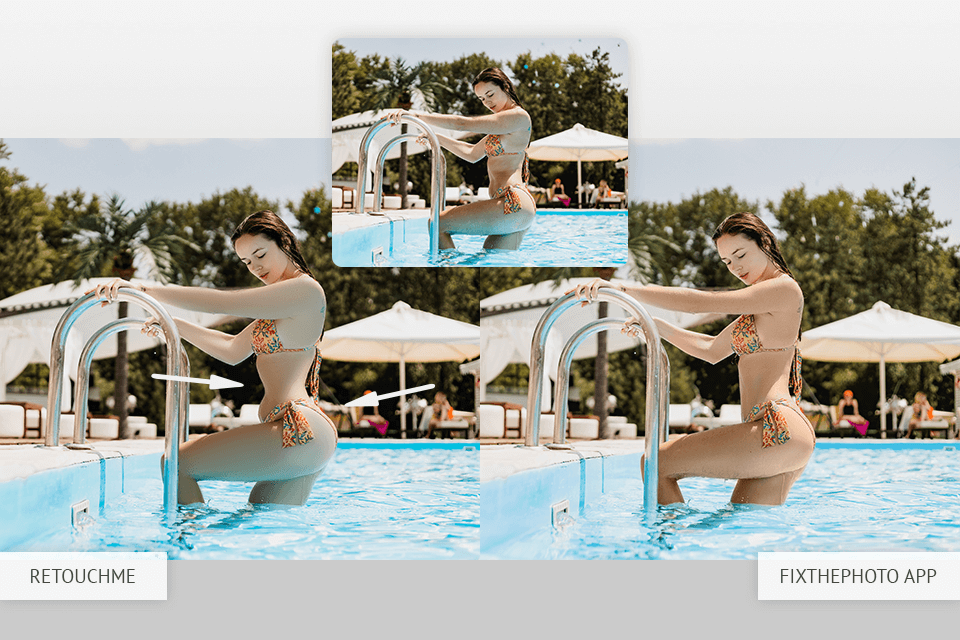
My goal was to examine how each app can tackle actual retouching work – not simple filters, but specific enhancements requested by clients. I chose a vacation-style picture of my friend, where she asked for a minor waist correction and smoother skin. I uploaded that image to both RetouchMe and the FixThePhoto App with the same requirements.

RetouchMe. I was surprised that RetouchMe took 30 minutes to send the edited photo back to me. Initially, I was satisfied with the quality of the result, but upon closer inspection, I noticed that the waist was made too thin and didn’t fit the rest of the body’s proportions.
The backdrop near the arm is warped, and the skin lost a lot of detail, looking almost plastic. It looked more like a result of an applied filter than manual retouching.

Fix The Photo Body Editor&Tune. The app provided the edited image within 15 minutes. The waist was slimmed down enough to look more appealing without making the body look disproportionate. The retouchers also did well to remove glare from the skin and face, achieving a more balanced, natural look.
My friend’s skin looked clean and soft while preserving its natural texture without any blur or artificial glow. My friend’s verdict was “I think this is the best I’ve ever looked in a photo.”
If you’re wondering whether the RetouchMe app is free, you need to know that you can download it without paying, but all the services cost money. Meanwhile, you can test FixThePhoto for free and only then decide if you want to pay for any orders.
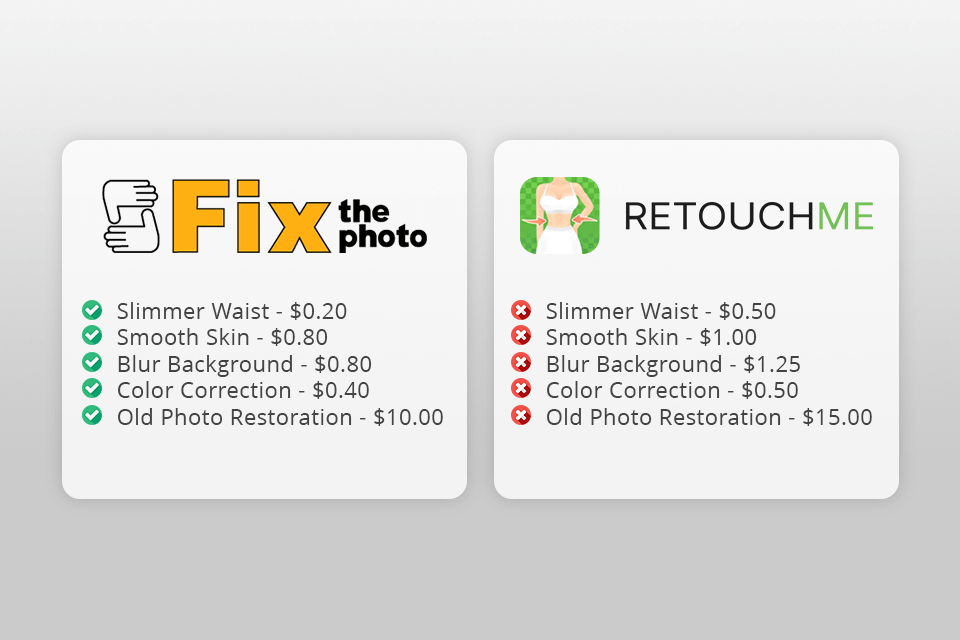
Fix The Photo Body Editor&Tune. The FixThePhoto app offers a transparent pricing policy. Basic portrait retouching costs $2, and full-body retouching with a background cleanup is $5. Even a product photo that involves a lot more editing is only $10. Everything was clear from the start.
Moreover, you can place the first order for free, allowing you to evaluate the quality of the service before committing to it. The app also lets me ask for as many revisions as I want without any additional fees to ensure I’m happy with the result.
RetouchMe. The pricing structure of RetouchMe had me puzzled from the get-go. It relies on a credit system that obfuscates the actual costs of different services. Basic portrait retouching with skin smoothing and teeth whitening ended up costing about 40 credits ($1.99), while full-body editing doubled the cost to more than 80 credits ($4.99).
The main issue is that I couldn’t learn the actual dollar price until I was finalizing the order, and the available small credit bundles are not big enough for one full edit. I don’t like doing guesswork when making purchases online.
RetouchMe. It employs AI-based presets and automatic filters. Most changes are completed after a single tap by applying standard templates for body and facial edits. It’s quick, but not particularly accurate. You can’t specify the exact changes you want, and the results frequently look overly edited when viewed zoomed in.
FixThePhoto App. It sticks to manual editing. Actual professional retouchers enhance each photo by hand. AI is only employed if the client requests something playful, like transforming themselves into a South Park-style avatar or wanting to test its functionality as an undress app. All serious changes are done manually and attentively, ensuring a natural and professional result.
The FixThePhoto App allows me to provide detailed requirements for each image I upload to ensure I get the results I want. I can also highlight the parts of the photo that need attention or upload a reference to what kind of effect or look I need.
This is very useful when working on portraits that require hair adjustments or background edits. The FixThePhoto photo editing service also allows you to order more complex edits, such as object deletion, clothing recoloring, and skin retouching that looks a lot more natural than a regular filter.
Top features:
RetouchMe relies entirely on presets. The app lets you choose the desired edit from a menu. You can use RetouchMe as a clothes remover, for waist slimming, skin smoothing, and much more. The process is pleasantly intuitive, but you can’t specify how strong you want the edit to be or attach a reference.
This app is great at basic beauty edits, particularly for selfies, but you can’t ask for any edit that isn’t included on the list. Additionally, you can’t request a revision once you get the result.
Top features:
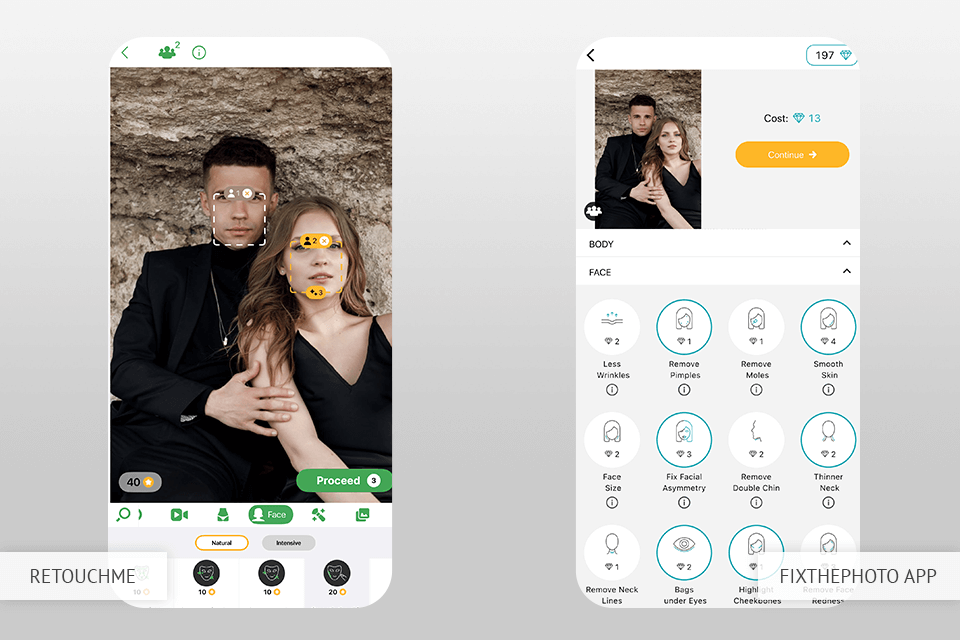
Both FixThePhoto and RetouchMe are safe, intuitive, and suitable for beginners. RetouchMe is incredibly fast – you simply import an image, pick the desired edit, and tap submit. It’s a streamlined process, particularly if you need results quickly without any messing around.
The FixThePhoto App is equally intuitive, but provides a wider range of services for you to pick from. It lets you mark individual image areas, provide specific requests, and upload reference photos. The ability to request the exact changes you need makes this app particularly appealing. It’s also suitable for a broader selection of genres, including real estate, product, and wedding.
As such, even though both options are beginner-friendly, the FixThePhoto app offers a lot more freedom and customization opportunities without feeling overwhelming. The expanded functionality can be crucial when you’re working on an important image.
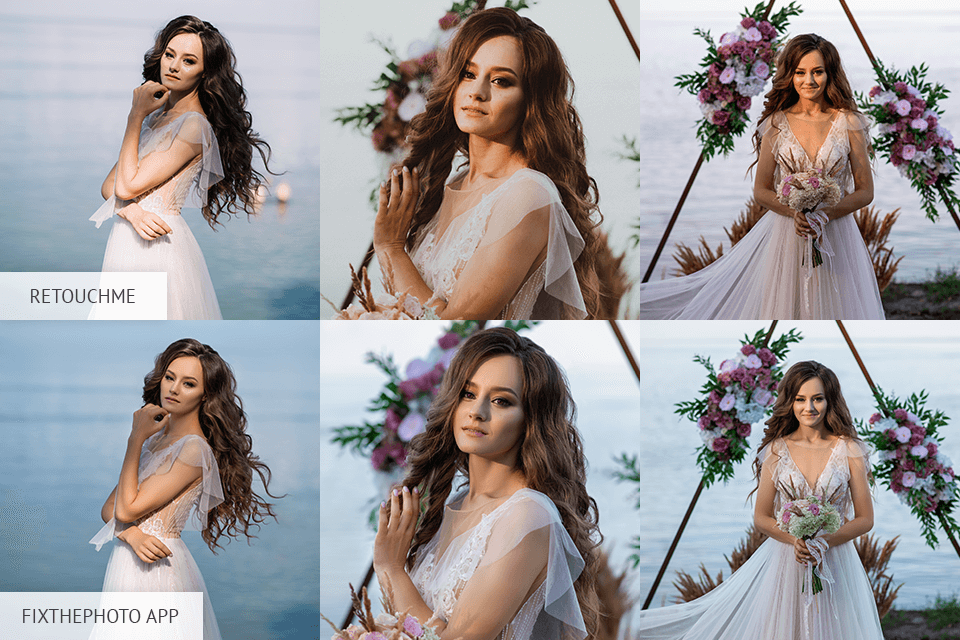
RetouchMe. When editing a group of similar images, like portraits from the same photoshoot, it can be difficult to maintain a coherent visual style.
I uploaded three almost identical photos into RetouchMe, and each one had a different editing intensity - skin tones didn’t match, and some changes were more aggressive than others. As such, looking at the photos side by side made them seem unprofessional and unbalanced.
FixThePhoto App. It makes it a lot easier to preserve a consistent style. I imported 5 bridal portraits and requested identical soft retouching, a natural skin tone, and a slightly smaller waist for all of them. The delivered images are nearly indistinguishable in style – balanced, refined, and cohesive.
Even smaller adjustments, like waist slimming, are performed with restraint to preserve a natural look. If you want to fill your portfolio with similar-styled images, this app is a much better option.
Whenever I need an image editing app, it’s crucial for me to know my request will be listened to. That’s why language support is such an important factor for me.
RetouchMe. The app is available in 10 languages, including English, Spanish, French, and a couple of others. That said, the translation is only related to the UI, and it’s hard to get a non-English support response. This can be a barrier if you want to converse in your native language, particularly when discussing specific retouching requirements.
FixThePhoto App. Meanwhile, this app is available in more than 25 languages, including Arabic, Turkish, Korean, Japanese, Polish, Ukrainian, and plenty of others. You get to determine not only the language of the UI, but also which language the support team representative will use when communicating with you, which is a lot more convenient.
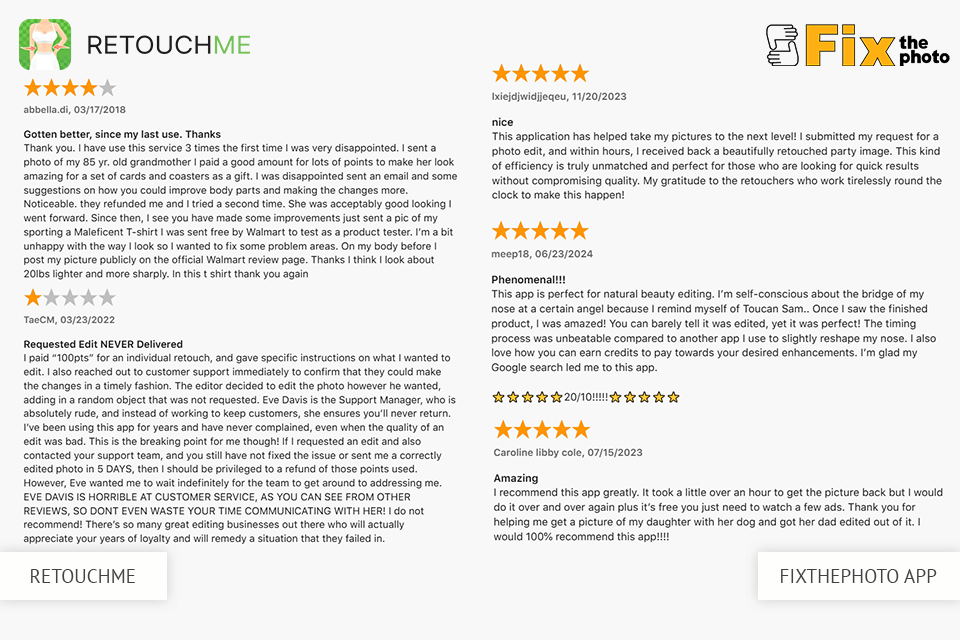
As someone who spent a lot of time working as a retoucher for the FixThePhoto App, I know the ins and outs of its structure and workflow. That’s why I know that FixThePhoto reviews that praise its professionalism and attention to detail are spot on. Your images aren’t enhanced by filters or AI bots – they’re manually edited by professionals who care about meeting your expectations.
The app has an ironed-out pipeline – each photo goes through a rehearsed process, your requirements are diligently adhered to, and the results aren’t sent without going through quality assurance. Moreover, the prices are surprisingly low. For only a couple of bucks, you can make lips bigger, receive natural body corrections, change hair color - and even ask for free revisions.
FixThePhoto App:
“I’ve used dozens of different editing apps during my career, but only the FixThePhoto app manages to reliably provide professional, natural-looking results every time.”

RetouchMe is suitable for basic edits that involve smoothing out a portrait photo or adjusting a couple of details on short notice. It’s intuitive and comes with a broad selection of body retouching presets that cover everything from waist slimming to height changes – all made after a single tap.
That said, the biggest drawback that needs to be mentioned in this RetouchMe review is that the delivered images look overly edited and artificial if you zoom in, and the credit payment system is inconvenient and obfuscates the final price. You also can’t ask for free revisions, forcing you to make a new order if you’re unhappy with the initial result.
RetouchMe:
“RetouchMe is fast and deserves a lot of credit for its efficiency. However, the results often resemble filters rather than manual retouching. This is good enough for social media, but not professional photography.”





![Barbie Filter App Online [First Photo FREE]](http://fixthephoto.com/blog/images/gallery/news_main__preview_27852.png)

![Remove Date Stamp from Photo Online [FREE]](http://fixthephoto.com/blog/images/gallery/news_main__preview_27825.png)



















