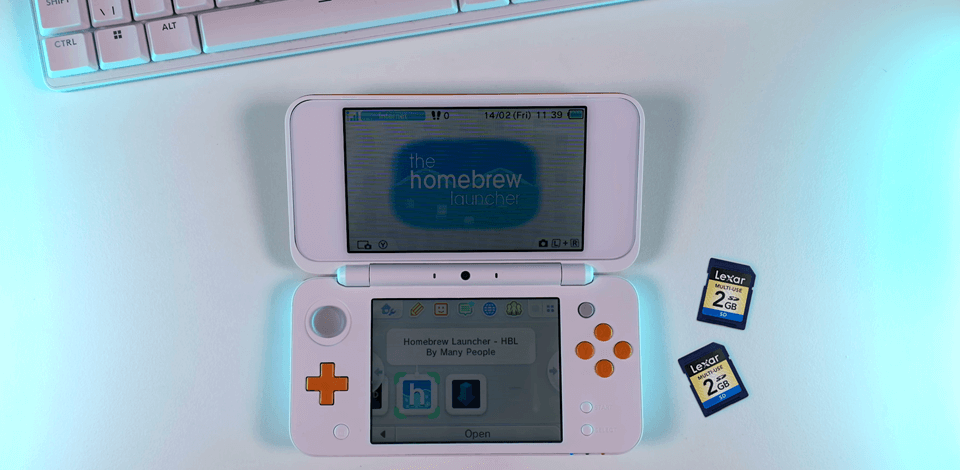
If you want to maximize homebrew capabilities on your 3DS, 3DS XL, or 2DS, picking the right 3DS memory card matters. The systems work with 2GB SD cards and 4GB - 32GB SDHC cards, so you can easily pick one that fits your storage needs.
As a passionate gamer and tech enthusiast, I recently discovered 3DS homebrew and decided to mod my old Nintendo 3DS. After spending hours learning about homebrew, I finally modded my old Nintendo 3DS and discovered a whole new world of possibilities.
Suddenly, my trusty old console could play classic Zelda titles, run fun indie games like Shovel Knight, and even let me customize the entire system with cool themes - it was like getting a brand-new console without spending a dime!
Before getting started, I quickly realized my old 4GB SD card, which originally came with my 3DS, wouldn’t be enough for what I wanted to do. All the tutorials highlighted the importance of a good SD card for homebrew, and I needed something that would cope with my future experiments.
Since I collaborate with the FixThePhoto team, I reached out to my colleagues for advice. Together, we tested 30+ SD cards for 3DS homebrew recommended on gaming forums to find the best option.
 Lexar 1TB ★★★★★ (5/5)
This SD card is perfect for 3DS homebrew because its generous storage space lets you keep countless homebrew apps, game backups, etc. Its fast read/write speeds mean quicker file transfers and smoother gameplay with no annoying delays. Also, its sturdy build ensures it will hold up well over time, even with frequent homebrew use and heavy modding projects.
Working with my team, we identified the key features that mattered most for my 3DS homebrew setup:
High capacity. We settled on finding an SD card with a minimum 64GB capacity to comfortably store everything I’d need: homebrew tools, emulators, game files, backups, and data all in one place.
Fast read/write speeds. A fast Class 10 or UHS-1 card would keep everything running smoothly with quick load times and quick file transfers.
Reliable brand. When it comes to SD cards, I only trust well-known brands with proven reliability. Based on recommendations from experienced homebrew enthusiasts, I’m sticking with reputable manufacturers like SanDisk, Lexar, and GIGASTONE for my 3DS modding needs.
Compatibility with 3DS. Jack carefully selected SDXC cards that met the 3DS’s strict compatibility needs, specifically choosing models that the modding community had successfully used after FAT32 formatting.
Durability and longevity. Before choosing, Jack verified each SDXC card against community reports of proper 3DS functionality post-FAT32 formatting, ensuring full compatibility.
We tested the Lexar 1TB card’s 3DS compatibility by loading several heavy files - homebrew tools, custom firmware, and game backups. The 3DS detected the card immediately, and we experienced flawless performance with zero lag during gameplay or file operations.
“What really impressed me was how effortlessly it runs even the most resource-heavy games. After months of daily use loading massive ROMs, emulators, and custom firmware, I’ve experienced no stutter or crash. ”

Using UHS-I advanced architecture, the Lexar 1TB delivers a staggering 160MB/s read capability – transforming multi-gigabyte transfers into quick, seamless operations. Designed for durability, the Lexar 1TB SD card can withstand water, X-rays, extreme temperatures, and shocks. Its sturdy construction guarantees long-term functioning, even with frequent use.
Sure, it’s an investment, but for dedicated 3DS modders looking for future-proof storage, every penny is justified.
To test this DS memory card, I first formatted it to FAT32 using a dedicated tool to ensure compatibility with the 3DS system. After inserting it into the 3DS XL console, it was immediately recognized without any trouble, proving it to be one of the best 3DS SD cards.
“I’ve st■ it with 300GB+ of content, including game libraries, custom firmware, and homebrew tools, and still have some spare room. Even demanding titles like Pokémon Sun run smoothly, with zero stuttering or slowdowns.”

When paired with the recommended Amazon Basics Micro SD card reader, this 3DS SD card reached speeds of up to 200MB/s during testing, making large file transfers, such as game backups and firmware, fast and efficient.
On average, it maintained speeds of around 150MB/s, enabling quick uploads of homebrew apps, updates, and saved files. In real-world use, it proved to be a highly reliable and functional option.
In my experience, SanDisk has the best deals on SD cards, and the 128GB model I tested is a great example. It’s affordable yet packs enough space for tons of games, homebrew apps, and backups, which is perfect for modders who want reliable storage without breaking the bank.
“I was shocked at how fast it installed my 100GB+ library of games and tools. Even massive titles like Bravely Default and Kid Icarus: Uprising load in a flash, with zero stuttering or slowdowns during gameplay.”

With impressive 200MB/s read and 90MB/s write speeds, this card delivers buttery-smooth file transfers and near-instant load times - something I verified firsthand when running Tomodachi Life. Whether you’re building a massive game library or stocking up on homebrew apps, this card handles it all effortlessly.
The card also comes with RescuePRO Deluxe, which is a premium file recovery tool available for free for 2 years. Whether you accidentally delete saves or corrupt files during modding, this feature ensures your precious data stays recoverable. For homebrewers managing extensive libraries, such an ability is a huge advantage.
Many 3DS users recommend the GIGASTONE 256GB SDHC card, and for good reason: my 3DS detected it right away, and all my homebrew apps worked perfectly. I tested its durability by dropping it, getting it slightly wet, and exposing it to hot and cold temps, and it endured everything. This budget SSD is waterproof, shockproof, and works at extreme temps, just as advertised.
“The speed is insane: Mario Kart 7 loads in seconds, Zelda fires up just as quickly, and even heavy-duty homebrew apps run flawlessly. I’ve loaded over 50 games plus all my homebrew tools, and there’s still a great amount of free space left.”

The speed tests really amazed me. This DS memory card meets the advertised 100MB/s read speeds for lightning-fast game loading and snappy data transfers. With consistent 60MB/s write speeds, I could move large game backups, firmware files, and homebrew apps quickly without any hiccups.
I find the micro SD card perfect for modding my Nintendo 3DS and operating homebrew software. The 150MB/s read speeds made transferring large game backups a breeze, allowing me to copy heavy files in minutes. Even though the 3DS can’t take full advantage of these speeds, games and apps still load way faster than they did on my old 64GB card.
“If you’re into modding your 3DS, this SanDisk is the way to go. It holds all your emulators and games easily, with much space left over. Sure, it costs a bit more, but you’re paying for quality that won’t let you down.”

The 512GB capacity is a game-changer: it allowed me to store hundreds of classic games, dozens of 3DS titles, and a full suite of homebrew apps, and I still had some free room.
This option with the max SD card size is perfect for emulator enthusiasts with massive libraries. I used it hard for a month, moving files, making backups, and playing games, and it worked the whole time flawlessly.
We set up several Nintendo 3DS consoles, including both original and new 3DS models, to account for different hardware configurations. Each device was installed with custom firmware (CFW) to support homebrew software. To simulate real-world usage, we used a combination of emulators, game backups, ROMs, saved game files, and custom themes.
The performance of SD cards with the 3DS was not always ideal. We tested each card by:
To evaluate the functionality of each SD card, we focused on:
We evaluated each SD card for Switch for its suitability in 3DS homebrew applications, assessing the following factors: